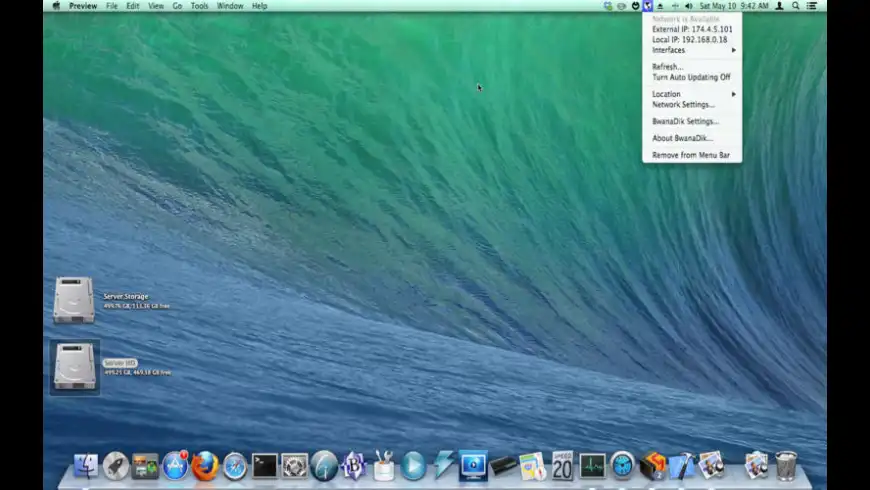
BwanaDik is an IP address (WAN and LAN) menu item. Yes, another IP address app. Just what the world needs. You may be asking yourself "why the heck does the world need another IP address application?" Well, it doesn't. But I did. I looked all over for an IP address app that met my needs, and never found one. So I wrote my own. Here's what I wanted in an IP app:
Small, simple, and resides in the menu bar
Monitors my network for a good connection. If the connection is lost, let me know with an alert the second it comes back online.
Quickly copy my WAN and LAN IP
What's New
Version 3.3:
Works with Mac OS X 10.6 (Snow Leopard).
No longer supported under 10.4.
Ability to send email alerts removed, as Apple removed the ability to do this in Cocoa under 10.5.
it could be that BwanaDik's been updated since the previous posters reviewed it, but for whatever reason, and speaking only of BwanaDik 3.3, i don't have any of the problems they describe. i've watched BD for a while in Activity Monitor and haven't seen it taking more than 1.0% of my CPU nor more than 18.3 MB of RAM. i'll keep an eye on it and see if it uses up more of anything than it should, but i run it constantly - and i don't shut my Macs down, either, so it frequently runs for weeks or months on end - and haven't yet traced any problems back to it.
i don't remember that my experience was so problem-free with earlier versions (but neither do i remember that it wasn't), so i'm not going to say anything about that. but i do heartily recommend giving BwanaDik 3.3 a try. i think it's indispensable.
I don't know why all these ip apps take up so much system resources. drives me crazy as I would like to see ipmenulet or ipmenu or bwanadik run all the time but they just eat up way more memory than they should. opening a browser and going to a proxyjudge gives your ip address with less system resources... not against bwanadik, just an issue with every "quick ip" app I have come across.
I'd love to be able to say that I like this app, but when it consumed 95%-110% of my CPU (i.e. a runaway process), I had to ditch it. A real pity.
I've noticed that it has a memory leak on a number of laptops that I've installed it on, and cannot recommend this app at all on that basis alone: it's too dangerous until it gets fixed.
Other than that, it shows great potential, though I'll be looking for alternatives for now.
Finally updated for Leopard. Was planning on doing it myself, but realized I do not have any coding skills at all.
Great little menubar applet that just simply shows whether I have an Internet connection or not. I personally set it to "Small Aqua Spheres", which looks great on Leopard's (and Tiger's) menubar. That, in my opinion, would be a better default than the bigger globe icons.
One wish: customizable servers for checking the external IP. There are plenty out there to choose from. And I'd love to setup my own for my personal use.
I too wish to get BwanaDik running again on Leopard. I'm willing to try to remove the preference file, but I have not been able to find it... where is it? what is is called?
after emdee's success I followed the procedure and deleted my old preferences file and still no love. I tried this on my PowerBook G4 1.5GHz and on a couple of PowerMac G5s Dual 2GHz and it did not produce any successful result… :(
@gap1028, to delete your BwanaDik preferences file, go to ~/Library/Preferences/ and find the file called com.stimpsoft.bwanadik.plist and send to the trash. :) good luck!
BD had problems after upgrading to Mac OS 10.4.10. Deleting the prefs file fixed my problem. Well, at least this problem :)
The external IP is displayed normally.
To Developer (Johnny Cat),
this is very good software but add keyword "network status" for this.
I using macupdate search but this thing is not show up. People will hard to find it using search.
I found BwanaDik from people review in other place.
If bwanadik doesn't work with Leopard (only local IP is shown in the menu), end it, clear the preference file "com.stimpsoft.bwanadik.plist" securely and restart a new copy of bwanadik 3.1. Since this procedure bwanadik worked again for me .
meatmcguffin is correct, (i forgot to specify on my previous message), BwanaDik identifies the Local IP address but not the more important External IP, and thus, no way of notifying me of whether or not i have a 'good' signal. :) BwanaDik is a great tool, I have sent the Developer an email (haven't heard back from him yet but hopefully soon), it'll be good to have BwanaDik running as part of my LoginItems again… :)
I have the same problem with OSX 10.5, Bwanadik gives the local IP but for the external IP it gives 'unknown'. By the way the same applies for the built-in System Preferences>Sharing>Remote login
the local IP is given instead of the external one, no ssh can work.
I am using in the meantime the get IP application but it's a widget, not in the menu bar.
BwanaDik has always worked flawlessly. Except version 3.0.1. I have a death beachball when I try to select the little blue ball in the menu bar. BwanaDik quits after this :(
I really like Bwanadik and it has the functionality I wanted. However, I have never been able to get the e-mail alerts to work. I have them checked in the preferences, but for some reason, I've never gotten an e-mail. I'd really love to have it all work-does anyone have a similar experience and/or fix?
The only reasons I can think of are A) bad email address entered into field or B) Mail.app is not installed. But those two reasons aside, I'll keep looking into it.
Please login or create a new MacUpdate Member account to use this feature
Watch Lists are available to MacUpdate Desktop Members Upgrade Now
Download and auto-install
using MacUpdate Desktop. Save
time moving folders and cleaning-up.
BwanaDik is an IP address (WAN and LAN) menu item. Yes, another IP address app. Just what the world needs. You may be asking yourself "why the heck does the world need another IP address application?" Well, it doesn't. But I did. I looked all over for an IP address app that met my needs, and never found one. So I wrote my own. Here's what I wanted in an IP app:
Small, simple, and resides in the menu bar
Monitors my network for a good connection. If the connection is lost, let me know with an alert the second it comes back online.
Quickly copy my WAN and LAN IP address to the menu bar.
The second point is the most important, which is really why I wrote this thing. See, I work at a coffee shop that has a really crappy DSL line, and an even crappier Airport Base Station. The connection comes and goes every 5 minutes. And there is nothing more frustrating than opening up Safari and typing in a search in the google bar only to be slapped with an alert sheet saying the site cannot be found. Then I have to sit around watching my Network control panel to see when I'm back online again, because a lot of times the info I need on the web is for work.
Now, with BwanaDik, I can look at the menu bar and know right away if I can access the internet or not. Even better, when my network is back online, BwanaDik lets me know right away with an alert window. So now I can keep typing code and when the network is ready, I can go do my searches and whatnot.
So, yes, there are a lot of IP address apps out there. I'm sure they are all great. But this one does exactly what I want it to. It probably doesn't do what you want, but that's OK with me. No more features will be added to BwanaDik anyway.
+12
KeesBakker reviewed on 09 Feb 2011
Works flawlessly .
Found this tiny application after the more popular one coconut completely screwed my system (both old and new version) - had over threading problem.
-3
i don't remember that my experience was so problem-free with earlier versions (but neither do i remember that it wasn't), so i'm not going to say anything about that. but i do heartily recommend giving BwanaDik 3.3 a try. i think it's indispensable.
+398
+39
ivanovitch reviewed on 31 Oct 2008
I've noticed that it has a memory leak on a number of laptops that I've installed it on, and cannot recommend this app at all on that basis alone: it's too dangerous until it gets fixed.
Other than that, it shows great potential, though I'll be looking for alternatives for now.
+3
+99
maulrat reviewed on 15 Oct 2008
+1
+4
bertobox reviewed on 15 Jan 2008
Long live the BwanaDik developers!!
+1
+37
follerec reviewed on 14 Jan 2008
Great little menubar applet that just simply shows whether I have an Internet connection or not. I personally set it to "Small Aqua Spheres", which looks great on Leopard's (and Tiger's) menubar. That, in my opinion, would be a better default than the bigger globe icons.
One wish: customizable servers for checking the external IP. There are plenty out there to choose from. And I'd love to setup my own for my personal use.
+4
@gap1028, to delete your BwanaDik preferences file, go to ~/Library/Preferences/ and find the file called com.stimpsoft.bwanadik.plist and send to the trash. :) good luck!
+39
The external IP is displayed normally.
+1
+1
sapigila reviewed on 20 Dec 2006
this is very good software but add keyword "network status" for this.
I using macupdate search but this thing is not show up. People will hard to find it using search.
I found BwanaDik from people review in other place.
+1
+39
CA reviewed on 23 Oct 2006
+1
+11
I appreciate this software! TNX developer!
+4
+334
http://www.jschilling.net/contact.php
+3
+4
the local IP is given instead of the external one, no ssh can work.
I am using in the meantime the get IP application but it's a widget, not in the menu bar.
+39
+39
Excellent support.
Excellent Zappa-esque utility :)
+334
