







April 3, 2026
The 5 Best Notch Apps for Mac: Getting More from Your Menu Bar
A MacBook is good for a number of things, including the addition of a big black space to the menu bar thanks to the notch. While some may be able to ignore it, others may find it to be too distracting. Considering Apple came up with a solution for the notch in the iPhone, some may wonder why the same hasn’t been done for a Mac. Fortunately, third-party developers found some options.
A good MacBook notch app should provide a good mixture of functionality and form, and we’re looking at some of the best apps available today. From capabilities to expanding your quick-access and media controls to providing dynamic notifications, each of these apps have something to offer, but there may only be one option worth considering as the best MacBook notch app.
#1 NotchNook

Starting our list off is NotchNook, one of the best MacBook notch apps available today, aiming to transform the black space in your menu bar into a space that increases your productivity. An incredibly powerful MacBook notch app, it focuses on delivering practical features that can transform your macOS experience. Unlike other apps that focus on simply providing an aesthetic experience to your MacBook’s notch, it focuses on speeding up your workflow.
Along with providing a space for quickly storing links, images, and documents for instant drag-and-drop file handling, NotchNook also gives you direct access to widgets, such as a calendar, notes, and media controls without needing to switch between multiple apps. It’s a great accessory for those that are always looking for new ways to enhance their productivity and workflow.
Right now, users can use the code MACUPDATE30 to get an exclusive 30% discount for both monthly subscription and lifetime license:
- Lifetime License
$24 → $16.80 (one-time payment) - Monthly Subscription
$3/month → $2.10/month - Free Trial Included
7-day money-back guarantee (risk-free)
For those looking to give it a try, there’s a 7-day free trial, and the company also provides a 7-day money-back guarantee that’s completely risk-free.
If you were looking for the best MacBook notch app around, Download NotchNook today. Just apply the code and start saving time on your Mac immediately.
3. Droppy

There’s a fair amount of features to Droppy, which is likely why it sees itself more as a productivity powerhouse rather than a notch app. Along with things like media controls, access to tasks, and file conversions, Droppy also offers some additional features, like HUDs, and its floating basket system for collecting files.
The app is good for those looking to expand the capabilities of their MacBook in a way that’s unobtrusive. With a focus on being intuitive, there’s not a giant learning curve to the app, which makes it good for those that are constantly moving files around.
On the other hand, the app can also be a bit buggy at times, though the developer is rather receptive to user feedback. Some users may be looking for a more simpler approach to adding more features to their notch, but this one can do its fair share of tricks.
3. TopNotch

As an app, TopNotch is going to be for those that want to eliminate the notch from their MacBook completely. The goal of this app is to transform your menu bar into an aesthetic space, providing a more uniform look for your display. This is going to be a good one for those that really appreciate their device’s display.
Though its goal is rather simple, there are some features to the app. It can work with multiple displays, and there’s also options to make your wallpapers more rounded. It also works in the background, so users don’t much to worry about.
Obviously this one is going to be almost entirely cosmetic, and that’s really the goal. TopNotch is a simple option for those with a clear goal, but there are ways to get far more out of your MacBook’s notch. However, if you like its premise, you’re pretty likely to enjoy the app.
4. DynamicLake
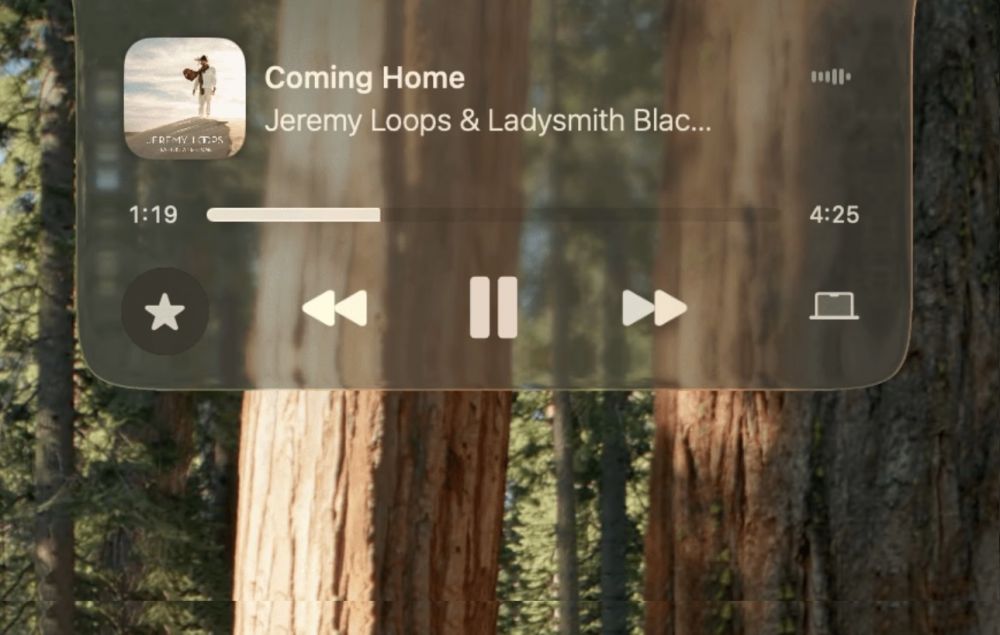
DynamicLake is a pretty big fan of the iPhone’s Dynamic Island, and it aims to bring the same novelty to a user’s MacBook. With system shortcuts, timers, interactive spaces, and more, it works with you rather than having you navigate an endless array of file menus.
The cool thing about DynamicLake is how much it can feel like it's a part of a standard macOS experience. Behaving just like a system layer, it can call up a variety of information just when you need it. There’s a good sense of fluidity to this one, and it can perform quick actions fairly easily.
However, there are a few cracks in the details. Though the app has high ambitions, there are some rough edges, and users do report some bugs. It also requires a bit of setting up, which may be far more involved than more minimal apps. However, this one can provide a solid experience, even though there may be some hiccups.
5. NotchNest

Available on the Apple App Store, NotchNest is all about packing itself with features. Providing options for AirDrop, bookmarks, and even a Pomodoro Timer, there’s a lot available here for those that are looking to transform their macOS experience.
Offering seamless integration into your workflow, it’s also a relatively lightweight app, so there’s no need to worry about the performance of your machine. Additionally, it has a fair amount of flexibility to it, which can be good for different workflows.
There’s a bit of a trade-off for this flexibility, however, as the app can feel rather crowded. While there’s plenty of features to be had, it can feel a tad overwhelming, especially if you’re not fully accustomed to it yet and are in the middle of a project. Nonetheless, it does have some versatility, even if there may be a learning curve.
The Final Verdict: What's the Best MacBook Notch App?
While Apple may still need to figure out what exactly it’s doing with the notch, this missed opportunity has certainly been seized by those looking for more from the menu bar. While it may have been a divisive design choice among Apple fans, the right app can really help expand the potential of your machine. While each of these apps are good in their own right, NotchNook stands out for offering a well-rounded solution with a polished approach. If you’re looking for the best MacBook notch app, give it a try today.

Digital Content Specialist
Nick deCourville is a Digital Content Specialist dedicated to the Apple ecosystem. He believes that fixing something can be just as straightforward as breaking it, which fuels his exploration of iPhone and iOS settings. As the owner of an iPhone 15 Pro, Apple Watch SE, and MacBook Pro, Nick is constantly honing his expertise in Apple’s products. With a Master’s degree in English Literature and Composition from The University of Akron, he has a strong foundation in writing and communication.



![Best AI Detector Tools [5 Powerful Solutions]](https://static.macupdate.com/app-gallery/215/d/phpuzudv2-main-image.jpg)

