


VMware Fusion
Run Windows apps alongside Mac apps without rebooting.
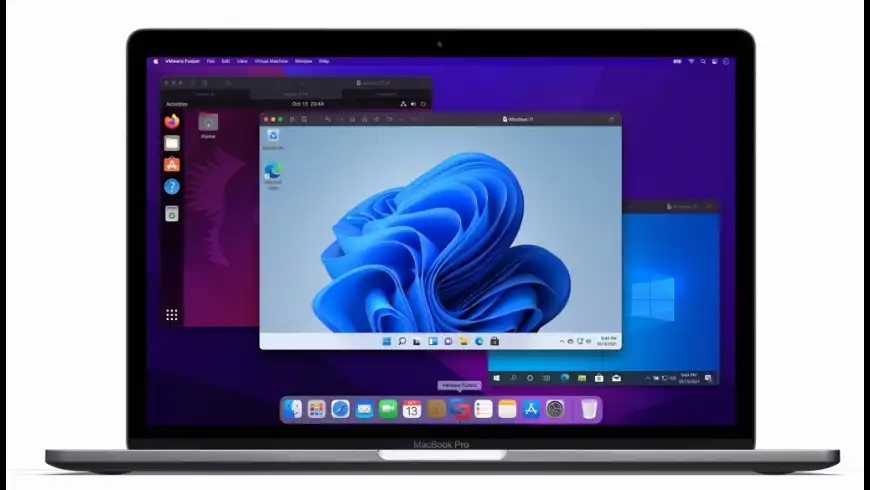
VMware Fusion overview
VMware Fusion - virtualization software for running Windows, Linux, and other systems on a Mac without rebooting. The latest version includes full support for Windows 10, macOS Mojave, and the latest Macs, including the 18-core iMac Pro and MacBook Pro with 6-core Intel i9 CPU.. VMware Fusion support DirectX 10.1 and Enhanced Metal Graphics Rendering Engine. The virtual machine platform also delivers full 64-bit support with up to 16 vCPUs, up to 3072 MB graphics memory, 64GB RAM, and an 8TB hard drive for a single virtual machine.
What’s new in version 13.5.1
Updated on Apr 26 2024
Resolved Issues
- ThinPrint warnings appear when powering on a virtual machine. When you power on a virtual machine, ThinPrint-related warnings might appear due to a missing option to remove serial ports.
- MTL renderer crashes when using unsupported GPUs. If you attempt to use Fusion on unsupported graphics hardware, the MTL renderer might crash.
- ESD file generation on ARM-based systems fails when system language is French. Windows 11 ARM easy download, ESD file generation is failing when the system language is set to French.
- curl has been updated to 8.4
Information
License
Shareware
Size
704.7 MB
Developer’s website
https://www.vmware.com/products/fusion.htmlDownloads
464395
App requirements
- Intel 64
- Apple Silicon
- macOS 12 or later
Try our new feature and write a detailed review about VMware Fusion. All reviews will be posted soon.
(0 Reviews of )
There are no reviews yet
Comments
User Ratings

Dec 2 2023
Version: 13.5
Sad times for VMware. My IMHO suggestion: Look elsewhere for emulation/virtualization. -> From Ars Technica 2023-12-01: "Broadcom cuts at least 2,800 VMware jobs following $69 billion acquisition". . . . "The WARN notices list the reason for the layoffs as "economic," but provide no further explanation or justification.... Despite the layoffs, VMware will remain central to Broadcom's enterprise software strategy. The company's Broadcom Software Group will be renamed VMware, and the company is reportedly planning to emphasize software subscriptions rather than one-time sales to boost revenue." - - Is it a football? Or is it software? :-(

Nov 18 2022
Version: 12.2.4
Version 13 is released with Apple silicon support.

May 30 2022
Version: 12.2.3
Can't believe they don't have M1/ARM support yet. :(

May 27 2022
Version: 12.2.3
Broadcom to Acquire VMware for Approximately $61 Billion in Cash and Stock (May 27, 2022). Press announcement here https://www.vmware.com/content/dam/digitalmarketing/vmware/en/pdf/company/vmware-broadcom.pdf
Mar 14 2022
Version: 12.2.1
12.2.3 has been released although I've been unable to download it. It appears the "Manually download" button is broken on VMWare's site.
Oct 15 2021
Version: 12.1.2
Just a heads up, version 12.2.0 is out. Installed windows 11 in a VM yesterday on a late 2015 27" iMac which has 32 GB RAM, and gave the VM 8GB. Runs extremely well. I'll be testing it more, but, I was quite impressed from initial impressions. The new version of Fusion now requires Big Sur, or later. So, if you need Catalina or older, stay on 12.1.2, or below.

May 19 2021
Version: 12.1.1
I have a question: is there an app to help use Mac apps on Windows computers?
Apr 1 2021
Version: 12.1.1
Still no EASY, app driven, menu accessible, solution for entering recovery mode for a Big Sur VM for purposes of disabling SIP. There ARE workarounds but NOT for the faint hearted. VMWare needs to address this. If you've been struggling to disable SIP on your Big Sur vm, here some of the hoops you can jump through https://apple.stackexchange.com/questions/415086/how-to-disable-sip-when-big-sur-is-installed-in-a-vmware-fusion-player-virtual-m ABSOLUTELY backup your vm image before trying any of these hacks...one slip up, a typo, well...you know the rest.
Apr 1 2021
Version: 12.1.1
MACUPDATE: the developer link on this page points to the European STORE (for buying) for VMWare (https://store-eu.vmware.com/) instead of the company website which is https://www.vmware.com/
Mar 11 2021
Version: 12.1.0
* For those concerned: "Code-execution flaw in VMware has a severity rating of 9.8 out of 10.
Thousands of servers running vCenter server could be in for a nasty surprise...." - - 'CVE-2021-21972, as the security flaw is tracked, is a remote code-execution vulnerability in VMware vCenter server, an application for Windows or Linux that administrators use to enable and manage virtualization of large networks.... CVE-2021-21972 allows hacker with no authorization to upload files to vulnerable vCenter servers that are publicly accessible over port 443.... CVE-2021-21972 affects vCenter Server versions 6.5, 6.7, and 7.01. Users running one of these versions should update to 6.5 U3n, 6.7 U3l, or 7.0 U1c as soon as possible....' - -> https://arstechnica.com/information-technology/2021/02/armed-with-exploits-hackers-on-the-prowl-for-a-critical-vmware-vulnerability/
Jan 5 2021
Version: 12.1.0
So, Parallels is showing off a Technical Preview of Parallels that can run the ARM version of Windows on Apple Silicon apps. I've tried it, it works, for the most part, still a lot of work to do, but interesting. It's a proof of concept, the bigger issue is, will running the ARM version Windows satisfy people who want to run Windows on a Apple Silicon Mac, because Windows ARM still has it's own issues even on official Windows hardware like the Surface Pro. Lingering application issues, emulation of Intel, problems running older 32-bit Intel apps (under emulation). Even still the, it's actually quite amazing that it can be done, that a 32/64-bit Intel Windows app can run under emulation on a ARM version of Windows built for Qualcomm's ARM chip, running as a Virtual Machine on a Apple Mac with a Apple designed ARM processor. I wonder if VMware has a skunk works project going on to do the same; I'm sure VMWare is watching how the Parallels experiment goes and whether consumers take to it. Ironically, because the M1 is so fast, according to some reviews, Windows ARM runs faster as a VM on a M1 Mac than it does on a Surface Pro natively. There was no competition before, so Qualcomm and Microsoft had no pressure to push Windows ARM or the Surface Pro, it just had to be good enough. Next Question, if you can run Windows ARM as VM on a M1 Mac, will it be possible some day to install Windows ARM NATIVELY to a Apple Silicon Mac, a la bootcamp? I think all that would be needed is a special bootloader to trick Windows ARM into thinking it is a Surface Pro or something.
Dec 17 2020
Version: 12.1.0
Original and best, runs linux flawlessley and fast. Steer clear of all imitations.

Nov 23 2020
Version: 12.1.0
I liked it a lot, found the upgrade cycle more friendly for my wallet, but unfortunately at the moment it does no longer work with the Boot Camp partition in Big Sur.
Parallels does, so I switched, and it is performing well.
I do see myself coming back to VMWare though, once all issues are ironed out.
Sep 18 2020
Version: 12.0.0
Gets the job done. Faster than the competition.
Sep 17 2020
Version: 12.0.0
So Fusion 12 is now free for personal use. How does it compare to Parallels 16?
Sep 17 2020
Version: 12.0.0
So Fusion 12 is now free for personal use. How does it compare to Parallels 16
Aug 24 2020
Version: 11.5.6
The future of Fusion: Fusion 12 is coming (already available as Technology Preview), it is based on very different design and is only for Catalina or Big Sur due to Apple design changes in macOS. F11 will be the last release to support Mojave. If you buy F11 after June 15, you will get a free upgrade. Fusion 12 PLAYER will be free for personal use and replaces the 'standard' version of Fusion 11. F12 Pro will replace F11 Pro and will include license for 3 devices, INCLUDING Windows and Linux (i.e. VMWare Workstation and Fusion will cross license). With the coming of Apple Silicon, which is NOT Intel architecture, Apple has made very clear that BootCamp will not be available. Virtualization of Windows Intel x86 on Apple Silicon, as we have come to enjoy with Fusion and Parallels, is not possible (don't confuse virtualization with EMULATION, as many people do). Emulation might work, but anyone's guess how efficient that will be. Windows ARM based MIGHT run on Apple Silicon, same with ARM based Linux; just not enough information yet, not even sure all the major players (Apple, Microsoft, Linux world) really know what is going to happen, unless they have had talks behind closed doors, but unlikely Apple would have tipped their hat, and frankly running Windows on a Mac is not high on Apple's priority list. MU is not the place to debate the technology, just wanted to give heads up to users that given all this, YOU BETTER HOLD ON to a few Macs that run Mojave and F11 for right now till all this settles out, if your business relies on running Windows on a Mac. F12 may be okay, but even with extensive beta testing and technology preview, there is still so much new and Big Sur is nowhere near stable right now, so who knows how well F12 and Big Sur combo will function upon final shipping, I'd hold off for a couple of months. If you have already moved to Catalina, F12 SHOULD run much like F11 on Mojave, but again, for business, at least we know F11 and Mojave combo is pretty stable. Many businesses and me personally, have decided to basically skip Catalina (I've heard people call it the 'Vista' or 'Windows 8' of the Mac world), still use Mojave for mission critical, and await to see what Big Sur will look like.
If you have a decent Mac purchased in the last year or two, I see no reason to buy a new Intel based Mac at this time, until we see what the new Apple Silicon Macs look like and perform like, unless your business requires the latest and fastest.
At the end of the day, if it is mission critical, the long term future of running Windows in a Mac shop may simply be a real Windows box running real Windows, and remote-ing into it. SO, don' lose your F11 licenses, or throw out your Macs running Mojave just yet, if running Windows is key for you.


Similar apps
Whisky
Modern Wine wrapper built with SwiftUI.
Is this app is similar to Whisky? Vote to improve the quality of this list.
Vote results
2
Upvotes
1
Total score
-1
Downvotes
Parallels Desktop
Run Windows apps without rebooting.
Is this app is similar to Parallels Desktop? Vote to improve the quality of this list.
Vote results
8
Upvotes
1
Total score
-7
Downvotes
CrossOver
Run Windows apps on your Mac.
Is this app is similar to CrossOver? Vote to improve the quality of this list.
Vote results
4
Upvotes
1
Total score
-3
Downvotes
Bochs
x86 PC emulator.
Is this app is similar to Bochs? Vote to improve the quality of this list.
Vote results
1
Upvotes
0
Total score
-1
Downvotes
VirtualBuddy
Virtualize macOS 12 and later on Apple Silicon.
Is this app is similar to VirtualBuddy? Vote to improve the quality of this list.
Vote results
1
Upvotes
0
Total score
-1
Downvotes
New and Recently Updated