


DVDRemaster
Duplicate, burn or convert DVD movies to iPod, iPhone or Apple TV.
$49.99
This app is no longer supported by it's developer. You can find similar apps here.
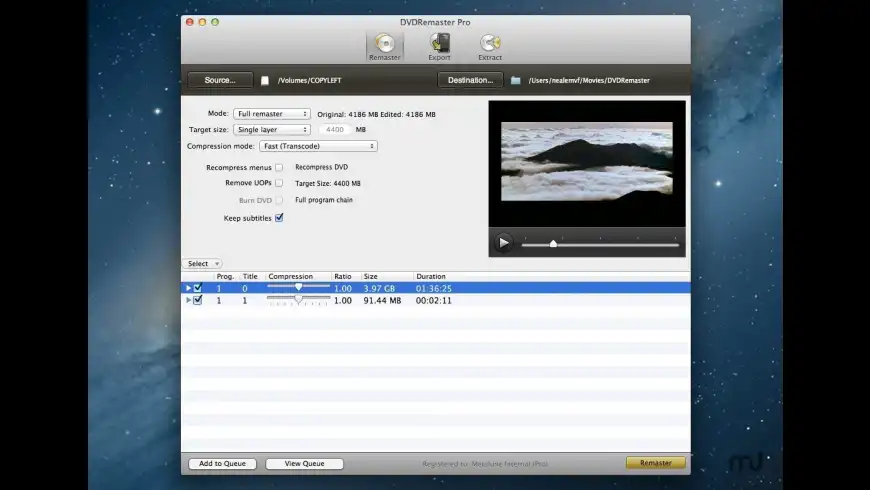
DVDRemaster overview
DVDRemaster has been acquired by DVDSuki Software and will be merged into Mac DVDRipper Pro. Contact dvdremaster@metakine.com if you have any questions.
DVDRemaster recompresses large DVDs so they can be burned on a standard DVD or convert them so they can be watched on your video iPod, iPod Touch, iPhone, iPad Apple TV and many other portable devices. DVDRemaster accommodates both novices and experts with its simple but yet powerful interface.
DVDRemaster also allows you to extract raw data streams from your DVD that can also be reused in other video editing applications.
Features:
- Soft subtitles: Switch subtitles on and off as you please and preserve subtitles in mutliple languages. Resolution-independent subtitles are always displayed at the best quality possible for your device, big or small.
- Custom cropping: Manually customize the removal of black borders and get a highly precise cropping when using this feature in combination with the preview feature.
- Fine-tune your selection: With additional and more detailed information about the size of each element, you can now better fine-tune the remasterization of your movies and shows
- Preserve mutiple audio tracks: when converting your movies and shows for your video player. This is ideal to retain several languages or audio commentaries.
- Faster than ever: with its new enhancements, you will have access to your DVDs, movies and shows even quicker.
- Surround sound: enjoy the full surround sound experience. The high-quality surround material is preserved when converting your movies and shows for your Apple TV.
- Convert to video players even faster: bring your movies and shows onto your video players faster with improved H.264 support. You can now convert to H.264 using turbo.264 thus freeing you computer so you can work on what matters to you.
- DVD backup made easy: From viewing your movies to selecting the languages you wish to keep and burning the final backup DVD, everything is built into a simple but yet powerful interface.
- Recompress with ease: No need to worry about complicated settings; everything is summarized into easy to use presets. Simply select a destination device and you are readyto go.
- Convert for video players: Watching your favorite movies and shows on the road using your video iPod, iPod Touch and iPhone or enjoying them at home on your Apple TV has neverbeen easier.
- Automatically include movie information: Easily locate and classify movies in your library using titles, genres andmany others. Finding the movie you are looking for is now a piece of cake.
- Prepare and execute multiple conversions: Never run out of movies to watch again. Prepare several conversion tasksahead of time and let DVDRemaster execute them without supervision.
- Easily navigate between chapters: It is easier than ever to find scenes in a movie on your iPod, iPod Touch or iPhone. Thanks to the new chapter markers, you can jump from one chapter to another.
What’s new in version 8.0.3
Updated on Dec 14 2012
Version 8.0.3:
- Fixed a bug when exporting a program with no audio
- Added a format for Apple TV 1 / iPod Classic
Try our new feature and write a detailed review about DVDRemaster. All reviews will be posted soon.
(0 Reviews of )
There are no reviews yet
Comments
User Ratings

Oct 10 2020
Version: 8.0.3
I have been using Toast Titanium 14.2 for a very long time, and it has been doing everything I've needed it to do... except for the occasional need to use DVDRemaster to compress a VIDEO_TS folder down to 4.5GB to fit on a standard DVD before burning with Toast (which otherwise says the file appears to be corrupted).
Now I want to move beyond macOS Mojave to Catalina (or Big Sir) which requires 64-bit applications.
My question/problem is: since DVDRemaster is no longer an available and supported option, does anyone know if there is there a reliable 64-bit replacement for DVDRemaster that someone can recommend to simply recompress a VIDEO_TS folder down to fit a standard size DVD?
Or if Toast Titanium 19 has an improved VIDEO_TS Fit-to-DVD video compression burning such that I am unlikely to need DVDRemaster like I occasionally needed before? Unfortunately, Toast Titanium does not appear to be as reliable as it once was, based on some of the more recent reviews, but I will need to upgrade to it anyway for the 64-bit support.
I have tried Mac DVDRipper Pro and it rips DVDs just fine, but it is unable to burn the larger VIDEO_TS folders to a standard DVD. It apparently does not have any video compression routines, contrary to the statements I've seen that DVDRemaster would be incorporated into it.
In the mean time, I plan to use my older Mac with High Sierra to run Toast Titanium 14.2 and DVDRemaster (along with RipIt) until something comes along that will meet those needs on a 64-bit macOS system.
Any suggestions would be most welcome.
Dec 1 2019
Version: 8.0.3
Here is an update. On my Mac running High Sierra, DVDRemaster Pro v7.2 (App Store Version) and DVDRemaster v8.0.3 (Download version) appear to run just fine. But when I first run DVDRemaster v8.0.3, I always get this message "Do you want the application “h264daemon” to accept incoming network connections?". Click Allow and all will be fine or change your Firewall settings accordingly.
It is a pity that the program is no longer being developed. There really is not a good alternative for Mac users who want to compress DVD's.
Feb 22 2019
Version: 8.0.3
Can anybody help me and advice me as to how I may retrieve my Licence Key code for my DVDremaster which I purchased quite sometime ago. Unfortunately I had a lot of problems with my Mac El Capitan and since then I have lost so many folders and files including all of my Licence key codes for lots of software products which I had bought in the past. Your help would be greatly appreciated. Thank you so much.

Jul 19 2017
Version: 8.0.3
I'm using the latest version of Sierra, and this app still works flawlessly, I will continue to use it until it no longer works. Yes, some of the technology has been incorporated into Mac DVDRipper Pro (MDRP), but the vast array of editable compression features has not. I still use this for compressing a dual-layer DVD into a single layer.
Nov 12 2015
Version: 8.0.3
Does anyone know if version 8.0.3 works on El Capitan?
Nov 18 2014
Version: 8.0.3
Oh, my god! It has been merged! Can't believe in it!
Feb 18 2014
Version: 8.0.3
I had licenses for both software titles before they merged.
Nov 18 2013
Version: 8.0.3
Here's the official final word from the Metakine web site:
"DVDRemaster has been acquired by DVDSuki Software and is no longer for sale. Parts of it will be integrated into Mac DVDRipper Pro."
That means that DVDRemaster is no longer going to be a standalone product. That sucks.
I always found DVDRemaster to be the best alternative to the recently problem plagued DVD2OneX.
Oh well, life goes on.
Oct 25 2013
Version: 8.0.3
This app is no longer listed on Metakine's site. Is it discontinued?
It was the best at what it di, but just like the last person to post, there were problems with versions 7 & 8 that were never resolved. I suppose thats because they knew it was going to be abandoned. Sad, this was a very easy and flexible transcoder. I especially loved the ability to do hard or soft subtitles.
Apr 27 2013
Version: 8.0.3
I spend a lot of time to this app. Since version 4 I used it and was happy with it until the point who I bought an Apple TV. For the latest Update from version 7 to 8 I waste my money (again).
What's happen?
Near the (silent) end of version 7 I was starting a conversation with the support around coding my videos with Dolby Sourround 5.1 for my Apple TV. My problem is, that if I coding a video with a dolby digital 5.1 track, it takes a lot of time on my Apple TV (3. Gen) to load and start the movie.
My hope was was, that I can found a solution with metakine to let coding my videos correctly, place them in iTunes and select them from my Apple TV with a quick playback after selecting the movie. I also give them the tip, that a coding with Dolby Sourround 5.1 will work perfectly when I using the free HandBrake application, who's Open Source.
The developer promised me, to look at this problem to fix it with a future update, but they don't.
A few months later, they deliver version 8 and at this point I was knowing, that I never will got a fix for my "5.1" problem in version 7, so I decide to buy version 8 to. I'm still waiting for a fix of that and I'm not the only one.
Also you need to know, that DVDRemaster is not able to rip DVDs who are copy protected. With version 7 they also delicver the tool "FairMount" who was for free. This tool using the source of the VLC Media Player to mount each DVD as an image to safe it on the Hard Drive of your mac. With Version 8 they announced, that metakine has sold the app to Mac DVDRipper Pro. Since them you are not longer able to download FairMount for free.
So if you want to safe a DRM protected DVD, you need Mac DVDRipper Pro or RipIt, who are booth shareware to. Booth applications can convert movies to an iOS format to btw. Well... You have not so much settings as on DVDRemaster.
The only good thing of this application is, that it looks nice and easy and it works good with subtitles. But you can do the most with the Open Source Application HandBrake to. This Softare came with different predefinied settings to for different devices and you are also able to edit each config and safe them for later, when you want. Only the Subtilte thing is sadly not the best on HandBrake.
With this deal you didn't safe realy much money (and there where be much better deals in the past for this software). It's an to expensive application for that what you can do with it. And be warned, that you must pay for each big update 9,99 US Dollar. And don't trust the low version numbers. The next version can berelased soon...
Version 4 was relased in 2008
Version 5 was relased on Feb. 2009
version 6 was relased on Dec. 2009
Version 7 was relased on Feb. 2011
Version 8 was relased on Jul. 2012
My tip:
If you just want to safe a DVD on your HD and search for a simple solution to convert it for you iOS devices, spend your money to Mac DVDRipper Pro or RipIt. They also came with a quick and good solution to convert a video. If you want to have a better control on the final coding for other decives, give HandBrake a try, who's for free. The price for this application is overpriced.

Apr 21 2013
Version: 8.0.3
I have the latest version of RipIt already. Does DVDRemaster do anything significantly different that that app? Or is it just a competitor and they basically do the same thing... rip from DVDs and transcode to various video/audio formats? Thanks!

Dec 14 2012
Version: 8.0.3
DVDRemaster 8.0.4 cranks up the CPU to 77% on my Late-2006 2.16 GHz Core2Duo iMac with 2 GB of RAM running Mac OS 10.6.8, and to 35% on my Mid-2012 2.9 GHz Core i7 MacBook Pro with 8 GB of RAM running Mac OS 10.8.2. The CPU remains cranked up until I finally have to close the app.
Anyone else having this problem?
Jul 24 2012
Version: 8.0.1
Though this MacUpdate page says DVDRemaster Pro, v. 8.0.1 no longer says ‘Pro' anywhere, nor is that word to be found on the developer’s website anymore. What gives?
Jul 20 2012
Version: 8.0.1
I using this applications since a long time for now and buy the upgrades several times. The god thing is, that this software is very easy to use. You have an little all rounder who can rip DVDs (you need FairMount if the DVD is protected and VLC 1.X), converting the movies in different formats (Quicktime Movie, iPod/iPhone, iPad, Apple TV and more) or export single files from the DVD with only less clicks. So you will make nothing wrong if you search for an simple solution to safe your DVD's on the Mac.
That's are the good things. The bad part is the very long time who this app need to convert a movie. I have no idea why this happen, because HandBrake doing it quit faster and it's for free. On my core 2 duo a full DVD copy who's safed on my HD needs around 40 minutes, on DVDRemaster I need to wait over one hour for an final result. This can happen because of some video-settings, not sure but I'm very happy to with the results of HandBrake.
The other negative thing is the support for the Apple TV in combination with Dolby Surround (AC3 Passthrough).
I have made a lot of different testings with the latest version of DVD Remaster Pro 7 and now with 8 to, but it's ever the same result. If I'm choosing the Dolby track and a non-coding for that track, the Apple TV 3 will need a lot of time to start the movie (around 6 minutes). This is unacceptable for me. I try the same stuff with HandBrake and on this app it works absolutely perfect. My movie has a stereo and dolby channel after the export and the movie starts immediately on the Apple TV.
I explain this problem in several mails to the developer and he collect all my informations, but he can't say me anything about the status or future plans. Now they deliver an update of DVD Remaster 8 and in the change log is still nothing around the bad coding around AC3 Passtrought. This makes me a bit angry.
Jul 18 2012
Version: 8.0
DVDRemaster 8 is not yet available on Mac Store. How can users who bought it from the store upgrade to the latest version? Thanks.
Jul 15 2012
Version: 8.0
Just a heads up - Fairmount is no longer shipped with DVDRemaster, so keep your old copy.
Jul 14 2012
Version: 8.0
Thank you, Metakine! My upgrade from 7.2 to 8.0 was free, with no hassle! :-)
Mar 17 2012
Version: 7.2
I've spent over two hours trying to make Fairmount work and detect VLC media player 32 bit. Nothing doing. Support material seriously lacking.
Jan 10 2012
Version: 7.2
I have had this application a long time and have gone thru a number of upgrade cycles. The app has consistently gotten better. It is very easy to use and it has always done what I needed easily - the key is easily. Keep up the good work.


$49.99
This app is no longer supported by it's developer. You can find similar apps here.

Similar apps
Toast Titanium
The ultimate media toolkit; disc burning, video conversion and more.
Is this app is similar to Toast Titanium? Vote to improve the quality of this list.
Vote results
0
Upvotes
0
Total score
0
Downvotes
Submerge
Add hardcoded subtitles with ease.
Is this app is similar to Submerge? Vote to improve the quality of this list.
Vote results
0
Upvotes
0
Total score
0
Downvotes
Cinematize Pro
Use virtually any part of an existing DVD as source material.
Is this app is similar to Cinematize Pro? Vote to improve the quality of this list.
Vote results
0
Upvotes
0
Total score
0
Downvotes
DVDxDV Pro
Convert DVDs to a variety of formats.
Is this app is similar to DVDxDV Pro? Vote to improve the quality of this list.
Vote results
0
Upvotes
0
Total score
0
Downvotes
DVDxDV
Convert DVDs to QuickTime movies for editing.
Is this app is similar to DVDxDV? Vote to improve the quality of this list.
Vote results
0
Upvotes
0
Total score
0
Downvotes
New and Recently Updated