MacUpdate
Join MacUpdate
New Member

New Developer
Explore
MacUpdate Desktop
Hot Apps

Business
Dashboard
Development
Drivers
Education
MacUpdate Promo
Popular Apps

Games
Home & Personal
Internet
Multimedia & Design
Utilities
iPhone
Apps

Login
Member Login

Developer Login
About
Search Mac Apps

Search iPhone Apps

Advanced Search
PDF Shrink
PDF Shrink 4.5.3
Your rating: Now say why...

(12) 4.125

Compress PDF documents.   Demo ($35)
Add to my Watch List
Email me when discounted
  • Download Now
    5.9 MB
  • Visit Developer's Site
    Apago, Inc.
PDF Shrink can reduce most PDF files - including those created by Mac OS X iLife and iWork applications, Adobe Creative Suite, Microsoft Word & PowerPoint - by as much as 90% of their original size. PDF Shrink is ideal for consumers and small businesses that need to produce PDFs at a quality and file size appropriate for use on the Web, as email attachments, CD-ROMs and for on-screen reading. The software is compatible with Mac OS X 10.4 and supports PDF Services, droplets and AppleScript.

Images make up a significant part of the size of typical PDF file. PDF Shrink can modify the
What's New
Version 4.5.3:
  • Resolves corruption problem with some images
  • Added more shrinking methods for Acrobat 9 compatible files
  • Updated standard settings to provide more compression
  • NOTE: To enable the new compression features in this upgrade, please edit your settings. You must select "Acrobat 7, 8, 9 or later" and/or "Mac OS X Preview 10.4/10.5" viewers and unselect "Acrobat 5.0 or earlier". Do not modify the settings for the iPhone.
Version 4.5.3:
  • Resolves corruption problem with some images
  • Added more shrinking methods for Acrobat 9 compatible files
  • Updated standard settings to provide more compression
  • NOTE: To enable the new compression features in this upgrade, please edit your settings. You must select "Acrobat 7, 8, 9 or later" and/or "Mac OS X Preview 10.4/10.5" viewers and unselect more...
Requirements
PPC / Intel, Mac OS X 10.4 or later.


  • PdfCompress
    +7
    Shareware $35
    Reduce the size of your .pdf ...

  • ShrinkIt
    +3
    Free
    Shrink PDF file sizes.

  • Imposition Stu...
    +1
    Shareware $99
    Create an impositioned PDF file.
PDF Shrink User Discussion (Write a Review)
ver. 4.x:
(12)
Your rating: Now say why...
Overall:
(18)

sort: smiles | time
burypromote


shutupxo reviewed on 01 Jul 2011
Perfection. I love this program. =D Thank you for making it.
[Version 4.5.3]


burypromote


Webzu reviewed on 24 Jun 2011
Tried to compress two files but it did not compress the PDF files. Same exact size, so this doesn't work. The features and concept are cool and easy who to use. You just drag and drop the PDF but the output file is not compressed so pointless. Too good to be true for the price. :-) Moved to trash.
[Version 4.5.3]


burypromote


Singerjttm11 reviewed on 14 Mar 2011
Being on the road you have to often send PDFs for expenses this has been a LIFESAVER!!! I would HIGHLY recommend it! Thank you!!!
[Version 4.5.3]


burypromote

+1

Rich Rodecker reviewed on 09 Dec 2010
Gonna have to give this one some props...simple to use, does the job well. It just took a 4.7mb pdf I wanted to email down to 319k while maintaining pretty good quality.
[Version 4.5.3]


burypromote
+1

+12

Uncoy reviewed on 30 Mar 2010
PDF Shrink does the job and does it well.

But PDF compression should be built into the OS.

It turns out that it is:

How-To - http(colon-slash-slash)www(dot)hoboes(dot)com(slash)Mimsy(slash)?ART=360

Apple Discussion Board - http(colon-slash-slash)discussions(dot)apple(dot)com(slash)thread(dot)jspa?messageID=6109445&tstart=0

On the other hand, if you don't have time to tinker with filters, PDF Shrink does the job well. If we went the PDF Shrink route, I'd have to put PDF Shrink on four designer computers so we are building our own filters instead. Plus, core OS filters are likely to be compatible with future OS without updating costs.
[Version 4.5.3]


burypromote
+1

+1

Buu-San reviewed on 10 Jan 2010
Magic !
I have succeeded easily in compressing 100Mo of a PDF booklet made with Illustrator, in a PDF file of only 3Mo, without altering so much all the drawings and pictures contained in each page. Especially the letters on the figures were still readable after the compression.
I tried many other software , but none of them were as powerful as this one.
I really recommend this software if you want to make small file size in PDF wiht keeping a very high resolution.
Amazing soft !
[Version 4.5.3]


burypromote

-27

An.onymous reviewed on 28 Oct 2009
I Aapologize. Actually, this app enables fine tuning the compression, even differentiating the compression quality of the components of the PDF (text, graphics, color pictures, etc.
I am very impressed by how efficient and convenient this app is.
[Version 4.5]


burypromote

-27

An.onymous reviewed on 26 Oct 2009
This app works perfectly and the quality is impressive. Unfortunately one cannot target a specific size. There are only four options and no intermediate possibility.
[Version 4.5]


burypromote

+9

taipan2008 reviewed on 09 Mar 2009
I scanned some docs and, after merging them with Preview, I got an insane 11 Mb pdf file.

I checked the web looking for compress solutions but all suggestions didn't work fine for me (not enough reduction or bad output quality).

I tried PDFshrink and it worked exactly how I needed. A little bit pricey (here's way 4 stars and not 5) but it does exactly what it should do

CG
[Version 4.5]


burypromote

+1

winet reviewed on 17 Aug 2008
use it since years and it works great. Probably the other with problems should have a bit of knowhow on what they doing. If jpg is compressed maximum you dont get more reduction.
For Me it works grest. Easy interface multiple jobs very stable.
[Version 4.2.5]


There are currently no troubleshooting comments. If you are experiencing a problem with this app, please post a comment.


Rmara rated on 18 Jan 2012

[Version 4.5.3]


Downloads:104,277
Version Downloads:61,731
Type:Utilities : Compression
License:Demo
Date:29 Oct 2009
Platform:PPC / Intel
Price: $35.00
Overall (Version 4.x):
Features:
Ease of Use:
Value:
Stability:
Displaying 1-10 of 22
< 1 2 3 >
Displaying 1-1 of 1
-
-
-
Please login or create a new
MacUpdate Member account
to use this feature
Watch Lists are available to
MacUpdate Desktop Members
Upgrade Now
Download and auto-install
using MacUpdate Desktop. Save
time moving folders and cleaning-up.
PDF Shrink can reduce most PDF files - including those created by Mac OS X iLife and iWork applications, Adobe Creative Suite, Microsoft Word & PowerPoint - by as much as 90% of their original size. PDF Shrink is ideal for consumers and small businesses that need to produce PDFs at a quality and file size appropriate for use on the Web, as email attachments, CD-ROMs and for on-screen reading. The software is compatible with Mac OS X 10.4 and supports PDF Services, droplets and AppleScript.

Images make up a significant part of the size of typical PDF file. PDF Shrink can modify the resolution and compression level of the images to match different requirements. Fonts can also make PDFs larger than necessary so Shrink allows you to optionally remove embedded "base 14" fonts. Shrink can also delete unused elements such as metadata, thumbnails and duplicated data.

Protect your documents using PDF Shrink's new encryption feature. Prevent unauthorized access by adding a password or restrict use by selecting from several options including whether to allow changes, printing and content extraction. You can even set a different password to prevent unauthorized people from opening the PDF.

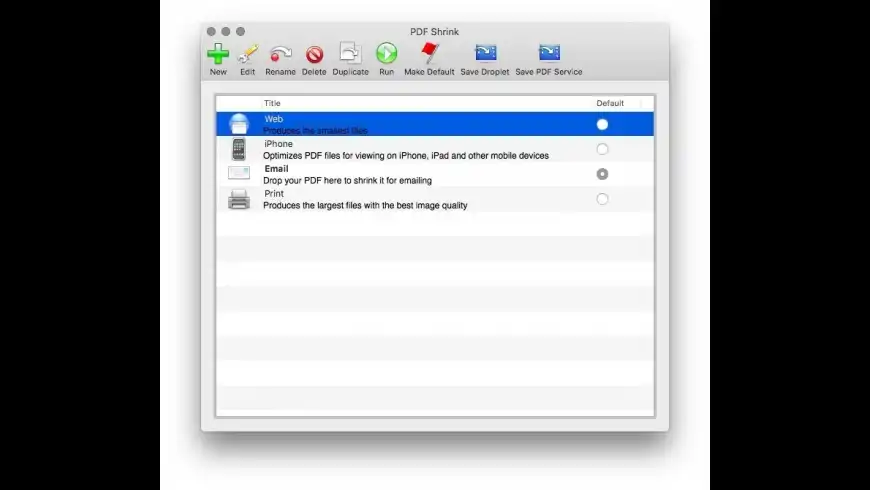
Need PDF optimized for a different use? The intuitive new wizard removes the jargon and unfamiliar terms from selecting different configurations to produce PDF optimized for different uses. Just tell the wizard how you plan to use your PDF and Shrink 4 picks the appropriate settings for you. Or use the Advanced mode to directly specify your settings.

PDF Shrink can be used in several different ways - drag-n-drop a PDF to the application icon or Dock, drag-n-drop to a setting, print through PDF Services, create a droplet or use AppleScript.

How much can PDF Shrink reduce the size of my PDF files? PDF files can be created by so many different applications that it is difficult to give one answer. PDF Shrink can reduce most types of PDF files by up to 10% to 90% of their original size.
Add/Update Listing About MacUpdate Desktop Career Opportunities RSS Twitter Facebook Advertise Sitemap
Copyright © 2012 MacUpdate LLC


- -