


Free
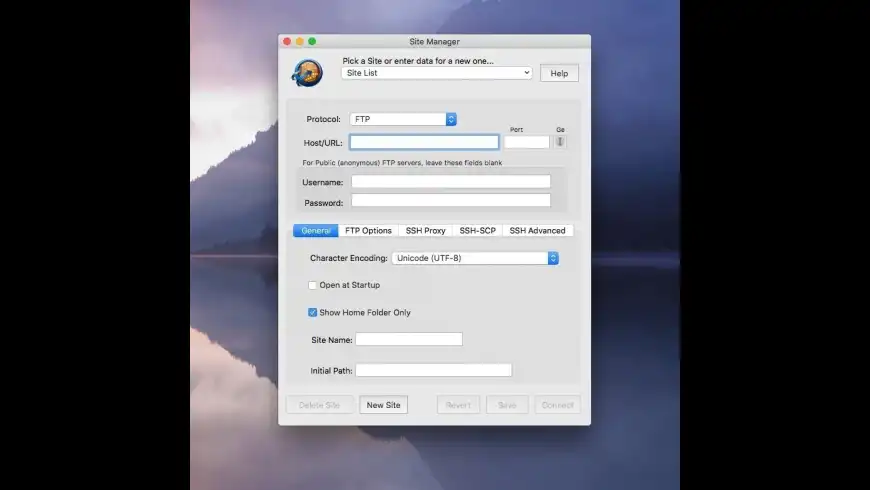
RBrowser overview
RBrowser is an easy-to-use tool for FTP - SFTP remote file management, file transfer, and folder synchronization. It provides access to files on the local host as well as remote UNIX systems with an easy-to-use graphical interface. RBrowser provides secure file transfers as well as folder sync that preserve HFS metadata. Maintain your Web pages and sync the changes with a single click. Backup your important files using the folder-sync engine in RBrowser!
RBrowser is now free! Use this license:
User: rbrowser
License key: 2fn0-8otn-tcz9-k479-yll7-xrw3-knj
Features
- Folder Synchronization: local-to-local and local-to-remote using any protocol. If folder sync's target is a local or remote Mac with ssh access, fork/type/creator data is preserved!
- Retains fork data, type/creator and attributes on Mac-to-Mac transfers.
- Automatic detection protocol capabilities on the remote host - no need to know whether to use FTP, SFTP or SSH, just leave it on "Auto" and let RBrowser figure out the best protocol to use.
- Definitely faster in all protocols and operations.
- Protocol independent transfers - remote-to-remote transfers between any hosts.
- Intelligent combining of ssh/sftp for optimal performance to get the best of the secure world - no longer have to decide which protocol is better for file operations or transfers. RBrowser's intelligent sftp/ssh protocol layer picks the optimal tool for the job for you automagically.
What’s new in version 4.6.8.2
Updated on Jan 09 2020
Version 4.6.8.2:
Note: Please use the registration info found in the "Description" above to license the application.
- RBrowser is free and unsupported. After installation, the first launch will trigger a warning about an unidentified developer. In the Preferences App/Security tab you can give permission for RBrowser to run.
Information
License
Free
Size
2.4 MB
Developer’s website
https://sites.google.com/a/vasvari.com/rbrowser-aasync/Downloads
56248
App requirements
- Intel 64
- OS X 10.9 or later
Try our new feature and write a detailed review about RBrowser. All reviews will be posted soon.
(0 Reviews of )
There are no reviews yet
Comments
User Ratings

Sep 28 2011
Version: 4.6.5.1
I would like to say thank you to Robert for writing a fantastic product. Not only does the package do what it says, Robert answered every single one of my emails within a few hours.
Jan 14 2009
Version: 4.4.7
I'm with Luther below: Never had a problem with RBrowser Lite, but I cannot connect to my usual FTP site with the newer versions -- or, rather, it connects, but the file list is blank. The log on the server says it's connected, but nothing shows up in the client window. RBrowser's troubleshooting gives two possible solutions; one doesn't fix it, and the other is referring to a preference setting that no longer exists in the newer versions. And I can't find an e-mail address on the RBrowser site to point out the problem. Ugh.
Loved RBrowser Lite, but will have to go looking for another plain ol' FTP client.
Mar 17 2007
Version: 4.3.9
I just want to leave a big "thank you" for this cool, awesome piece of
software. I'm using it in free mode with 10.39 for my private homepage and tried a
copy of Netfinder with OS 9.22 before, but rbrowser lite is even better.
Thank you so much!
May 17 2006
Version: 4.3.5
I've been using RBrowserLite for years with no problems. Great little FTP utility. I just purchased a new MacBook to replace a Mac Mini G4 so thought I download the newer version of RBrowser that is Intel native. Deleted old app/prefs/application support of the Lite Version, but couldn't get v. 4.3.5 of RBrowser to work. I have reinstalled RB Lite on my Mini from my backup, and all is working well just like it used to. Guess I'll just use the lite version under Rosetta emulation for now.
Mar 22 2006
Version: 4.3.4
Like many recent applications that 'claim' to be Universal Binaries that work on MacIntel machines, this is another one that just doesn't live up to its claim. Runs just fine on my old G4, but crashes like Gangbusters on this new iMac.
Aug 19 2005
Version: 4.1
Very good FTP client. Allways stable and fast. I recommend this app.
Jun 26 2005
Version: 4.0.6
This seems like a decent ftp client.
Easy to use and worked first time, no problems so far.
Sep 24 2004
Version: 3.3.6
I've been using this app for at least four years and in that time it has never caused me any serious problems whatsoever. This app is solid. If you have issues with it you should contact the developer. He *WILL* fix them, I know this to be true.
Sep 24 2004
Version: 3.3.6
I paid for this shortly after OSX 10.0 came out, and it was essential then (it was the only graphical ftp client that worked) but I've barely used it in the past few years. It just hasn't developed the way other clients have. The UI still feels like a 10.0 app, that is, it feels half finished. This is the only ftp client I can still crash on a regular basis (Cyberduck, Fugu and Transmit being the others I use.) Try any of those three before buying this one.
Mar 15 2004
Version: 3.3.4
Dependable, and getting faster with every update. I use it constantly and it never fails me.
Feb 8 2004
Version: 3.3.3
I can't believe I have gone this long without RBrowser!
I love this application. It does everything I wish it did!
I have been using SFTP mode for a couple weeks. Wow! I love the column view!
I tried SSH mode and was delighted when I could option-drag files to copy them!!!! This software is so intuitive and informing, I have been able to get rid of Fetch and Fugu from my Dock. I have enjoyed Fetch (and Fugu) for years, but RBrowser is the best of both worlds with even more capabilities. I love being able to double-click a file and it opens in my app of choice!!!
The education price is well worth the return to me.
Thanks, RBrowser Team, for a job well done!!!
-doug http://www.mscd.edu/~printit/
Feb 3 2004
Version: 3.3.3
This app is always getting better, and has always been completely stable for me, I've used it for maybe a bit more than two years now. The one time I had an issue with the app, and I can't remember what the issue was now, I emailed the developer and got a very quick reponse and everything got ironed out nicely.
Jun 27 2003
Version: 3.1.3
Great program BUT.... no support of SSL. There is a significant need to connect with windows servers securely and that don't offer SSH, but SSL instead. This feature is severely lacking for mac users as ssl remains the standard for PCs

Oct 11 2002
Version: 3.0.9.3
Listen up, folks... This app is the best of its kind. More features, more protocols, best GUI. And support? The developer is an ace, and he will fix your issue, if you have any, in a heartbeat. RBrowser is the app you want, look no further.
Aug 18 2002
Version: 3.0.8
Alternatives, did you say? I can't find one that allows browsing and file management through SSH. If you want nice icons get a drawing app.
Aug 12 2002
Version: 3.0.7
complex web site, complex licencing protocole, and limited demo featurtes which makes this demo little able to tell you if this is working or not. also this software has undecent icons. Not recommended despite interesting features. In contrast to the previous comment, they are numerous alternatives on OS X nowadays.
May 31 2002
Version: 3.0.7
I read this review from a guy called Konstantin Riabitsev. I guess this say's it all. It definitely reflects my own opinion about RBrowser.
Hello, all:
I thought I'd caution you against using RBrowser. It's an application
for Mac OS X which allows easy use of such protocols as FTP, SSH, SFTP,
and others. I've recommended it to one of our faculty members, but it
appears that it is doing very dirty things in attempts to enforce its
license.
There are several licenses you can buy for RBrowser, each costing upward
of $35. If you get a personal license, RBrowser, when run, will send UDP
packets to the broadcast address of your network at the following ports:
2927/udp
4038/udp
4626/udp
4800/udp
5058/udp
6647/udp
6791/udp
8674/udp
9170/udp
9912/udp
This is, apparently, done to make sure that nobody on the network is
running RBrowser using the same license. When another computer receives
these broadcasts, it sends a reply back to the originator and compares
license keys. If they are the same, one of them will quit. To us in
Physics this meant that we saw upward of 500 firewall violation reports
from 150 machines, which significantly increased our syslog traffic. And
that's just from one client -- I can only guess how much traffic 50
clients can generate when they all send udp broadcasts and chat with
each-other comparing license notes.
This behavior CANNOT be turned off. When I contacted the author of
RBrowser about this issue, he recommended getting a "host license"
instead of a "personal license", but this is not acceptable, as a "host
license" is bound to the unique identifier of ONE computer, meaning that
if you ever upgrade your computers, you will have to get a whole new set
of licenses.
It appears that you can't firewall this off on the client end as well --
when I tried placing firewall rules on the faculty's machine to make
sure that these broadcasts are swallowed and not sent to the network
broadcast, RBrowser would exit with a license violation message. Ugh.
Naturally, this was not acceptable to us and I thought I'd caution you
all about doing business with this company -- it seems to me that they
are not concerned about the problems of network administrators and are
solely centered on enforcing their licenses.
An alternative was found quite soon -- MacSFTP is a great replacement
for RBrowser, not to mention that it's $15 cheaper. If you are looking
for a good SFTP client, make sure you use MacSFTP and not RBrowser --
that horrorware is forever banned from Physics, that's for sure. :)
Best regards,
--=20
0> Konstantin ("Icon") Riabitsev
/ ) Duke University Physics Sysadmin
~ www.phy.duke.edu/~icon/pubkey.asc
Free


Similar apps
Transmit
Excellent FTP/SFTP client.
Is this app is similar to Transmit? Vote to improve the quality of this list.
Vote results
0
Upvotes
1
Total score
0
Downvotes
Fetch
FTP/SFTP client with Bonjour, Unicode support and more.
Is this app is similar to Fetch? Vote to improve the quality of this list.
Vote results
0
Upvotes
0
Total score
0
Downvotes
Captain FTP
Task-savvy FTP/SSL-FTP/SFTP client.
Is this app is similar to Captain FTP? Vote to improve the quality of this list.
Vote results
0
Upvotes
0
Total score
0
Downvotes
Cyberduck
FTP and SFTP browser.
Is this app is similar to Cyberduck? Vote to improve the quality of this list.
Vote results
0
Upvotes
0
Total score
0
Downvotes
CrossFTP Pro
FTP client and synchronization tool.
Is this app is similar to CrossFTP Pro? Vote to improve the quality of this list.
Vote results
0
Upvotes
0
Total score
0
Downvotes
New and Recently Updated