


Macintosh Explorer
Alternative file browser for the Finder, aqua version available.
$24.95
Application is not under development & not supported.
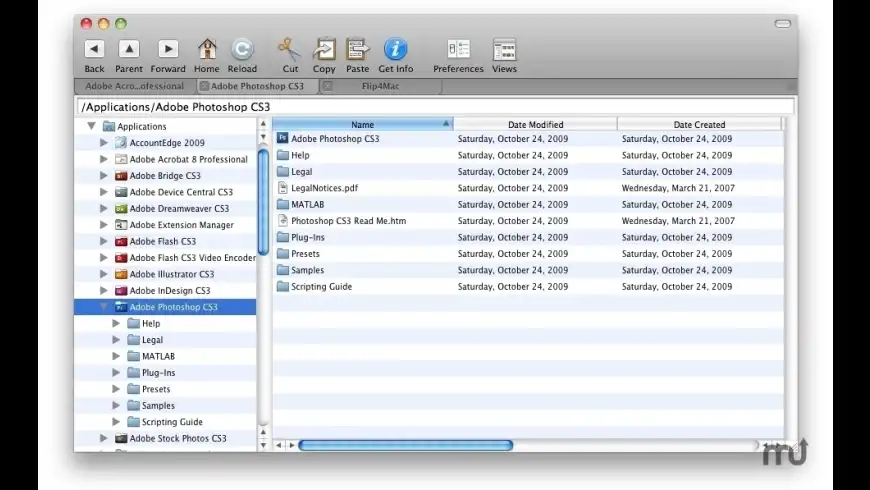
Macintosh Explorer overview
Note: Mac Explorer is no longer under development, and it is no longer available for sale.
Mac Explorer is a file browser and management tool that brings a hierarchal navigation system to the Mac. The first ever Mac OS X file browser to offer tabbed file browsing, Thumbnail previews of pictures files and filter based file browser, Mac Explorer offers a totally new and unique file browsing experience
Features:
- Mac Explorer In Action: The first ever tabbed file browser for the Mac. Complete with the favorites shelf for commonly used files and applications, fast file searching from within each Explorer window and contextual menus to quickly perform various actions on selected files.
- Picture Previews as you Browse: No more generic icons when what you really want to see is the actual picture file. Mac Explorer is the first Mac File Browser to offer Thumbnail file browsing. Quickly locate the pictures you are looking for in a large list of files.
- Find Anything You Need: With access to the same search capabilities as Sherlock right from within Mac Explorer's main window, you can locate exactly what you are looking for without relying on third party applications or cluttering your desktop with more windows. You won't even disturb your current file location.
- Customized to the Way you Want: Choose between FIVE different file views including icon view, list view, detailed list view,compact list view and even Thumbnail view. Flavors let you further customize Mac Explorer to match your desired tastes.
- Treat Multiple Files as One with File Banks: Move, copy and store multiple files as one with File Banks. File Banks will store a pile of files so that a drag and drop operation can be posed while you navigate to a destination directory or if you just want to conveniently move multiple files as one pile of files.
- Change Info For Multiple Files At Once: Batch change file info for multiple files at once with Mac Explorer's Batch File Info Changer. Just enter some new information for the selected files, or even all files or folders within the current folder, and Mac Explorer will update all the specified files with the new file info.
What’s new in version 5.1
Updated on Dec 02 2010
Version 5.1:
Fixed:
- You can now change the font size for the listed files and folders.
- You can now change the font for the listed files and folders.
- Minor bug fixes and speed improvements.
Information
License
Shareware
Size
7 MB
Developer’s website
https://www.ragesw.com/products/explorer.htmlDownloads
60676
App requirements
- Intel 32
- PPC 32
- Mac OS X 10.5.8 or later
Try our new feature and write a detailed review about Macintosh Explorer. All reviews will be posted soon.
(0 Reviews of )
There are no reviews yet
Comments
User Ratings

Dec 28 2014
Version: 5.1
Actually this is quite good, unfortunately i have discovered it too late as the developer is now giving it away and not developing. Many of the other finder replacements or enhancements do too much or too little.
Probably as others have established the name of this app alienates some and it has been its downfall.
Finder is not that great for ease of finding files and directories, but good for searching, whilst windows was never that great at searching but better at file structures for digging deep to find files.
I often work on a big screen and open this in one corner to help me find and sort things quickly and easily. I think what I need is "Total-Path lite"


Nov 1 2010
Version: 5.0
If your coming from Windows and have never used Macs before or any other Unix based file system this is a good aid to use your My Computer thinking on a Mac. You will however chuck it away after a few months when you learn finder and pick out one of the multitude of better 3rd party file managers available for OSX.
Downside they never update it which tells me sales are bad and finder is instantly a hit with new users these days.
Perhaps to niche to do well on OSX but it still works fine even if not updated for a long time.
Aug 26 2010
Version: 5.0
Greetings.
The name "Macintosh Explorer" is too coincidental with "Microsoft Explorer," and "Microsoft Internet Explorer."
Mac users choose Macs over the [IBM]PC Industry Standard from a position of intelligence, and to have excellence in computing that goes way above and beyond the de-facto "industry standard." Likewise, many Mac users (myself included) prefer to distance ourselves from Microsoft and Microsoft software titles.
There are some who may rightfully disagree, but Microsoft has been our adversary for many years where Microsoft enjoys at least 95% of the market share, yet we, the Macintosh community, beat them down consistently with vastly superior software.
The software title, "Macintosh Explorer" conveys too much (imho) of a reminder of the overbearing presence of "the dark side of computing."
It's difficult to discern why a software developer would choose such a title when thousands of other excellent possibilities are readily available.
Cheers.
Jan 19 2010
Version: 4.5
Please help with the crashing. I love the concept, but I cannot seem to move the window around on the desktop without experiencing major delays or crashing. Is there a fix?
Product is super useful for those of us who like the folder / list display. Just wish it wasn't slow to respond.
May 27 2009
Version: 4.5
I love it, this I was missing.
one TIP: build in the option for FTP transfers and there you are!
Thats what I miss a lot
But 5 stars
Apr 8 2009
Version: 4.5
Works for me. There's a minor redrawing issue when the window is resized in 10.5.6, but I'm certainly glad this program is available, and for such a reasonable price.
Jan 13 2008
Version: 4.5
I have run Macintosh Explorer demo on my new iMac 24" 4gig with no problems. I bought version 4.5. Now, it quickly quits. I've re-downloaded and erased the preferences files. Doesn't help. What to do?
Nov 7 2007
Version: 4.5
This could be a decent program if it had better functionality. First, it doesn't remember most of my settings upon restart. I'll get the window sized, the icons sized, etc., and upon restart, it reverts to small fonts, small icons, etc. Very annoying and useless to me. It would also be nice if the toolbar had more sensible customization. For example, if you want to add a space between items, you get to do so only once. Any other program I've ever seen allows you to drag as many spaces as needed to wherever you want. This program, however, gives you one and only one space (as well as one and only one flexible space). How does that possibly make sense?
Feb 27 2007
Version: 4.5
Please send us an email using the contact from at the following URL. This is probably due to you having installed a much earlier version. All you have to do is delete the Preferences and everything should work ok.
Please email me at the following URL and I will help you get this working;
http://www.ragesw.com/support/
Feb 14 2007
Version: 4.5
I've gotta' say -- this app launches *much* faster, and is more responsive (even if it is less feature-laden) than Path Finder.

Feb 13 2007
Version: 4.5
GREGSGRAPHICS:
Yeah, Path Finder is pretty freaking awesome, but it costs twice as much as Mac Explorer and it may be a bit much for even the slightly-above-average user. I think this app fills the gap between the Finder and Path Finder nicely.
Feb 13 2007
Version: 4.5
Two words... Path Finder.
http://www.macupdate.com/info.php/id/6371

Jan 6 2007
Version: 4.4
Any shareware company that at this point does not have Universal Binaries of their products should really be questioned on the update support of their applications. No UB, no purchase - heck, not even download.
Mar 15 2006
Version: 4.4
The only viable Finder replacement is Path Finder. This may all change March 17th when FileRun explodes onto the scene.
http://filerun.info/
Aug 6 2005
Version: 4.3.5
Very poor program with hardly any features, to say that this is meant to be better than the Finder makes me laugh. In Macintosh Explorer I can't even change a file's permissions. Info dialogs don't have file previews, and the column view is missing.
The program is awfully slow, and the toolbar isn't even customizable. The tabs are ugly. Preferences settings aren't applied until the application is reopened. Icons in the icon view can't even be dragged around. The menus are extremely messy, a file's label color can't even be changed in Macintosh Explorer.
The Edit menu is very disappointing, missing even things that Windows Explorer has. I can't even connect to servers using Macintosh Explorer. I haven't covered all the problems and missing features in this program, there are lots more!
I'd like the developers to explain to me why they think this is better than the Finder, Windows Explorer and Path Finder; as far as I can see there's no reason why I should use this over the Finder or Path Finder.
To put it simply, just don't waste your $15 on this poor program.
Aug 3 2005
Version: 4.3.5
A very useful tool for those who have problems with the Finder or those who switched from Window$ to Mac.
Unfortunatly the tool is way too expensive (must be freeware!) and there's no multilangual support like german, french etc.
It also has some poor preformance, specialy on G3 Macs it runs very slow and undynamic.
Jun 15 2005
Version: 4.3.5
honestly, it took me years to escape from M$ - why should I step back to an 'windows explorer look & feel'
... I dont get it !!
$24.95
Application is not under development & not supported.


Similar apps
Raskin
Alternate desktop interface for OS X.
Is this app is similar to Raskin? Vote to improve the quality of this list.
Vote results
0
Upvotes
1
Total score
0
Downvotes
Nimble Commander Pro
Minimalist dual-pane file manager (was Files Pro).
Is this app is similar to Nimble Commander Pro? Vote to improve the quality of this list.
Vote results
0
Upvotes
1
Total score
0
Downvotes
CRAX Commander
Dual-pane and multi-tabbed file manager.
Is this app is similar to CRAX Commander? Vote to improve the quality of this list.
Vote results
0
Upvotes
1
Total score
0
Downvotes
Viper FTP
Simple, user-friendly yet powerful FTP client.
Is this app is similar to Viper FTP? Vote to improve the quality of this list.
Vote results
0
Upvotes
1
Total score
0
Downvotes
Total Manager
Archive utility and media viewer.
Is this app is similar to Total Manager? Vote to improve the quality of this list.
Vote results
0
Upvotes
1
Total score
0
Downvotes
New and Recently Updated