MacUpdate
Join MacUpdate
New Member

New Developer
Explore
MacUpdate Desktop
Hot Apps

Business
Dashboard
Development
Drivers
Education
MacUpdate Promo
Popular Apps

Games
Home & Personal
Internet
Multimedia & Design
Utilities
iPhone
Apps

Login
Member Login

Developer Login
About
Search Mac Apps

Search iPhone Apps

Advanced Search
ControllerMate
ControllerMate 4.4.7
Your rating: Now say why...

(14) 4.589285714285714

Use joystick, gamepad, trackball in place of keyboard.   Shareware ($15)
Add to my Watch List
Email me when discounted
  • Download Now
    10.6 MB
  • Visit Developer's Site
    OrderedBytes
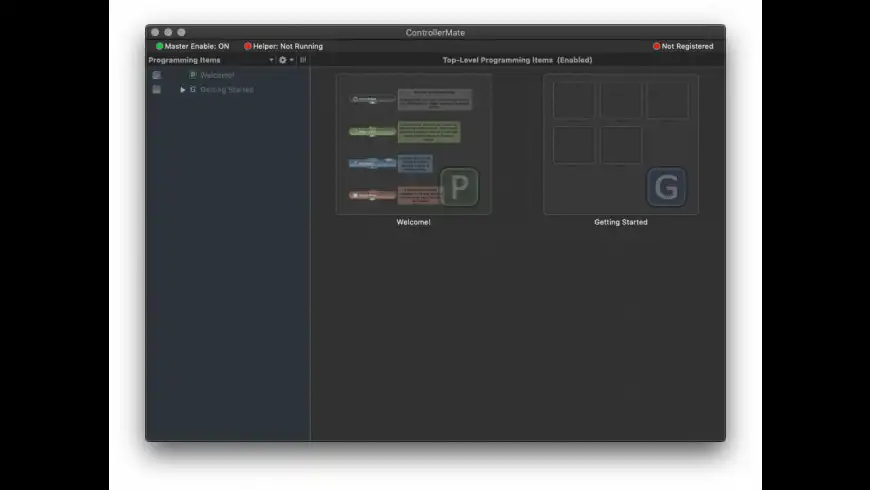
ControllerMate is a controller programming tool that allows custom functionality to be added to standard HID devices (joysticks, trackballs, gamepads, keyboards, and more).

Using a graphical interface and drag-and-drop editing, users can program controller buttons to perform complex keyboard and mouse sequences. Programming is accomplished using "building blocks". Each type of building block performs a different type of function. Building blocks can be individually configured and linked together to perform an endless variety of tasks.

Common programming tasks that
What's New
Version 4.4.7:
  • dd compatibility with three of the latest X-keys devices from P. I. Engineering.
Requirements
PPC / Intel, Mac OS X 10.4.11 or later


  • USB Overdrive...
    +5
    Shareware $20
    USB driver handles most mice, ...

  • GamePad Compan...
    +1
    Commercial $7.99
    Make any joystick compatible ...

  • OSCulator
    +1
    Shareware $19
    Make music and motion with ...

  • XBox HID Drive...
    +1
    Free
    Improve your XBox controller's ...

  • DarwiinRemote
    +1
    Free
    Control other applications by ...
ControllerMate User Discussion (Write a Review)
ver. 4.x:
(14)
Your rating: Now say why...
Overall:
(15)

sort: smiles | time
burypromote

+20

Dgeo reviewed on 16 Aug 2011
This is a real gem; one of those applications that makes you proud/happy you are a Mac owner.

The UI could be better in a few places, e.g. in the Palette window, and you feel some functionality is hidden, but once you play a few times with it and study the examples in OrderedBytes site you 'll find it intuitive and rather easy to master and the results can be very satisfying.

I really like the ability to import/export different settings selectively and the ability to enable ControllerMate based on whether an application is running or not either in the foreground or the background.

I was looking to transform one of my macs into a HTPC/gaming center. With ControllerMate I 've managed to configure multiple joystick controllers and gamepads for MAME use, bluetooth Logitech devices that were not recognised by the Logitech Control Center, etc.

Probably the best $15 I 've spent on Mac software.
[Version 4.4.7]


burypromote
+2

+2

Dude_s reviewed on 06 Jun 2011
You need to hang up a picture. What do you do?

a) You neighbor tells you you need a stud finder, a self-leveling cross line laser, digital measure, calculator, percussion drill and one or more anchor screws. You have no idea what half of those things are, but you find an online tutorial to learn how to use them and at the end, you make the perfect hook. (1 point)

b) You laugh at your neighbor and use a nail and a hammer. (0 points)

You need to leave your husband/wife a note to remind him/her to pick up your daughter after school. What do you do?

a) You buy a new 12-core Mac Pro, MS Office 2011, Adobe Font Folio and a color laser printer, install everything and take a course in typography. Then you lay out and print the perfectly designed note. (1 point)

b) You use a piece of scrap paper and a pencil. (0 points)

If you got 2 points, then Controller Mate is the right choice for you. Of course, SOMETIMES you actually need all those tools to hang a picture. SOME people, professional designers perhaps, need a fancy computer to produce notes. Most of us don't.

I found Controller Mate absolute overkill, apparently very powerful, but impossible to figure out without studying tutorials, and I'm usually VERY good at the "jump in and wing it" method, even with complicated software. Controller Mate lets you do very complex setups with multi-conditional button assignments, interdependencies, logic gates and math calculations. I may not be imaginative enough, but to me, it seems like a solution in search of a problem. I have a hard time envisioning use cases for most of these things, but I'm sure some hard-core gamers out there or other special-case users will find it a godsend and are willing to go through the extensive tutorial to get it to work.

If you're like me and just need that damn game pad to work, Controller Mate is the definition of "crack a nut with a sledgehammer". I have a Thrustmaster Firestorm Digital 3 gamepad that I wanted to play the Defendoid game from the awesome TV series JPod with. It has a digital D-pad which I wanted to map to the arrow keys. Seems straight-forward enough right? Controller Mate recognized the D-pad as X and Y axis producing values of 0, 128 or 255. To assign keys, you need to convert that somehow into an On/Off signal using math operator "building blocks" that you arrange in a flow-chart type graphical layout. If that sounds like overcomplicating things, it's because it is. I tried various ways going back and forth between tutorial and application and, after about 30 minutes, gave up in frustration.

Installed a different USB driver app and setup was as straight forward as: press button on game pad, press key you want to assign. 2 minutes later I was playing. Kambamthankyoumaam.
[Version 4.4.6]


burypromote
+1

+51

Megaman reviewed on 20 Mar 2011
The best controller for the Mac by far!

I've used SteerMouse, USB Overdrive, LCC (Woeful), and CM is by far the most stable and powerful device software I have used.

I have used many performance mice (gaming mice) that had absolutely no Mac compatibility according to their manufacturers. With ControllerMate, I can use pretty much anything on the market - including the Cyborg R.A.T 9 mouse - my favourite mouse of all time.

Yes it takes a bit of learning, but for a small investment in time, the power of this application is amazing.

Can't say enough good things about it.
[Version 4.4.5]

2 Replies

burypromote

+27
Antoinesynopsis replied on 31 Jul 2011
Happy to learn that. I was disappointed that the Rat couldn't be used in Mac... I Will try it.
burypromote

+27
Antoinesynopsis replied on 31 Jul 2011
Hi ! I just saw that Cyborg came out pilots for Mac... I'm going to see that in details.
burypromote
+6

+432

Corpsecorps reviewed on 10 Jul 2010
Since reviewing this back in 2008, I've switched to "Das Keyboard". Controllermate, Das Keyboard, a Saitech P2900, my Wacom PTZ, and another Logitech MX620 mouse make the most spectacular array of input options ever.

The software remains rock solid after all the intervening OS updates and upgrades and has never interfered with anything else on my system as far as i can tell. It's "Playability" is still excellent. X^D

So cool it deserves ANOTHER 5 star review!
[Version 4.4.2]


burypromote
+2

+53
Crunc commented on 06 Jan 2010
I'm sure if you can figure this thing out it would be wonderful, but it is completely incomprehensible. I just want something to turn my xbox 360 wireless controller into a mouse controller, etc, and I haven't the slightest idea how to do it with this thing.
[Version 4.4]

5 Replies

burypromote
-1

+10
Zeebie replied on 08 Jan 2010
I have the same problem. Just want to configure a gamepad but I'm afraid you need an academical degree in computer science to understand this. Horrible.
burypromote
+4

+53
Crunc replied on 08 Jan 2010
If it makes you feel any better, I *do* have a degree in computer science, and I still find it pretty incomprehensible!
burypromote
+7

+10
Zeebie replied on 08 Jan 2010
I've got ist. Without degree. ;) Check http://www.orderedbytes.com for tutorials, I'm configuring my gamepad right now.
burypromote
+3

+42
Blacksmith_tb commented on 13 May 2010
I suggest you try harder (and I don't have a degree in CS). Really the only thing I can think of that would make CM easier for beginners would be to include a small library of examples for common USB devices.

I bought ControllerMate long ago, to get some more mileage out of a Microsoft ergonomic keyboard, and since then I've tweaked mouse settings, configured a couple of gamepads, and I'm now thinking about making my own shuttle control out a big knob and some minimal Teensyduino programming in tandem with ControllerMate. It is amazingly versatile.
burypromote
+4

+432
Corpsecorps replied on 10 Jul 2010
I don't have any relevant degrees and I can practically make my mice, keyboards, gamepads and other USB input devices dance, sing, and juggle with this thing.*

It takes some experimentation and the stuff at the web site (including the dev) is very helpful.

I don't use a tenth of what i'm sure it can do and i still have so much programming in this thing that makes everything i do on my system so much easier that if it went away, it would be like trying to go back to DOS.


* A slight exageration, but i CAN make a keypress cycle the caps-lock, num-lock, and scroll-lock LED's on the keyboard like a mini light show! X-D
burypromote
+4

+112

Zx reviewed on 15 Dec 2009
Destroys the competition (USB Overdrive X,SteerMouse, Logitech Control Center)!!!

Super versatile and 0 issues.

thanks:)
[Version 4.4]

1 Reply

burypromote
+4

+32
Maruko Drinking Team replied on 08 Jan 2010
OK, agreed, but you can't compare USB Overdrive X and SteerMouse with Logitech Control Center. The first two are reasonably decent mouse drivers, whereas the Logitech thing is one of the worst software abominations ever perpetrated. (It's not only a godawful piece of crap design-wise, but it uses insanely dangerous third-party hacks that totally break your Mac (kernel panics and no longer booting at all after system updates).)

But anyway, yes, ControllerMate is probably the most powerful mouse (and other miscellaneous USB device) driver ever made.
burypromote
+4

+4

Schlaefer reviewed on 15 May 2009
The versatility of the programm is utterly impressive. And compared to other products (which are mainly in the 'do some configuration of your *mouse*'-business) it's a complete bargain too.
[Version 4.3.10]


burypromote
+8

+22

brsma reviewed on 31 Oct 2008
An incredibly useful, powerful and, as far as I can tell, mature extension to get the most out of your input devices - if you are willing to spare some time in the beginning. It took me about 1 hour after installation to register this jewel. Never regretted. The only obvious downside lies in feeling quite clumsy and crippled when using a different computer. ;-)

Setting up and configuring devices is suprisingly user-friendly, though at first sight still somewhat complex. CM mostly takes a graphical programming approach with building blocks which can be freely “wired”. Basic stuff like (re-)defining keys, buttons or acceleration comes still quite easy. But CM really starts - and shines - where other drivers I tried before end. And you will need to learn about and explore the different available modules to achieve at more intermediate to advanced configurations. Switchable configs, basic maths and logic, time logic, custom acceleration curves, etc. - it is (nearly) all there. You can even make your gear behave differently depending on active application/context. Nonetheless, the time spend at learning and tweaking pays back well: in terms of convenience, efficiency and, at least in my case, even less muscle strain. (My hands feel less stressed and tired after working long if my input devices are better adapted to me instead the other way round.)

The only thing I would currently like to see added to CM is something like reusable macro blocks or nested structures. Think of e. g. Quartz Composer, which might have been amonst the inspirations for the CM interface, anyway. Macros and examples for some for common configuration tasks should be directly provided with CM. (Something like e. g. a well behaved click-lock is not as trivial to set up as it might seem at first sight.) Further, this might also help to accomodate users who want to have CM “just work” with their device(s) and initially do not want to spend much time at configuration.

Bottom line: if you happen to own some non-standard gear that you want to hook up to your mac or if you would like to highly improve the usefulness of your existing input devices: get this now.

BTW, some equipment manufacturers should better license CM for their gear rather than further distributing their own OS X-challenged drivers. I am looking at you, Logitech.

(Not affiliated with the developer in any way, just extraordinarily satisfied with his product.)
[Version 4.3.8]

2 Replies

burypromote
+2

+13
Ronl commented on 08 Mar 2009
Quite right about Logitech's Control Center software.
It is the most pathetic, limited, buggy,__________, I have ever tried.
I just got a new Logitech MX Revolution (do NOT purchase one... even bad when using SteerMouse... i.e. BUGGY and limited as compared to my older MX 1000 which is excellent).
burypromote
+2

+22
brsma replied on 08 Mar 2009
Oops, sorry! My review should have been accompanied by a full five star rating, actually. Unfortunately, I did not recognise in time how to edit your postings… :-(
burypromote
+4

+10

Tazintosh reviewed on 28 May 2008
Powerful application. You can control & program almost anything you want. The node UI, like Shake, QuartzComposer & others app. Possibilities are infinite.

A must have!

Btw, choosing Bezier lines by avoiding straight lines connections and deleting them by double-clicking (or pressing suppr) on it for example, would be cool for the futur. Sometimes, nodes alignment isn't perfect too.

Really great support.
[Version 4.3.5]


burypromote
+5

+432
Corpsecorps commented on 26 Mar 2008
BTW, i've never had the background helper use an even noticeable amount of CPU.

And ControllerMate isn't just to give your mouse more functions. I've given my Cherry keyboard F13, F14, and F15 function keys, corrected the placement of alt/option & command/gui (i know, that's in prefs, also), caused the 'Num Lock' and 'Scroll Lock' LEDs to indicate things applicable to Mac, as well as restoring volume-up, volume-down, mute, and eject as Control+ numlock, keypad-/, keypad-*, and keypad--, respectively!

Simulated Eject responds MUCH faster than the Eject key on my old crud-catching Apple keyboard did.

I was even able to fix 2 problems i sometimes had when gaming with my Logitech MX620 mouse. Sometimes during heated play, when i would press the "Search" button (right next to the left mouse button), i'd accidentally press left-click also.

With ControllerMate, i programmed the two to be incapable of operating simultaneously.

Ditto for left scroll-wheel tilt and right-click. Easy to accidentally press the right mouse button when only intending to click left-tilt. Just programmed them not to function close together.

What other universal gadget driver will allow you to create a keyboard shortcut such as {command(left)-command(right)-option-F}, simulate keystrokes that don't exist on your particular keyboard, enable/disable parts of itself depending on which controllers are present, and what software is running?!

Amazing stuff can be done with this thingamajig! It's actually fun seeing what crazy things you can get it to do, and how it can make different devices interact.

Well worth $15!
[Version 4.3.4]


There are currently no troubleshooting comments. If you are experiencing a problem with this app, please post a comment.


+432

Corpsecorps rated on 20 Apr 2011

[Version 4.4.6]


+1

Janguita rated on 03 Apr 2011

[Version 4.4.5]


Downloads:29,708
Version Downloads:8,674
Type:Games : Gaming Tools & Utilities
License:Shareware
Date:12 Aug 2011
Platform:PPC / Intel
Price: $15.00
Overall (Version 4.x):
Features:
Ease of Use:
Value:
Stability:
Displaying 1-10 of 18
< 1 2 >
Displaying 1-2 of 2
-
-
-
Please login or create a new
MacUpdate Member account
to use this feature
Watch Lists are available to
MacUpdate Desktop Members
Upgrade Now
Download and auto-install
using MacUpdate Desktop. Save
time moving folders and cleaning-up.
ControllerMate is a controller programming tool that allows custom functionality to be added to standard HID devices (joysticks, trackballs, gamepads, keyboards, and more).

Using a graphical interface and drag-and-drop editing, users can program controller buttons to perform complex keyboard and mouse sequences. Programming is accomplished using "building blocks". Each type of building block performs a different type of function. Building blocks can be individually configured and linked together to perform an endless variety of tasks.

Common programming tasks that can be performed with ControllerMate include:
  • Configuring controller buttons to act like individual keyboard keys
  • Configuring controller buttons to generate simple text
  • Configuring controller axes to act like mouse axes
  • Assigning an AppleScript to a controller button
  • Redefining keyboard keys
  • Assigning a custom acceleration curve to a mouse
Add/Update Listing About MacUpdate Desktop Career Opportunities RSS Twitter Facebook Advertise Sitemap
Copyright © 2012 MacUpdate LLC


- -