


Free
Absolutely Free
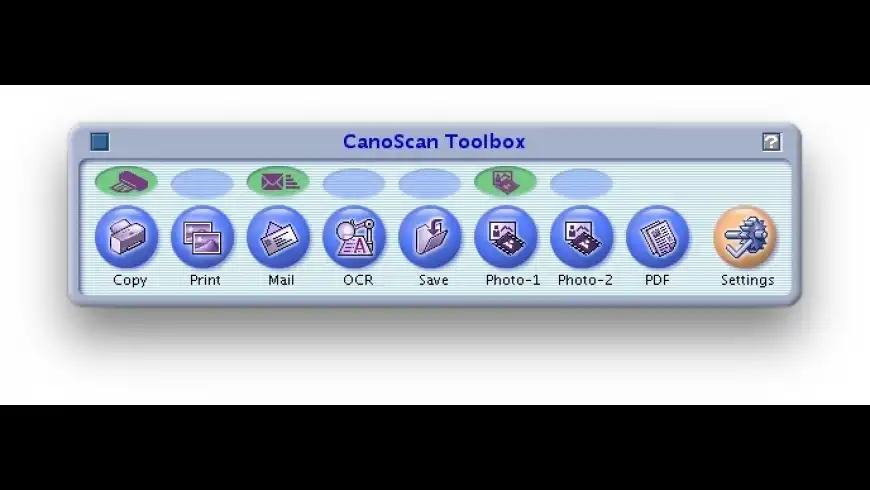
CanoScan Toolbox overview
CanoScan Toolbox is for use with Canon scanners.
What’s new in version 5.0.1.4
Updated on Jul 14 2010
Version 5.0.1.4:
- The problem that the English UI is displayed when the OS environment is French or German has been rectified.
Information
License
Free
Size
11.9 MB
Developer’s website
https://www.usa.canon.com/internet/portal/us/homeDownloads
199556
App requirements
- Intel 32
- PPC 32
- Mac OS X 10.2.8 or later
Try our new feature and write a detailed review about CanoScan Toolbox. All reviews will be posted soon.
What customer like
Performance
Regular updates
Security
What needs improvements
Bug fixing
(0 Reviews of )
There are no reviews yet
Comments
User Ratings

May 26 2021
Version: 5.0.1.4
I've just wanted that my Canon began to work, But I've found this app, now it's working.
Dec 27 2016
Version: 5.0.1.4
Not compatible with my Canon Lide 210 scanner (2012). Older version does not work well with Windows 10. Canon does not give a damn about making a decent application for its scanners, in spite of all the ressources it has.
Aug 31 2014
Version: 5.0.1.4
terrible software, OLD, Canon doesn't give a damn to create a tool that can be USED.
This piece is over bloated garbage.
Nov 17 2012
Version: 5.0.1.4
Unfortunately installing only the CansScan Toolbox software will not get your scanner working. You also need the driver files, which I couldn't find anywhere on the Canon website. On Mac OS X 10.8, the software on the original CD doesn't install any longer, it hangs in the middle of its installation.
Solution: there is an excellent site called drivers collection.com which seems to have the driver files for many scanners and other equipment.
Mar 17 2012
Version: 5.0.1.4
I just use CS3 Photoshop in order to use my 8400F scanner. It's the only thing that works. I tried half a day to get the correct driver and toolbox and gave up on that.
Who else is frustrated that you can't change star ratings once you choose them? That's just crazy. MAC Update folks should fix that.

Feb 23 2012
Version: 5.0.1.4
I have a Canoscan 9950 also and so far have not been able to get it working with Lion. VueScan is supposed to support the scanner. I have not been able to get VueScan to recognize the scanner. Any help is appreciated.
Nov 26 2011
Version: 5.0.1.4
I have continually had problems using my 9550F with Leopard and Snow Leopard over the past few years. At one stage I was able to use it with Graphic Converter even when the ToolBox did not recognise the hardware.
I recently moved house again, and on installing the scanner found myself completely locked out. So I followed the steps here and downloaded the 4.9.3 software, but still had no driver. Canon US no longer has the driver mentioned on their website as far as I can see, but i found one here :
http://support-sg.canon-asia.com/contents/SG/EN/0900336501.html
Download that, plus the new Toolbox 4.9 and you'll be in business again. And if you use Graphic Converter (much nicer to use than the Toolbox) you'll find it recognised there too.
I'm running 10.6.8, by the way. Thanx to all who paved the way to my solution.
Oct 24 2011
Version: 5.0.1.4
I download driver scanner to update my drivers to the latest version, and the performance has got a great improvement. In fact, whatever you want to get hp support drivers, dell support drivers, other brand dirvers,the updates driver software can help you solve it. The driver scanner can be downloaded and tell you how to update drivers in detail.
More information about how to update drivers: http://www.updatesdriver.com
Apr 7 2011
Version: 5.0.1.4
I hope my ratings get updated, because there is really no way that I would rate it as anything other than mediocre. I have to use this software with my aged scanner, but it's only because I only use the scanner once in a blue moon.
Aug 21 2010
Version: 5.0.1.4
I am using a Cannon LiDE 35 Scanner with:
Mac OS X 10;8.4, lide35osx7721en, and cstbosx4512ej4
The lide35 driver and cstosx (toolbox) were downloaded today, Sat Aug 21, from:
http://software.canon-europe.com/products/0010075.asp
I Downloaded:
2. CanoScan Toolbox for OSX (4.512)
5. ScanGear CS (7.721X)
I have only used the 'File' 'button'. Once setting this up from the toolbox window, and scanning once, one is then able to use the 'File' button on the scanner to scan a document into MyPictures folder on my MacBook Pro.
Canon software leaves something to be desired, but for my purposes it is satisfactory.
Jul 15 2010
Version: 5.0.1.4
Absolutely no way to use it with my CanoScan 9950F: is it so old? But when I PAID for it it was NEW! Canon, plz...
Jul 14 2010
Version: 5.0.1.4
Agreed. If you have an older scanner, stick with the original driver. Like Umax before them, Canon does a poor job of supporting their older, but still functional, scanners. Is my Canoscan 8400F really that old? I, too, will not buy another Canon scanner. They show no loyalty to their customers. How can they expect us to be loyal to them?
Jul 14 2010
Version: 5.0.1.4
Yes, my LiDE 80 really only works with the original software and just barely. There were a couple of updates specifically for the LidDE 80 and they worked, that is CanoScan Toolbox 4.1.3.0 and ScanGear CS 7.2.5, nothing later works.
It is a shame that Canon abandons old but good products so quickly.
I have used VueScan and even though it is Universal, you must use Rosetta because VueScan uses the driver ScanGear CS 7.2.5, which is not Universal and hence requires Rosetta.
Would it kill Canon to write a new driver?
Apr 8 2010
Version: 5.0.1.3
I didn't mind this ugly, outdated interface when I didn't have to use it. Because CanonUSA refuses to update its driver to work with Photoshop on Leopard and later, I'm stuck with it. I was instructed by Canon to open Photoshop in Rosetta mode. There's still no option to import the scanner. Not to mention, there are many faults of using Rosetta. So which company is to blame: Apple, Adobe or Canon? Regardless, there are no excuses for such an eyesore of a GUI. Shame on you, Canon.
Dec 26 2009
Version: 5.0.1.3
I have a LiDE 80 and changed from XP to OS X 10.6.2 on 24.12.2009.
Following your advice I installed:
• ScanGear CS Installer - SGCD7252MXDE
• CanoScan Toolbox 5.0.1.3
Scanner connected to the mac the tollbox bar opened.
All applications chosen show the message:
“Failed to open a driver”
What did I forget or what did I do wrong?
Is there anyone who knows how to bring my scanner back to life?
Thanks for any support.
Nov 10 2009
Version: 5.0.1.3
I have a Canon Lide 60 and I run 10.6.1.
I am noticing comments all over the net that installing 10.6.1 Cannon driver doesn't work.
It wasn't working for me either until I remembered an experience I had with an old Epson scanner back in 10.4. Somebody at Epson told me to never install a scanner driver with the scanner connected to your computer. So, I disconnected the scanner...then installed the driver...and then plugged it back in right after start up sound and bingo! No problem. I happened to remember this this morning and now my Lide60 works perfectly again. I only wish that I could get the tool box for this model to work. I have never gotten it to recognize the presence of a driver even once. Excellent inexpensive scanner though.
Sep 18 2009
Version: 5.0.1.3
I have installed the latest driver. That did not seem to help. I agree tht the 4.9 toolbox works fine under SN. The 5.0 toolbox does seem to have some added features that I was hoping to take advantage of.The macupdate entry does not specify which sanner and driverare supported by this update.
Sep 18 2009
Version: 5.0.1.3
The Toolbox software is an update on the previous to work with SL. You also need to update the specific scanner driver software for which you can find the latest SL updated version on Canon's site.
I updated my 8600F driver first, then updated the Toolbox and all seems to be fine.
Sep 17 2009
Version: 5.0.1.3
Does not seem to work with the latest 8400F driver of 9/09.Doesn't see scanner. Perhaps a new scangear driver is needed and has not been released?
The latest 9/09 toolbox weems to work fine under SN.
Oct 26 2008
Version: 5.0.12
I had never(!) any problems with this Software. It simply does the job and the user interface is nearly as ugly as VueScan's. So why spend 40 bucks for VueScan, which btw. also needs the Canon driver.
Just install the Canon ScanGear driver, then the Toolbox, connect the scanner and there you go.

Free
Absolutely Free

Similar apps
TWAIN SANE
Scanner software works with large range of scanners.
Is this app is similar to TWAIN SANE? Vote to improve the quality of this list.
Vote results
0
Upvotes
5
Total score
0
Downvotes
GraphicConverter
Graphics editor with powerful features.
Is this app is similar to GraphicConverter? Vote to improve the quality of this list.
Vote results
0
Upvotes
1
Total score
0
Downvotes
VueScan
Scanner software with advanced features.
Is this app is similar to VueScan? Vote to improve the quality of this list.
Vote results
1
Upvotes
1
Total score
0
Downvotes
SilverFast (Epson)
Powerful drivers for Epson scanners.
Is this app is similar to SilverFast (Epson)? Vote to improve the quality of this list.
Vote results
0
Upvotes
1
Total score
0
Downvotes
Growl
Notification system for OS X apps.
Is this app is similar to Growl? Vote to improve the quality of this list.
Vote results
0
Upvotes
0
Total score
0
Downvotes
New and Recently Updated