



DYMO Labelwriter
Driver for Dymo dedicated label writer.
Free
Absolutely Free
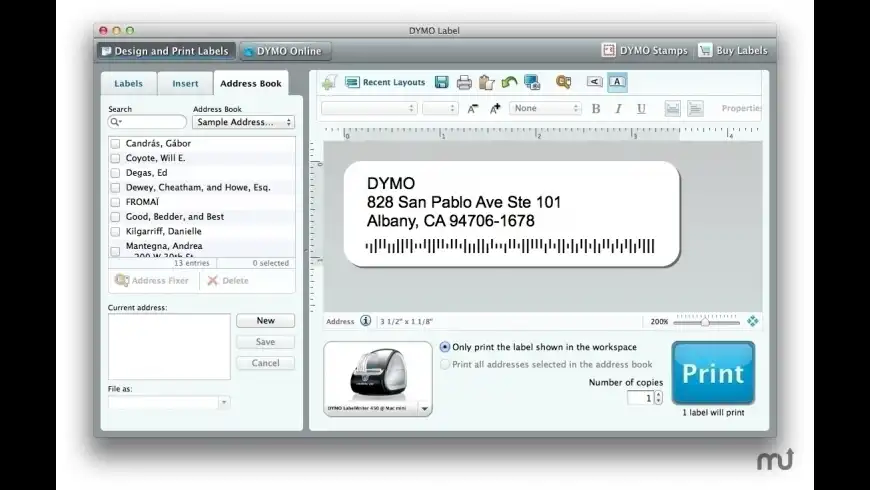
DYMO Labelwriter overview
DYMO Labelwriter for the dedicated Dymo label and tape maker machines, supports the following printer models:
- LabelWriter 450
- LabelWriter 450 Turbo
- LabelWriter 450 Twin Turbo
- LabelWriter 450 Duo
- LabelWriter 4XL
- LabelWriter 400
- LabelWriter 400 Turbo
- LabelWriter Duo
- LabelWriter Twin Turbo
- LabelWriter 310 (models 90966, 93029 & 93034 ONLY)
- LabelWriter 315 (model 90975 ONLY)
- LabelWriter 320 (models 90892, 93031 & 93036 ONLY)
- LabelWriter 330 (model 90891 & 93037 USB ONLY)
- LabelWriter 330 Turbo (models 90884, 93033 & 93038, USB ONLY)
- LabelManager PCII
- LabelManager 450
- LabelManager 450D
- LabelPoint 350
The LabelWriter 300, 330, and 330 Turbo printers mentioned in the list above are only supported when connected through a USB port on your Mac computer. Printers connected to a serial port or using a Serial-to-USB adapter are NOT supported.
With some video cards set to display thousands of colors, you may notice that label shadows are distorted or have the wrong colors. If this happens, you can either turn off drop shadows or switch the display to either 256 colors or millions of colors and the distortion will not occur.
What’s new in version 8.7.4.23
Updated on May 11 2020
Version 8.7.4.23:
- Release notes were unavailable when this listing was updated.
Information
App requirements
- Intel 64
- OS X 10.10 or later
Try our new feature and write a detailed review about DYMO Labelwriter. All reviews will be posted soon.
(0 Reviews of )
There are no reviews yet
Comments
User Ratings

Feb 16 2024
Version: 8.7.4.23
Agreed, Dymo Connect is poorly conceived and executed software. Dymo does not support its printers on Mac. I have 3 that are now gathering dust. Very useful product but without support they are no longer useful.
Apr 1 2021
Version: 8.7.4.23
Dymo Connect is horrible software. Not the least bit intuitive. Impossible to figure out some of the most basic things...like just trying to make a portion of a label Bold.
Should be...highlight what you want Bold, hit Bold in Text format...done. But do you think it even remotely works this way? Don't know, even after consulting Help, I still can't figure it out.
Mar 17 2021
Version: 8.7.4.23
ABSOLUTE TRASH.
Each release wastes more labels. Labels start to print, fail to advance properly, then stall or 'pause' emptying the print buffer and restarting has no effect. Dymo has gone from a trusted and respected vendor to useless trash. My printer is going to Goodwill today.
Nov 11 2020
Version: 8.7.4.23
On one mac I can get this to access my contacts on the other no, I have reinstalled, it doesn't even ask and therefore is useless. Unless somene has a way to add it to access contacts in catalina
Oct 8 2019
Version: 8.7.0.331
when will DYMO release a 64 bit driver for Mac. After todays release by apple the driver will no longer work

Jun 2 2019
Version: 8.7.0.331
"Note: Although Finder indicates that this is version 8.7.0.331, the developer states that this is version 8.7.3."
Seriously? What's wrong with Dymo that they can't even get the numbering of their own SW right? I should mention that the creation date for the installed app (cmd+i) is Friday, 11 May 2018 at 11:34, so not exactly super fresh. In fact less fresh than my previous install which was numbered 8.7.2 and dated September 2018. WTF???
(See also the version numbers on the posts below this one.)
Seriously? What's wrong with Dymo that they can't even get the numbering of their own SW right? I should mention that the creation date for the installed app (cmd+i) is Friday, 11 May 2018 at 11:34, so not exactly super fresh. In fact less fresh than my previous install which was numbered 8.7.2 and dated September 2018. WTF???
(See also the version numbers on the posts below this one.)
May 31 2019
Version: 8.7.0.331
DYMO Labelwriter 8.7.0.331, 28 May 2019 fails to install

May 17 2019
Version: 8.7.2
Multiple users should be harassing them to update their drivers to 64 bit! When the next macOS comers out, they won't work

Apr 7 2019
Version: 8.7.2
I installed the from Apple Mac update version 10.14.4 provided recently and now my Label Writer wont print? Very frustrating.
Feb 12 2019
Version: 8.7.2
It's a great tool for individual labels. I wouldn't be without it. But it always seems to have minor problems that are never fully resolved with new updates.
Dec 9 2018
Version: 8.7.2
After Apple doing an update to my Mac Demo LabelWritter 450 would no longer print from my Mac I lost 5 hours of my day and life that I won't get back trying to fix something that was working before Apple stuffed it
Aug 21 2018
Version: 8.7
It works for their label printers. However, if you use the Mac Address Book and have iCloud sync enabled, you get duplicate entries for every entry. I contacted support and it took 3 weeks before I got any response, and they said that's the way it works - duplicates for every entry.
Apr 18 2018
Version: 8.7
I've had this version 8.7.0.181 for some time now, so I don't understand this release today, 4-18-18, except as a reminder?
Sep 23 2015
Version: 8.5.2.95
OS X Yosemite 10.10.3 on late 2012 iMac 27in, 9/23/15
I had some trouble with this, printer wasn't recognized after installing. I did eventually get it to work :
Go to System Preferences > Printers & Scanners, then click the + button, bottom left. The Dymo printer was in the list. Select, then in the Use dropdown box, click Select Software. In the Filter box, type Dymo, and look for the model of your particular printer. Click OK then Add. This instantly solved the issue, and the printer works great now! It's possible that this still needs to be installed first, but not sure.
I had some trouble with this, printer wasn't recognized after installing. I did eventually get it to work :
Go to System Preferences > Printers & Scanners, then click the + button, bottom left. The Dymo printer was in the list. Select, then in the Use dropdown box, click Select Software. In the Filter box, type Dymo, and look for the model of your particular printer. Click OK then Add. This instantly solved the issue, and the printer works great now! It's possible that this still needs to be installed first, but not sure.

Oct 21 2014
Version: 8.5.2.95
BEWARE: After an update to the public release of OS 10.10, the app asked to install this update. After the update installed, the drivers that were apparently updated for Dymo Labelwriter Pro and Dymo Labelwriter 450 Twin Turbo were hosed to the point of causing a consistent crash with a log, even when used with another app called Endicia, which prints labels and postage to the Dymo printers. Please post your experience.
Oct 21 2014
Version: 8.5.2.95
I don't use DYMO's label software, so I won't speak to that, but I do use DYMO Stamps and BeLight's Labels & Addresses with a DYMO LaserWriter Twin Turbo (older, but works great) and I can definitely say that this release restored my ability to print both labels and stamps. For me, it's a 5 star App because it does what I need. Happy to have working driver!

May 19 2013
Version: 8.5.0.1836
CAUTION!!
Installing this latest version wiped out my address book.
EXPORT your address book >before< running v 8.5.0.1836.
Apr 14 2013
Version: 8.4.2.9
Version 8.4.2.9 is the latest version that seems to work on my 2009 MacBook Pro 17" running OS X 10.8.3. Version 8.5 does not work and in fact, removes a file called DYMO_LabelWriter_400.ppd from the hidden cups location. Also version 8.5 does not recognize my USB connected Labelwriter 400.
Finally, under previous versions of Mountain Lion I was able to print a label using the software while the printer was disconnected, then carry my laptop over to the printer, connect it and have the labels print. Under 8.4.2.9 and OS X 10.8.3, doing this causes the printer to show as disconnected even after physical connection with no (known to me) remedy short of yanking the entire Dymo installation, installing 8.4.2.9 from scratch and scrounging a copy of DYMO_LabelWriter_400.ppd from an old backup.
To summarize my experience under ML 10.8.3: I need to ALWAYS connect the Dymo printer prior to hitting the Print button on their software and stick with this version rather than updating to 8.5.
Jan 13 2013
Version: 8.4.2.9
I managed to get v8.4.2.9 working on my MBP Core 2 Duo running Mountain Lion and connected via USB. Main problem was that the installer would run satisfactorily, then in the OS X Printers and Scanners Preference Pane, I would try to Add (+) my Dymo 400 printer and the Name and Location of the printer were shown, but the driver could not be found. Also, the Dymo Label app could not find the printer and advised reinstallation. This did not help. Using EasyFind, I removed all Files containing the string “Dymo” in them except for the cups Dymo 400 Labelwriter.PPD and a cups filter “rastertodymo.” I had to enable EasyFind to look for hidden files and folders and iTweax to make hidden files appear in the Finder. By the way, the Dymo uninstaller is a joke. Fuggetaboutit. I then installed v8.4.2.9 with the Dymo unplugged and plugged it in only at the end as recommended. I still had no luck with the Add Printer Preference Pane and the Dymo Label app. On a hunch (or last gasp), I restarted the machine and suddenly everything worked. The Dymo 400 was there; I didn't even need to “Add” it; it was already there. The Dymo Label app worked. I restored my “DYMO Label Software” folder to my Documents folder as that is where my custom labels are stored. Seems to me that this company has terrible documentation which leads to a terrible experience. However the software, once installed, seems to work well enough. Apologies for the long post.


Free
Absolutely Free


Similar apps
Be the first one to propose an app
similar to DYMO Labelwriter.
similar to DYMO Labelwriter.
New and Recently Updated