


Free
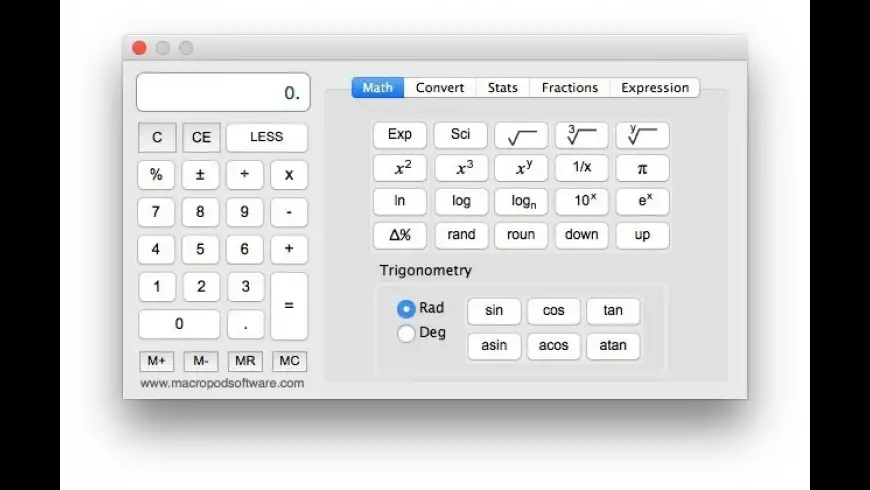
KoalaCalc overview
KoalaCalc is a free multi-purpose calculator for Mac OS X. In its compacted state, it looks similar to the standard calculator that comes with Mac OS X. However, simply click the 'advanced features' box and KoalaCalc comes to life to become one of the most advanced scientific, conversion, statistical and expression calculators available.
The list of features includes:
- Numerous mathematical functions including trig and log functions plus 10 individual memory banks
- Conversion to and from dozens of units (inches to millimeters, pounds to kilograms, etc.)
- Basic statistical calculations on up to 10 data sets including t-tests and analysis of variance (ANOVA)
- Built-in tape recorder (contents can be saved, recalled, or printed)
- Voice feedback (button pressed and/or computed value can be read aloud)
- Built-in expression calculator which supports brackets and the proper order of operations
- Probability calculator computes exact p value based on the F distribution, with or without epsilon correction (this unique feature is useful for statistical calculations)
- Constants menu which can be customized
- No silly 2nd function button - all features have their own button
- Most buttons including advanced scientific functions include keyboard shortcuts - a real time saver
- Help on how to use each button is provided by simply leaving the mouse cursor over a button for a few seconds
- User can set various preferences including
- Advanced features can be hidden to reduce the size of the footprint
What’s new in version 4.5.3
Updated on Sep 26 2012
Version 4.5.3:
Note: This is a 32-bit application and it will not work on macOS Catalina or later
- Release notes were unavailable when this listing was updated.
Information
App requirements
- Intel 32
- PPC 32
- Mac OS X 10.4 or later
Try our new feature and write a detailed review about KoalaCalc. All reviews will be posted soon.
What customer like
Security
Value
Privacy
What needs improvements
Bug fixing
Social media integration
(0 Reviews of )
There are no reviews yet
Comments
User Ratings

May 27 2021
Version: 4.5.3
Wow, Voice feedback- amazing feature, especially for me and my cowokers)
May 19 2021
Version: 4.5.3
Oh, I don't waste my time when I do some stats or make some audits. Perfect, just THANKS))))))
May 6 2015
Version: 4.5.3
The currency converter doesn't include the Russian Ruble. I understand if they can't include every country, but Russia is probably more important than many that are included.
Mar 7 2014
Version: 4.5.3
Seems the KoalaCalc site is back up and running! Yes!

Dec 22 2013
Version: 4.5.3
What has happened here? A great piece of software that was extremely useful, quick and easy to use, especially for currency conversions seems to have bitten the dust (my currency conversions no longer work!).
As the last reviewer points out, the web site seems to have completely vanished off the planet. SHAME!
Dec 20 2013
Version: 4.5.3
Nice, up to a point. But unfortunately, the "convert" feature of this calculator has a bad bug: I tried to do a calculation where a non-metric quantity first had to be converted to metric units, with some subsequent calculations to be performed on the metric values resulting from this conversion. The calculator contained the required conversion routine (electron volts to joules), but the final result after the subsequent calculation was obvious garbage, off by a huge factor. Trying to track down this bug, I found that all unit conversions, while showing on the display, are totally ignored in all subsequent operations; the program always uses the original pre-conversion values. This makes the program unusable for me. Yuck!
Dec 8 2013
Version: 4.5.3
Has this app gone the way of all flesh? The link to the developer's site seems to be broken.
Jan 29 2013
Version: 4.5.3
This is a nice little freeware calc, I especially like the fraction and expression calculators. But why was the window 'minimize' function removed from the program? It's a minor quibble, but frustrating nonetheless.
Aug 31 2012
Version: 4.5.2
Why does a simple app needs to be a installer package and require my admin privileges to install? Why can't I just copy the .app to where ever I want? I would like to know what the installer actually does.
Jul 7 2011
Version: 4.4
I downloaded KoalaCalc out of curiosity to see the fractions feature. It installed itself as root! All of my attempts to change its owner and group (via the Finder, Path Finder and the terminal) have failed since it immediately switches back to root, so I can't even move it to the trash. There is absolutely no reason why a calculator program should be installing itself this way.
Jul 6 2011
Version: 4.4
I d/l the zip file here and got operation not permitted. I then went to the Developer's web site and got the same results.
Jul 6 2011
Version: 4.4
It's great to see this gem updated. I used it regularly many years ago. I eventually replaced it with PCalc, but KoalaCalc was quite good and free (open to donations).
Nice to see it's still being supported.
Feb 16 2011
Version: 4.3.1
Awesome!
The fraction part is really well designed. That saves the hassle of paper.
A graphic artist needs to make them a new icon though! Must be someone who will donate one that uses this.
Nov 6 2007
Version: 4.3.1
THE BEST CALCULATOR
Thank you very much, developer, for this gift.
Dec 27 2005
Version: 4.3.1
A Great Product. Fantastic for those who like Apple's own calculator but need that extra "Oomph". Highly Recommended.
Aug 25 2005
Version: 4.3.1
Last I heard, 6+14÷5-3=5.8, but in Simple mode, KoalaCalc told me that 6+14÷5-3=1! Hmm!
Aug 3 2005
Version: 4.3
It's nice again to have an update, but could you please tell us what's new in this version?
Thank you ...
Jul 31 2005
Version: 4.3
Please don't distribute it as a StuffIt archive. With Tiger ommitting expander it's become a pain.
Jul 18 2005
Version: 4.2.1
This free calc has mucho more functions than Apple's! Great ... Just one prob: I left it on my second monitor, but now I only have one monitor attached to my G4 so that I cannot see or grab the calc and tape windows anymore ... Can you help?
Apr 14 2005
Version: 4.2.1
Well.. this doesnt do much that the Mac OS X system calculator doesnt do the same, or better. And the System calculator has more features too. But as this is free who can complain.
Free

Similar apps
Soulver
Smart notepad with built-in calculator.
Is this app is similar to Soulver? Vote to improve the quality of this list.
Vote results
0
Upvotes
8
Total score
0
Downvotes
PCalc
Full-featured scientific calculator.
Is this app is similar to PCalc? Vote to improve the quality of this list.
Vote results
0
Upvotes
4
Total score
0
Downvotes
Magic Number Machine
25-digit scientific calculator.
Is this app is similar to Magic Number Machine? Vote to improve the quality of this list.
Vote results
0
Upvotes
1
Total score
0
Downvotes
Magic Number
A better calculator.
Is this app is similar to Magic Number? Vote to improve the quality of this list.
Vote results
0
Upvotes
1
Total score
0
Downvotes
CalcVerter
All-in-one unit converter, calculator, and more (was Converter).
Is this app is similar to CalcVerter? Vote to improve the quality of this list.
Vote results
1
Upvotes
1
Total score
0
Downvotes
New and Recently Updated