

Macaroni

Free
This app is no longer supported by it's developer. You can find similar apps here.
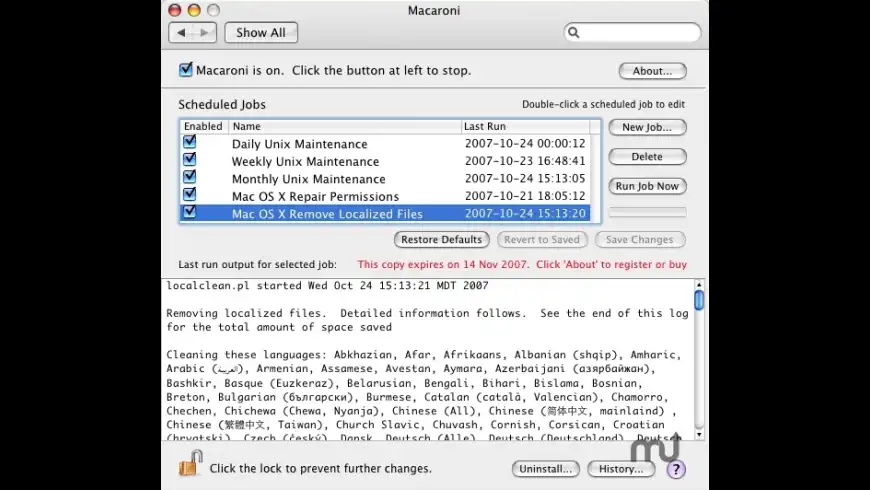
Macaroni overview
Note: Atomic Bird's Web site states, "Atomic Bird's Mac OS X titles have been discontinued and are now free. They may be downloaded and registered using information below. Note that this software is unsupported and may not work normally with the current version of Mac OS X." Users may use either the Download link or the Visit Developer's Site link to access the download, the registration name, and the serial number.
Macaroni is a tool which handles regular maintenance for Mac OS X's UNIX core. Normally these tasks run on a regular schedule, in the middle of the night. However if you don't leave your Mac on all night, they never run. Your Mac won't wake from sleep to handle this. Macaroni solves this problem. If a scheduled maintenance task is not run when it's normally scheduled, Macaroni automatically ensures that it's run at the next opportunity, whenever the Mac is on.
What’s new in version 2.1.1
Updated on Jan 08 2008
Version 2.1.1:
- Minor bug fixes.
Information
License
Free
Size
1.1 MB
Downloads
67923
App requirements
- Intel 32
- PPC 32
- Mac OS X 10.4.11 or later
Try our new feature and write a detailed review about Macaroni. All reviews will be posted soon.
(0 Reviews of )
There are no reviews yet
Comments
User Ratings

Jun 22 2019
Version: 2.1.1
I'm now running High Sierra 10.13 and Macaroni still works after all these years and functions as it was designed to do in the background. It is now free. Download and use at your own discretion.
Nov 10 2013
Version: 2.1.1
From Atomic Bird's Website: "Atomic Bird's Mac OS X titles have been discontinued and are now free. They may be downloaded and registered using information below. Note that this software is unsupported and may not work normally with the current version of Mac OS X."

Jul 26 2012
Version: 2.1.1
It's still working in Mountain Lion by the looks of it but clearly this is unsupported software judging by the other comments and lack of updates, so I'm even wondering if it is wise to keep it installed at this point.
Oct 10 2011
Version: 2.1.1
I have been using Macaroni for quite some time. I have sent two emails to the developer re: whether the current version is compatible with Lion but have received no answer. Can anyone answer that question for me?
Don't know if I want to continue to use it if Atomic Bird does not respond to inquires. Are they still around?
Aug 17 2011
Version: 2.1.1
I opened/installed Macaroni v2.1.1 a long time ago but immediately removed it when I saw that it offers little insight to what it is doing, unless you are a Unix person.
But I just noticed in my Console the following 3 repeating entries:
08/17/11 4:17:18 PM com.apple.launchd[1] (com.atomicbird.macaroniTool) Throttling respawn: Will start in 10 seconds
08/17/11 4:17:28 PM com.apple.launchd[1] (com.atomicbird.macaroniTool[23327]) posix_spawn("/Library/PreferencePanes/Macaroni.prefPane/Contents/MacOS/MacaroniTool", ...): No such file or directory
08/17/11 4:17:28 PM com.apple.launchd[1] (com.atomicbird.macaroniTool[23327]) Exited with exit code: 1
The repeat, over and over and over again, every 10 sec (per the log). Anyone know how to get rid of this?
Feb 17 2011
Version: 2.1.1
I always liked macaroni. My computer crashed and I lost a lot of stuff including macaroni. I have writing to them requesting my registration number but get no answer. Are they gone forever?
Dec 9 2010
Version: 2.1.1
Appalling customer service. A month with no reply whatsoever, despite several reminders. Avoid them like the plague
Dec 2 2010
Version: 2.1.1
Macupdate emailed them on 22nd November on my behalf. They ignored it.
I've used their websites 'Contact Us' form for the second time just to send a duplicate.
Nov 13 2010
Version: 2.1.1
I've tried to contact the developers three times (twice with email, once with their websites contact form) asking if I can get a replacement licence file. It's been two weeks and they have yet to reply. Anyone suggestions welcomed. Thanks
Jul 5 2010
Version: 2.1.1
I have been using this preference pane successfully for at least 5 years and pre Panther. As opposed to other utilities I use which take a kitchen-sink approach, Macaroni has a tightly focused suite of jobs which it performs seamlessly and flawlessly in the background. I suppose this is a function of its being a maintenance utility as opposed to a troubleshooting utility.
Macaroni automates the recommended housekeeping for OS X, plus adds some other benefits. After initial setup, it requires little or no follow-up or maintenance and has kept up with the evolution of the OS admirably. Set it a and forget it! I credit this little utility with allowing me to use my Mac over these past few years with extremely few issues.
Stable, cheap, efficient, well designed,and truly useful: This seems to be a paragon of what a utility should be.
Apr 15 2010
Version: 2.1.1
I've been using Macaroni for years now. It's never let me down; it's ALWAYS performed reliably and dependably, does the important maintenance jobs regularly, without issues.
Doesn't get any better than this!
Two thumbs up and 5 stars! Would all developers adhere to such an impeccable standard of excellence.
Nov 11 2009
Version: 2.1.1
I can verify that the current version (2.1.1) works just fine under Snow Leopard (10.6.2).
Aug 30 2009
Version: 2.1.1
Snow Leopard compatibility coming up? We'll see. I contacted the developer but he remains mum.
It would be a crying shame if he drops the ball on updates. None since January of '08.
Jun 25 2009
Version: 2.1.1
this is still the best for scheduled routine maintenance. I wish it is still maintained.I use it exclusively.it is worth the money I spent and more.Onyx can not do what this one does. the nice thing about Macaroni, that it works, when I am not.
Jan 9 2008
Version: 2.1.1
Yet another great update for this awesome application. I love how all the updates (even across OS upgrades) have been free. Best money I've spent! Thanks so much.
Jan 8 2008
Version: 2.1.1
Why pay 10$ for this software while Onyx does the same job (and even much more) for free?
Jan 8 2008
Version: 2.1.1
It seems that I have had ‘Macaroni' always in the system preferences do it's thing. I look at the logs and it does do everything it says it does. All the updates are free. Thanks for the very good product...
Jan 7 2008
Version: 2.1.1
I am more than willing to pay the meager $10 fee for a program that runs all my scripts in the background. The program also runs any custom script when the machine is awake and not busy. I use it to run my backup scripts.
Jul 12 2007
Version: 2.0.8
Thank you so much for that little fix. That Adobe problem was stopping me to set the language process on full auto. Now I will even forget the Macaroni is installed ;-)


Free
This app is no longer supported by it's developer. You can find similar apps here.
Similar apps
Monolingual
Remove unwanted OS X language resources.
Is this app is similar to Monolingual? Vote to improve the quality of this list.
Vote results
0
Upvotes
1
Total score
0
Downvotes
OnyX
Maintenance and optimization tool.
Is this app is similar to OnyX? Vote to improve the quality of this list.
Vote results
1
Upvotes
1
Total score
0
Downvotes
MainMenu Pro
Accelerate and improve your Mac's performance.
Is this app is similar to MainMenu Pro? Vote to improve the quality of this list.
Vote results
0
Upvotes
0
Total score
0
Downvotes
New and Recently Updated