


Free
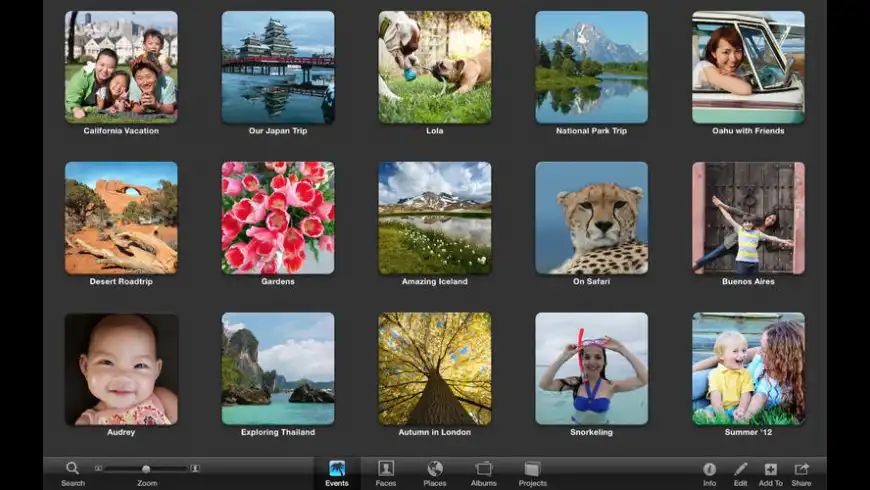
iPhoto overview
Note: This is a legacy application. It has been replaced by Photos in OS X 10.10.
iPhoto lets you do more than you ever thought possible with your photos. It gives you easy ways to find, sort, and rediscover your favorites. Simple but powerful editing tools let you turn good shots into magnificent ones. And you can share your photos in all kinds of great ways, including fun slideshows, Facebook, and Twitter -- even professional-quality prints, photo books, cards, and calendars. iPhoto isn't just a collection of pictures. It's a collection of possibilities.
What’s new in version 9.4.3
Updated on Mar 20 2015
Version 9.4.3:
- Photos can now be deleted from My Photo Stream by dragging to the Trash
- Photos can now be exported from Photo Stream using the Export command in the File menu
- RAW images manually imported from My Photo Stream are now editable
- Fixes a bug that could cause manually-rotated photos to appear unrotated when shared to Photo Stream
- Addresses an issue that could cause iPhoto to quit unexpectedly while syncing to Facebook
- Resolves an issue that could cause calendar text to appear at the wrong font size, resulting in order cancellation
- Fixes an issue that could cause books to have an incorrect number of pages after rearranging two-page spreads
- Includes stability improvements
Information
License
Free
Size
766.4 MB
Developer’s website
https://support.apple.com/kb/DL1650?viewlocale=en_US&locale=en_USDownloads
362562
App requirements
- Intel 64
- Intel 32
- OS X 10.7.5 or later
Try our new feature and write a detailed review about iPhoto. All reviews will be posted soon.
(0 Reviews of )
There are no reviews yet
Comments
User Ratings

Oct 13 2022
Version: 9.4.3
How can I transfer my old photos stored on iPhoto to the Photo app available now?
Mar 22 2021
Version: 9.4.3
Kind of obsolete app (nowadays it's called Photos)
Oct 23 2020
Version: 9.4.3
iPhoto under "TRENDING" applications today October 23, 2020...??!!??????
MU, please select these "trending" applications manually and seriously.
Feb 27 2020
Version: 9.4.3
I was unsuccessful in downloading. It was needing I file I could not aquire.
Feb 1 2020
Version: 9.4.3
I bought refurbished Mac and I have never been able to download it to my computer??
It says it belongs to another owner???

Oct 30 2019
Version: 9.4.3
Note, this will no longer run in Catalina, 10.15. It DOES, however, still run in Mojave, 10.14. I still prefer it to Photos. I may stick with Mojave for awhile....
Mar 7 2016
Version: 9.6.1
this excellent software was one reason to have a MAC. Unfortunatelly Apple did not know that and replaced it with the inferior Photos app
Nov 23 2015
Version: 9.6.1
I have iPhoto 7.1.5 and i can't print anything because i get an error message that there are "no themes" installed. is there anyway to get themes so i can prints? I'm using Maverick 10.9.5 operating system.

Oct 23 2015
Version: 9.6.1
When Apple executives released the new application called Photos in the spring of 2015, they left open a very short window in which iPhoto fans could download and install version 9.6.1 of iPhoto, which is the end of the line for that application. Apple had apparently adopted a rather arrogant policy in which they were compelling iPhoto users to make the transition to Photos and to the iCloud by locking iPhoto users out of using the latest iteration of iPhoto anymore.
How did they accomplish this? In two ways: (1) by making sure that iPhoto before 9.6.1 was not going to launch under the newest Mac OSes; and (2) by removing version 9.6.1, the last update, from the App Store so that it could not be downloaded. It is their game, and you have to play by their rules, they were saying. If you could not manage to download version 9.6.1 while it was still available through the App Store, you were out-of-luck. Too bad for you!
Apple fixed things so that version 9.6 was not going to launch under Yosemite, so many iPhoto fans, who did not check in at the App Store to download the final upgrade before the window abruptly closed, got angry and cursed Apple for leaving them in the lurch. They vented their anger all over the Internet, as they repeatedly encountered what appeared to be an error in the App Store application whenever they tried to download the upgrade to version 9.6.1 of iPhoto. When they tried to download the iPhoto update, all they would get was a cryptic message saying that the file was "temporarily unavailable." This frustration went on for about six months. I was among that group who tried, but failed, to download that final upgrade.
Well, the frustration is over, because today, as always, I clicked on iPhoto listing in the Updates tab of the App Store, and, to my surprise and delight, the upgrade to version 9.6.1 of iPhoto actually began to download! I just installed it on the Yosemite partition of my Mac Pro, and it launched just fine. The "temporary" freeze-out appears to have ended.
Now, all those diehard iPhoto fans—some of whom complained that they were unable to access their treasure trove of images—can get off their knees: their prayers have been answered.
However, these humble supplicants should not overlook the lesson: you never know how long the download window will remain open. So, if you want version 9.6.1 of iPhoto, you better grab it while you still can. You just never know if that window will soon crash right on top of your hands.
Sep 6 2015
Version: 9.6.1
Just opened my Macbook and wanted to download all the photos i made. for some reason i can't find my iPhoto. all i found was a line up of my photos in a terrible designed program which is not coming close to what i was used to. Why does apple do this? why would you change a perfectly working program to a shit tool like this. Not that i am against change, but this ...seriously?? Please get it back and make a lot of apple users happy.
Aug 8 2015
Version: 9.6.1
I just found this site to DL IPhoto to my newer model Macbook Pro. It didn't have Iphoto in it and had to DL PHOTOS. I rarely use this word but I HATE it. Whoever programmed it must have once worked for Microsoft. There is no rhyme or reason to it. I tried every which way to organize my photos from IPHOTO to the new APP to no avail it was horrendous. PLEASE APPLE people "if it ain't broke don't fix it" Improvements are welcome though IF logical. Apple for some reason is becoming less user friendly on some of its Applications sigh.

Aug 3 2015
Version: 9.6.1
Great app. It used to be great and continues to be great.
Apr 22 2015
Version: 9.6.1
Hey Folks, two things I can' figure out. How to have my albums on the left organized either in alphabetical order or in order they were created--mine is total chaos. Second thing, can't even figure out how to name a photo right now! Help function has not helped--I don't see what they describe when I folo the steps Any tips? David
Apr 14 2015
Version: 9.6.1
Not quite handy software. It is not clear how to move files with pictures to another places.

Apr 1 2015
Version: 9.6.1
PIECE OF JUNK !!!!! PIECE OF JUNK !!!!! PIECE OF JUNK !!!!! PIECE OF JUNK !!!!! PIECE OF JUNK !!!!! PIECE OF JUNK !!!!! PIECE OF JUNK !!!!! PIECE OF JUNK !!!!! PIECE OF JUNK !!!!! PIECE OF JUNK !!!!! Nothing else can describe this piece of low end engineering poor excuse of a program ! Upgraded to Yosemite (which was a hell) and of course, iPhoto screwed up my data base !!!!!!!!!!!!!

Jan 22 2015
Version: 9.6
Latest version for iLife '11 that still runs on Snow Leopard is 9.2.3, available here: http://support.apple.com/kb/dl1514
Nov 6 2014
Version: 9.6
This update is not available for this Apple ID either because it was bought by a different user or the item was refunded or cancelled. I don't understand, i updated to os x Yosemite and then attempted to update iPhoto but it says that. any advice?


Free

Similar apps
digiKam
Professional photo management.
Is this app is similar to digiKam? Vote to improve the quality of this list.
Vote results
2
Upvotes
2
Total score
0
Downvotes
Nikon Capture NX-D
Digital image processing and editing software (was Capture NX).
Is this app is similar to Nikon Capture NX-D? Vote to improve the quality of this list.
Vote results
0
Upvotes
0
Total score
0
Downvotes
MyPublisher
Create photo albums and books from your photos.
Is this app is similar to MyPublisher? Vote to improve the quality of this list.
Vote results
0
Upvotes
0
Total score
0
Downvotes
GraphicConverter
Graphics editor with powerful features.
Is this app is similar to GraphicConverter? Vote to improve the quality of this list.
Vote results
1
Upvotes
0
Total score
-1
Downvotes
Helicon Focus
Create one focused image from several partially focused ones.
Is this app is similar to Helicon Focus? Vote to improve the quality of this list.
Vote results
0
Upvotes
0
Total score
0
Downvotes