

Quicken

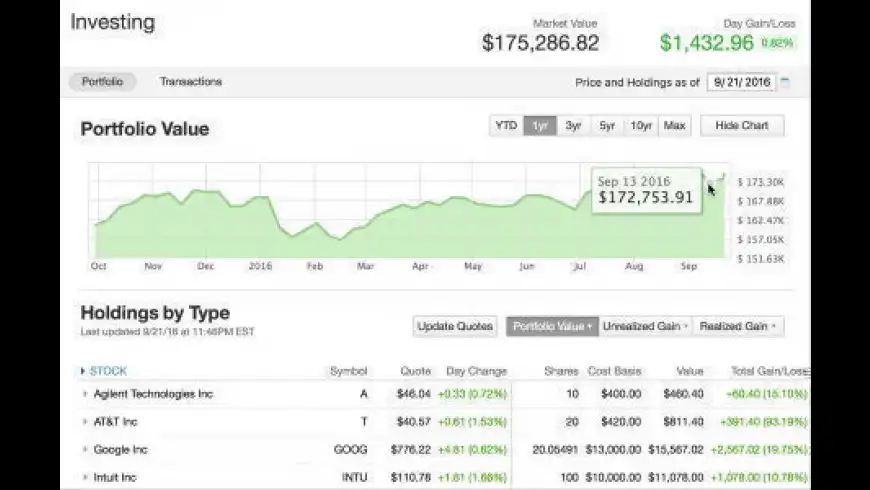
Quicken overview
Quicken makes managing your money easier than ever. Whether paying bills, upgrading from Windows, enjoying more reliable downloads, or getting expert product help, Quicken's new and improved features will help you save time and get better control of your money.
Features
- Pay your bills from right within Quicken:
- See and track them all in one place so that you never miss a bill
- See what bills have been paid, are coming up, or past due
- Easily pay your bills on time from right within Quicken
- Single-click upgrade from Quicken Windows to Quicken Mac:
- Convert from Quicken Windows to Quicken Mac in one click (excludes version from Mac App Store)
- Do it all right from your Mac (no Windows required)
- Easily import data from Quicken Mac 2015, Quicken Mac 2007, and Quicken Essentials with just one click
- Export Category Summary and Tax Summary reports to a CSV file:
- Export these reports with a single click
- Enables you to analyze and graph data in Excel, Numbers, or your favorite spreadsheet app
- Send your Quicken data to your accountant, financial planner, or other non-Quicken users
- Ability to transfer money between different accounts within your bank:
- Transfer funds from your savings account to your checking account
- User must enable transaction download with the associated bank account
- Free phone support:
- We'll help every step of the way: we'll help you get started, upgrade, or set up new features
- Phone support available Monday to Friday 5 a.m. to 5 p.m. PST
- Reach us online via our 24-hour live chat support
- See all your accounts in one place - Get a single comprehensive view of your bank, credit, card, investment and retirement accounts. Say "goodbye" to multiple sites, passwords and statements. Automatically download transactions from over 14,500 financial institutions. Easily see where you're spending and where you can save.
- Easily manage your accounts and transactions - The completely redesigned account register makes it easier than ever to manage your transactions--super fast search and filtering options, customizable columns and row height, and a great new look. Plus, all the features you expect from Quicken--categories, splits, tags, attachments, check printing and more.
- Stay on top of bills and spending - Schedule reminders for upcoming paychecks, bills and payments to help avoid late fees. Get helpful reminders and alerts so that you can make your payments on time. See the impact of upcoming paychecks and bills on your account balance to avoid overdrafts or slipping below minimum balance requirements.
- Get a handy calendar view of your spending - See your transactions at a glance. See when and where you spent your money. Look at your future bill and income reminders to understand the impact on your account balance.
- Plan and stay on a budget - Makes budgeting and sticking to a budget painless. Automatically create a budget based on your past spending. Customize your plan, and track your progress.
- Make smart money decisions on the go - Check your account balances and budget on the go. Free mobile app syncs data from your computer to your iPhone, iPad, and Android device. Take pictures of receipts to track key purchases.
- Manage your investments and plan for taxes - See how your investments are performing. We continuously update quotes to keep your portfolio value current. Track cost basis, see realized and unrealized gains, and calculate capital gains, and more to make tax time easier.
- Get valuable reports to help you make better financial decisions - Get or customize reports that help you understand different aspects of your finances. A cash flow graph shows how your upcoming bills and income affect your balance to help avoid overspending or late fees. Knowing your net worth over time helps you evaluate your current financial health and plan your financial future. We'll even show the amount spent by payee so that you can be smarter about managing your money. Other popular reports include category summary, spending over time, and tax schedule.
- Easily import data - Easily import data from Quicken Essentials for Mac, Quicken Mac 2007, and Quicken 2010 for Windows or newer versions.
- Easy to get started and keep going - Step-by-step guidance helps you get up and running fast. Gives you the big picture in minutes. Special tool for upgraders, too! Easy setup tool for automatic downloads. See a list of all accounts that can be connected and just click to get set up.
What’s new in version 7.6.1
Updated on Mar 08 2024
- Fixed: Fixed a problem where account filter pop-ups in existing files could show the wrong setting in 7.6.0; for example, the Investing register could be set to All Savings Accounts and no data would be shown
- Fixed: The connection status of hidden accounts is now correctly reported
Information
App requirements
- Intel 64
- Apple Silicon
- macOS 11 or later
Try our new feature and write a detailed review about Quicken. All reviews will be posted soon.
What customer like
Regular updates
Performance
What needs improvements
Customization
User Experience
(0 Reviews of )
There are no reviews yet
Comments
User Ratings

Dec 15 2022
Version: 6.10.3
I am using Quicken 16.10.3. I switched from Bantivity when they got worse and worse on Support and compatibility. When I couldn't get the latest Bantivity 8 to sync properly (even support could not fix it) I decided to try Quicken again a year ago. I don't do Subscription apps but this one is worth it the hassle. I Pay on yearly plan instead of monthly.
What a surprise from the old Quicken for Mac days. It seemed much better right off the bat but knew it still needed work. I only use it for Syncing my Bank accounts not for Investment or anything else. I have had to call support I think three times in the last year and they were outstanding each time. They were patient, friendly, professional and stuck with me until the problem was resolved. And it was resolved quickly. Great support means everything.
The best thing is you can talk to a real person not like Banktivity (Emails and chats).
To me and for my needs Quicken just keeps getting better and while it is doing that Support is there for you. Keep up the good work Quicken.
Jul 23 2022
Version: 6.8
Been using it for a few years now, just keeps getting better and better.
Apr 19 2022
Version: 6.6
Just a couple of months ago I complained about Quicken having become a virus. They have since managed to make it even worse! A couple of weeks ago they overwrote all of the categories that I had used for the past 28-years to keep track of my expenditures and, even more important, to fill out my taxes which I was in the process of doing. It appears that they had a 112-year old glance at my payee names and guess a useless category such as "bills and utilities" instead of "rental water" (a business expense). It will not allow me to change them which would take months of work.They make no sense whatever in addition to being inconsistent. Pure useless garbage! When I complained (angrily) they cancelled my subscription-no refund.
Feb 28 2022
Version: 6.6
This is a comprehensive financial program that has become indispensable to me.
It is easy to use and very intuitive. I just finished my 2021 income tax. Quicken reports made it very easy to recall the pertinent information. Yes it is now on an annual subscription plan, but it is worth every penny. When I have infrequently needed telephone support, it has been more than satisfactory. Recommended without reservation
Feb 4 2022
Version: 6.5.1
I have been using Quicken since about 1994 and kept version 2007 and Snow Leopard until Catalina came out. I regarded it as an essential. The past several months I have come to regard it as a virus. The last few updates added several different files & log in names except that they were labeled "ME original", "ME original2" etc but I kept my same login. I was slow to realize that these newbies were making reconciling difficult. I called support and the woman was adamant that Quicken could not create these but I just had to pick one of the logins & label it Main. This cost me years of data for my taxes. I don't know how to recover years of lost data.
Sep 24 2021
Version: 6.4.0
Quick rev is indeed 6.4.0 but the MacUpdate download is 6.3.3. Intuit's download file naming scheme is between difficult and impossible to decode.
Aug 11 2021
Version: 6.3.1
Too bad this app went to the subscription mode. I don't mind paying once for an app but I refuse to pay a monthly fee to use it. Time to look elsewhere.
May 28 2021
Version: 6.2.1
I've used this app for several years and it is a solid choice, though, especially now that it's possible to connect to my bank and automatically update all accounts.
Dec 8 2020
Version: 6.0.1
Quicken 6.0 and later is now a universal binary that will run on Intel Macs as well as run natively on the new Apple Silicon M1 Macs. I subscribe to Quicken Deluxe and have been very pleased. Reports are up to par now. Portfolio management is adequate. My IRAs, Bond Funds, Securities all auto-update and provide me with a clear picture of my investments. Quicken has become indispensable to me.
Dec 2 2020
Version: 6.0.1
This product does not provide the functionality they advertise. On the page get.quicken.com (as of 12/2/2020) it clearly states that savings goals are part of the product. When I called in to support, the support person told me that is not a quicken site (now that is really stupid). I have a screen shot of the page. He denied it over and over.
Sep 11 2020
Version: 5.17.6
Stunning. I rated Quicken recently at four-stars. But the latest reporting changes make Quicken 2020 essentially useless for small business use. It's tax season for late business filers. But I cannot get the data out as with prior versions. The new reporting framework is entirely misplaced. Why oh why did they not learn from the original Quicken 2007 of the Mac. It's easy to record data, near impossible to report it in a meaningful fashion.
For example, I merely want to summarize by category the income and spending related to a single account, irrespective of whether the funds are linked to another account.
That's simply not possible with the latest report generator. Those transactions that originate in another account are treated differently and not summarized by category.
Apr 30 2020
Version: 5.15.3
VERY LIMITED TO 6 CHECK PAYMENTS, CANNOT CONVERT FROM BILL PAY, CANNOT MAKE A CHECK PAYMENT ON A SPECIFIC DATE, CANNOT SPLIT PAYMENTS, QUICK PAY DOES NOT RELATE TO ANY OF MY ACCOUNTS, BANK PAY IS ALSO WORTHLESS, I GUESS IT IT TIME TO MOVE ON WHAT WE PAY FOR PREMIER SUPPORT - 6 CHECKS SERIOUSLY, OH YES TRY TO DO A RECURRING PAYMENT WITH THIS NOPE- I WILL PASS ON TO MY CLIENT, FRIENDS, AND EMPLOYEES AND CANCEL NOT WORTH IT.

Apr 24 2020
Version: 5.15.3
I held on to Quicken for Mac 2007 until Catalina. Had previewed several previous incarnations (and competing financial apps), and finally made the leap. The transition was not as smooth as I hoped, importing transactions and categories and I'm still on the learning curve after 9 months. Does operate in decidedly different ways than it's predecessor. The 2020 version does all I need it to, and is worth the subscription price, so far....
Apr 22 2020
Version: 5.15.3
There are THREE versions of Quicken, costing $35, $45, and $69 PER YEAR. MU needs to update this page or make three pages.

Apr 8 2020
Version: 5.15.3
First time I have bought quicken since the 2007 version. It works pretty well, but many features either don't work or do nothing. Like for a loan I have, I tried to do a 'What If'. Three options are available, but nothing happens Calculate button is clicked. No matter what option you choose or criteria entered. Must use vapor code.

Mar 5 2020
Version: 5.15.1
It's now Quicken 2020 as of version 5.15.1. I use it every day and I find it's well worth the subscription price. Nice and fast and the developer keeps it regularly updated. Keeper.
Feb 1 2020
Version: 5.14.2
A time suck vs a time saver. You will spend more time trying to fix data corruption from updates and software bugs than you can possibly imagine. When I called tech support on screen sharing, we hit a bug every few minutes. Despite seeing the issues in real time, support was unable to solve the issues. REALLY REALLY BAD.
Jan 19 2020
Version: 5.14.0
The new owners of Quicken have done a terrific job so far! The most important enhancements required for me going forward: continued improvements to the reporting features. The key part of any finance software package is flexible, relevant reporting capabilities.
Nov 1 2019
Version: 5.13.0
I'm now relying only on Quicken 2019 ever since Catalina broke Quicken 2007 as was expected. Q2019 does meet my needs pretty well. It is nice and fast and the company updates and improves it frequently. Q2019's reporting capability is almost on par with Quicken 2007's QuickReport, I just wish it could run subtotals and I'm still hoping it will soon.

Jun 21 2019
Version: 5.11.0
Pretty impressed this time. I haven't encountered any bugs yet, which is a first. I love the simple clean interface, and its ability to interface with my banks/creditors asap. Very little fuss, and the budget features are awesome.


Similar apps
Money
Easy way to track your finance.
Is this app is similar to Money? Vote to improve the quality of this list.
Vote results
2
Upvotes
2
Total score
0
Downvotes
Debit & Credit
Personal finance manager.
Is this app is similar to Debit & Credit? Vote to improve the quality of this list.
Vote results
3
Upvotes
1
Total score
-2
Downvotes
Easy Books Accounting
Double-entry accounting application.
Is this app is similar to Easy Books Accounting? Vote to improve the quality of this list.
Vote results
0
Upvotes
0
Total score
0
Downvotes
Finance
Personal checking and saving management tool.
Is this app is similar to Finance? Vote to improve the quality of this list.
Vote results
0
Upvotes
0
Total score
0
Downvotes
Squirrel
Simple way to track and plan finances.
Is this app is similar to Squirrel? Vote to improve the quality of this list.
Vote results
0
Upvotes
0
Total score
0
Downvotes