MacUpdate
Join MacUpdate
New Member

New Developer
Explore
MacUpdate Desktop
Hot Apps

Business
Dashboard
Development
Drivers
Education
MacUpdate Promo
Popular Apps

Games
Home & Personal
Internet
Multimedia & Design
Utilities
iPhone
Apps

Login
Member Login

Developer Login
About
Search Mac Apps

Search iPhone Apps

Advanced Search
ABBYY FineReader Express
ABBYY FineReader Express 8.2.6996
Your rating: Now say why...

(15) 4

OCR application.   Demo ($99.99)
Add to my Watch List
Email me when discounted
  • Download Now
    120.4 MB
  • Buy
    $99.99
  • Visit Developer's Site
    ABBYY USA Software House, Inc.
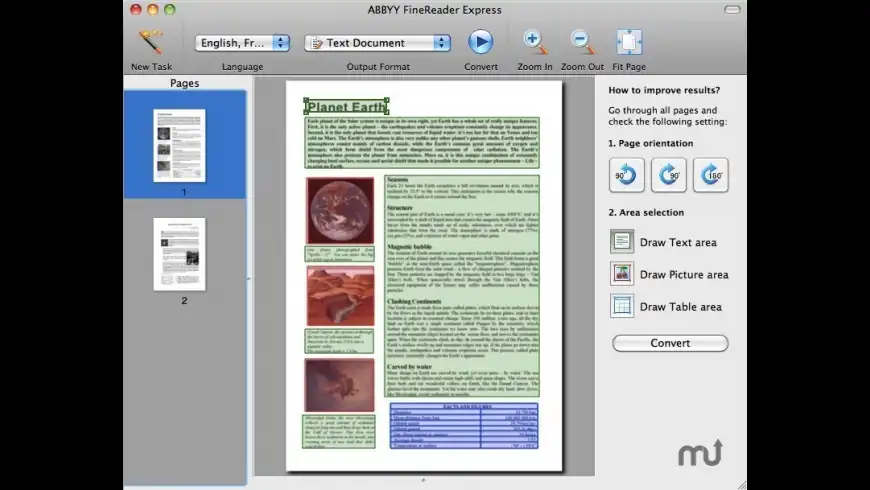
ABBYY FineReader Express is a highly accurate and easy-to-use multi-lingual OCR application designed specifically for Mac users. Based on ABBYY's intelligent document recognition technologies, FineReader Express for Mac quickly turns any scanned paper document, PDF files and digital camera images into editable and searchable formats while keeping the original layout and formatting in tact.
What's New
Version 8.2.6996: Release notes were unavailable when this listing was updated.
Requirements
  • PPC / Intel
  • Mac OS X 10.4 or later
  • TWAIN-compatible scanner
  • Digital camera or fax modem


MacUpdate - ABBYY FineReader Express


  • Readiris Pro
    +2
    Commercial $129.99
    Powerful, accurate OCR software.

  • Prizmo
    +2
    Demo $49.95
    Scan documents with your ...

  • OCRKit
    +1
    Demo $59.99
    Convert PDF or image graphics ...

  • Drive Genius
    +1
    Demo $99
    Optimize/repair/test/resize and ...

  • ExactScan
    +1
    Demo $115
    Fast document scanning.
ABBYY FineReader E... User Discussion (Write a Review)
ver. 8.x:
(15)
Your rating: Now say why...
Overall:
(15)

sort: smiles | time
burypromote
+1

+106

Neil_m reviewed on 28 Apr 2012
After being asked to pay yet another upgrade fee by Readiris, I decided to trial ABBYY.

The most important feature for me, is the the accuracy, I can use the results without having to edit and double check. That is not something I could ever do with Readiris Pro.
I have had several versions of Readiris, including the server version for watched folders - but if the accuracy is lacking - it defeats the purpose.
The files need to be properly searchable.

I have found interesting ways to incorporate ABBYY into our workflow using applescript and automator.

ABBYY seems to be able to handle documents with multiple languages as well, so documents with foreign place names are handled correctly. Something Readiris never managed for me.

I am happy that Readiris wanted an upgrade fee because it forced me to reconsider my options - it has been a big step forward.
[Version 8.2.6996]


burypromote

-65
Holypoly commented on 05 Mar 2012
Build 718/10 (from ABBYY's web site):


The update includes the following enhancements:

Support for ICA-compatible scanners and MFPs
New scanning interface for ICA-compatible devices
Some interface and usability improvements
[Version 8.2.6996]

2 Replies

burypromote

-65
Holypoly replied on 05 Mar 2012
Sorry, make that 718/17 ;^D)
burypromote

-65
Holypoly replied on 05 Mar 2012
Actually, it's Build 253159, no joke.
burypromote

Matbard commented on 12 Feb 2012
Where is the 8.01.6996 update???
[Version 8.01.6996]

1 Reply

burypromote

+106
Neil_m replied on 27 Feb 2012
Build 718/17 was posted on 22nd Feb.
burypromote
+2

+4

Mk-Ultra reviewed on 12 Dec 2011
Frustratingly slow compared to Readiris Pro. But it hands down beats it in accuracy.
Very crippled compared to the full fledged windows version. Still, even with the lack of controls that the windows version offers, I found it to be the best OCR sw for the mac.

If someone has a better suggestion for OCR sw please msg me. Thanks
[Version 8.0.0.4123]


burypromote
+2

+79

Aargl reviewed on 08 Oct 2011
Having tried this vs Omnipage and Readiris, with the same text, there's no doubt: ABBYY is the winner!
The other two produced nothing usable, full of errors that you must manually correct (and the "learning mode" is even worse!).
The ease of use for the OCR part is amazing, but there is no fine tuning available here, and it's pretty hard to reorder pages after you've scanned them.
Anyway, it does so little errors that it's unbelievable.
It was the first time in my life that I needed OCR (for work), so I won't buy it for myself, but if I must give an advice to some of my employers, this will definitely be my choice (and it's the cheapest one!!!)
[Version 8.0.0.3948]


burypromote

-65
Holypoly commented on 21 Sep 2011
Lion support added:

http://www.abbyy.com/support/finereader_for_mac/update/
[Version 8.0.0.3948]


burypromote
+2

+19

Trashie reviewed on 28 Aug 2011
Just tried the trial hit it with some docs. It was almost perfect! Will buy. Simple and easy. Stable and fast. I did not even use 300dpi on it, it still was perfect just warned 300dpi may give better results but it worked great on 150dpi docs. A star off as it needs some more features and toolbar buttons etc but the OCR engine is 5 stars.

I also like read iris but since I can't get a trial they can go spin. It also costs more for very little extras.

ABBYY is the one for Mac users for sure. The software feels Mac the others feel they are trying to be Mac.
[Version 8.0.0.3948]

1 Reply

burypromote
+1

+79
Aargl replied on 08 Oct 2011
Hi! I've made my own review, but I totally agree with yours.
I have a version of Readiris that came with my scanner, if I remember well, and I could do nothing with it (it even crashed everytime!) while this one gave quite perfect results.
burypromote

+22
Istra commented on 11 Aug 2011
can this app. scan & ocr lating and greek texts? other languages/alphabets?
[Version 8.0.0.3948]

2 Replies

burypromote

+22
Istra replied on 11 Aug 2011
i mean ocr "latin & greek texts" (of course)...
burypromote

+1
Schmidhauser replied on 07 Nov 2011
It does Latin and Modern Greek. Was looking for the same…
burypromote
+2

+233

Poikkeus reviewed on 02 May 2011
I've used this software, in different versions, but I've always noticed that the character recognition is speedy, accuracy impressive (about 99%, by my rough count), and very easy to use. FineReader Express relies on a minimal design with a small footprint. My preferred work flow is to scan from a TWAIN compliant Canon scanner, after which the completed document appears on MS Word; from there, you can manually edit, if necessary.

OCR software is never going to be cheap, but at a retail of $99, it's the most competitive software available for the Mac.
[Version 8.0.0.3948]


burypromote
+1

+43

Awado reviewed on 02 Jan 2011
Like katz219 already said, this piece of software is a horrible UI around a "good" engine. After editing almost 100 pages of a document for proper text recognition, i had to realize that all of that editing is gone, a soon as you switch to another page. That means you can only change one page of the document.

I reported this to their tech. support and got a short reply after a few days, but no solution. A second request is still unanswered for two months now. To me it's not worth the money they charge. They know of the bug(s) but don't care.
[Version 8.0.0.3948]


burypromote
+4

+13
Kaz219 had trouble on 24 Jul 2010
Playing around with the software, and I have one problem: it isn't possible to do any kind of fine tuning on multi-pages documents. When I modify anything and go to the next page, the changes on the previous page are lost (if I navigate back, everything is back the way it was).

The help in the software is very limited and on the website it's just a joke.

Their only (but big) advantage is that they got the best engine so far. But the interface is pretty bad I have to say.
[Version 8.0.0.3948]


ParisP rated on 27 Apr 2012

[Version 8.2.6996]


Downloads:14,281
Version Downloads:1,755
Type:Business : Word Processing
License:Demo
Date:05 Mar 2012
Platform:PPC / Intel
Price: $99.99
Overall (Version 8.x):
Features:
Ease of Use:
Value:
Stability:
Displaying 1-10 of 24
< 1 2 3 >
Displaying 1-1 of 1
Displaying 1-1 of 1
-
-
-
Please login or create a new
MacUpdate Member account
to use this feature
Watch Lists are available to
MacUpdate Desktop Members
Upgrade Now
Download and auto-install
using MacUpdate Desktop. Save
time moving folders and cleaning-up.
ABBYY FineReader Express is a highly accurate and easy-to-use multi-lingual OCR application designed specifically for Mac users. Based on ABBYY's intelligent document recognition technologies, FineReader Express for Mac quickly turns any scanned paper document, PDF files and digital camera images into editable and searchable formats while keeping the original layout and formatting in tact.
Add/Update Listing About MacUpdate Desktop Career Opportunities RSS Twitter Facebook Advertise Sitemap
Copyright © 2012 MacUpdate LLC


- -