


EasyCapViewer
High performance, low latency driver for the EasyCap DC60.
Free
Application is not under development & not supported.
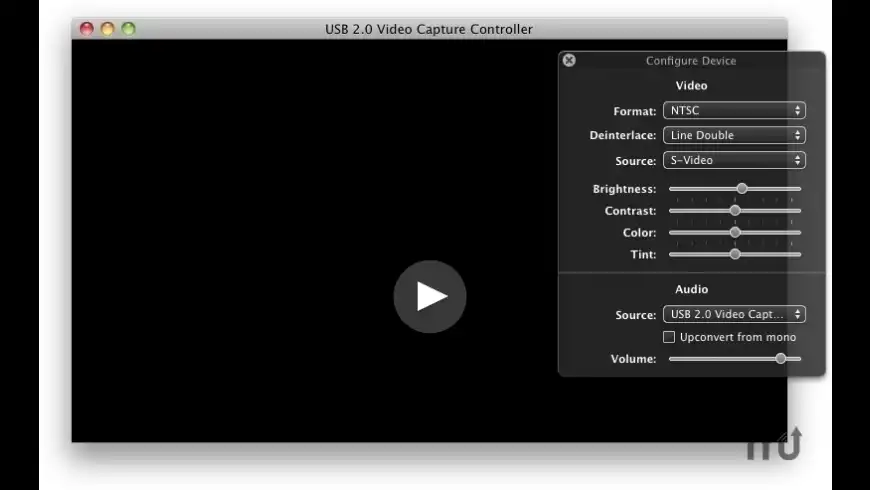
EasyCapViewer overview
EasyCapViewer is a high performance, low latency driver for various EasyCap models and versions. Supports AV playback and recording with Composite and S-Video input. Low-latency means it's great for gaming
Features:- "User-space" driver
- Runs like a normal application
- No special installation needed
- Supports audio and video (audio only supported with certain models)
- Low latency
- Great for games
- Theoretical 1-3 frame delay (not measured)
- OpenGL display for best performance
- Supports NTSC, PAL, SECAM, and other formats
- Supports Composite and S-Video input
- Records to QuickTime .mov format
- Adjustable brightness, contrast, color, and tint
- Many de-interlacing options
- 720x480 (NTSC) or 720x576 (PAL) resolutions
- Anamorphic widescreen (16:9) and other aspect ratios
- Cropping
What’s new in version 0.6.2
Updated on Apr 07 2013
Version 0.6.2:
- Fixes black screens with some EasyCaps
Information
App requirements
- Intel 32
- PPC 32
- Mac OS X 10.5.8 or later
- Certain EasyCap models
Try our new feature and write a detailed review about EasyCapViewer. All reviews will be posted soon.
(0 Reviews of )
There are no reviews yet
Comments
User Ratings

Feb 14 2022
Version: 0.6.2
alguien me puede pasa el enlace de este software o recomiendan algún otro para Mac? gracias. No aparece nada en el enlace!!
Aug 11 2021
Version: 0.6.2
The download link does not seem to work. Anyone have the installer file they can share?
Oct 28 2020
Version: 0.6.2
It I not working with Mac OS 10.12.6 (16G2136) on MAC MINI,
please I am waiting for your help.
THANKS
Jun 12 2020
Version: 0.6.2
It doesn't work on my iMac with macOS High Sierra and also not on my PC with Windows 10. It downloads the program to work in but doesn't download the drivers for the USB plug-in gadget when you plug it in. According to the manual, it is supposed to download the drivers for the gadget automatically when you plug it in. It doesn't read my VHS machine at all on both computers. What a waste of money.
Jun 12 2020
Version: 0.6.2
It is not working on my iMac and also not on my PC with Windows 10. It downloads the program from the disc that came with, but hen you plug in the USB gadget it doesn't download the driver for the plug-in gadget. I google the drivers but could not find anything. What a waste of money.
Jan 22 2020
Version: 0.6.2
Having a difficult time getting my video to download. I wish I could talk to a real person .
Dec 4 2018
Version: 0.6.2
i keep getting a message that says "no supported capture hardware was found, please connect an easycap dc60 to your computer, please note that the dc60+ is not supported"

Nov 4 2017
Version: 0.6.2
Unable to download. Error message: file is corrupt. Using Mac OS 10.8.5
Aug 24 2017
Version: 0.6.2
It works with Mac OS X 10.6.8 SnowLeopard! Thank you.

Apr 8 2013
Version: 0.6.2
Great that the dev works further on his freeware software. New version works very good and this is , together with the 10 € Easycap (& clones) USB Stick the cheapest way of video digitizing / videorecording for Videotapes and also XBOX, PS. To get significant better solutions you need to buy at least HW for 150 €+. Other "Mac" Video USB Sticks around 50 € giving NOT better results!
Jan 28 2013
Version: 0.5.5
Very simple to use program, plug in your DC60 and hit the play button on the screen.
Doesn't offer much in real-time rendering, only things like de-interlacing techniques but that really doesn't bother me.
I use it to copy 8mm from a camcorder, I have to go from camcorder to VCR to DC60 in order to get sound but it works fine.
I also use it to turn my monitor into a simple television to play video games on There is very little to no latency between what is happening and what is showing up on the screen. rhythm based games like Guitar Hero can be played with the game's calibration settings.
Windows must use USB differently because Windows will only play video-games on this card with very high latency and no sound...this program and the Mac OS are clear winners.
Can't beat free, and this is the only free video adapter software to support the DC60.
Nov 17 2012
Version: 0.5.5
Cant seem to get it to run.
I am on Mountain Lion
Have the DC60
Ran the app and it says
No supported capture hardware was found.
Can anyone assist?

May 25 2012
Version: 0.5.4
OMG This is totally awesome - especially as it is free and not $29.95 which some others want! Thank you for making it free! I have a CCTV feed and this is precisely what I wanted to do.
As a believer in DON'T ASK, DON'T GET may I make two upgrade requests?
1. RED DOT appears on image when recording
2. ability to superimpose day, date, 24 hour clock, opacity, location etc.
Yes I know I am greedy, but it might be something that is very easily achieved - you can tell I am no programmer!
Aug 31 2011
Version: 0.5.3
Very cool - works a charm. I have the Miglia TVMax which is bulky (size of a Mini) and while it's great, it's hardly portable. EasyCAP is cheap and portable and goes with my MBP and this software very nicely.
Could do with an icon though...

Apr 6 2011
Version: 0.5.3
Note that this app only works with a very specific model of EasyCap DC60. The Product ID must be 0x0408, the Vendor ID must be 0x05e1, and the video version must be 11. I scored on the first two, but even so, audio is not supported (this is random chance). No worries, I run a pro-audio rig so I hook that up separately and verify levels. Try to play video, nothing, check error log: My EasyCap's video version is 10, so.. I am out. It doesn't work at all. Dev says he will add video version 10 support for a $120 donation. Huh. While the DC60 hardware is cheap—under ten bucks—there are too many possible ways to fail here. I'll keep an eye out for a sale on the $35 Mac-specific iGrabber package and be done.


Free
Application is not under development & not supported.

Similar apps
Be the first one to propose an app
similar to EasyCapViewer.
similar to EasyCapViewer.
New and Recently Updated