


Free
Absolutely Free
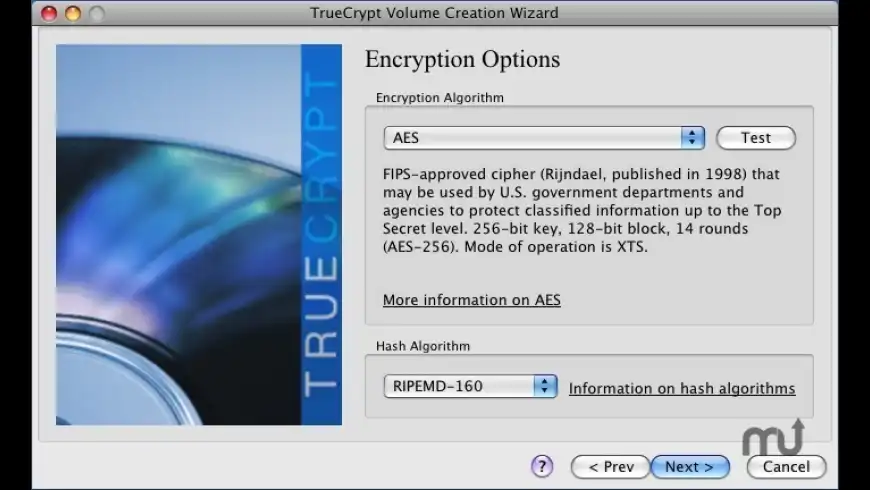
TrueCrypt overview
Note: TrueCrypt is no longer under development and the developer provides no support for it.
TrueCrypt is free, open-source disk encryption software.
It uses stronger encryption than FileVault (built into Mac OS X) and allows the encryption of entire volumes and partitions.
Make sure you choose the right download for your OS version and CPU type.
What’s new in version 7.2
Updated on Sep 11 2019
Version 7.2:
Note: This product is not compatible with macOS Sierra and later.
- Minor improvements and bug fixes
Information
License
Free
Size
8.2 MB
Developer’s website
http://truecrypt.sourceforge.net/OtherPlatforms.htmlDownloads
85438
App requirements
- Intel 32
- PPC 32
- Mac OS X 10.4.11 or later
Try our new feature and write a detailed review about TrueCrypt. All reviews will be posted soon.
(0 Reviews of )
There are no reviews yet
Comments
User Ratings

Sep 12 2019
Version: 7.2
TrueCrypt is 32 bit and not maintained.
VeraCrypt is the successor to TrueCrypt
https://www.veracrypt.fr/en/Home.html
Sep 12 2019
Version: 7.2
Wow. According to the SourceForge page for TrueCrypt, this version is from 2014.

Sep 11 2019
Version: 7.2
Just tried to install it and it failed with the message "Needs 10.4 or later".
May 28 2014
Version: 7.1.1
TrueCrypt is no longer being developed and the developers state that using encrypted containers may no longer be secure.
From the developer's website:
"WARNING: Using TrueCrypt is not secure as it may contain unfixed security issues
The development of TrueCrypt was ended in 5/2014 after Microsoft terminated support of Windows XP. Windows 8/7/Vista and later offer integrated support for encrypted disks and virtual disk images. Such integrated support is also available on other platforms. You should migrate any data encrypted by TrueCrypt to encrypted disks or virtual disk images supported on your platform."
Dec 31 2013
Version: 7.1a
I like this software a lot. I use it extensively creating encrypted containers and drive partitions.
I am concerned that the developers are basically silent, and support is zero. It also appears that updates for OSX is minimal, despite the fact that at present you cannot encrypt a lot of newer external drives due to a patch not being applied allowing use of drives with non-512 byte sectors.
I would gladly pay $100 (would be well worth it) for this software, but would need to see some developer action....
Would get 5 stars across the board if OSX updates were in line with Win....
Jun 23 2012
Version: 7.1a
For basic encryption of user data OR for the hiding and protection of data you not only want to encrypt but actually wish to hide completely (i.e. make it impossible for anyone to actually know there's encrypted data on your Mac) TrueCrypt is the way to go.
It now supports 64 bit on OS X Lion.
You can create hidden volumes, which makes it possible to completely hide encrypted data. This allows for plausible deniability. Simply put, a Govt agency or some other threaten foe will not be able to force (through law or malice) you to reveal the password to your encrypted data, because there will be no way to prove this encrypted data exists. It's unlikely most people need such plausible deniability, but for those who do TrueCrypt makes it easy.
You can encrypt any volume, which includes external drives and USB sticks. A wise move if you have ANY data on your stick or drive you'd rather no one but you could access.
TrueCrypt is open source software, which means all the application code is publicly viewable. This eliminates any chance of it having "back-doors". As far as I know, Apple can not make the same claim for Filevault/Firevault2, because it uses proprietary code. Again, most people are not likely to need this added level of security (i.e. the US govt. not being able to back-door their way into your data, with Apple's "help"), but for some this may provide added peace-of-mind.
Apr 9 2012
Version: 7.1a
True Crypt is awesome tool, also simplifies a bakup alot!
Thanks for keeping it free!
Sep 1 2011
Version: 7.1
The description is misleading. It still does not support encrypting a Mac boot volume.
http://www.truecrypt.org/docs/?s=sys-encryption-supported-os
This page lists various versions of Windows only.
When a software vendor can't get the basics of what their software can and can't do, be very wary about using it. Doubly so if the software in question has anything to do with security.
Sep 1 2011
Version: 7.1
Does this still rely on MacFUSE?
If so, I have little doubt that it is leaving fragments of plain text data scattered on the system volume.
Jan 19 2011
Version: 7.0.1
If anyone is interested, I wrote a short tutorial on how to mount truecrypt volumes on startup here: http://www.myiphoneadventure.com/os-x/truecrypt-automator-automatically-mounted-encrypted-drives-in-os-x
It's pretty easy to do with automator and makes truecrypt a little less unwieldy.
Jul 30 2010
Version: 7.0
crap - you HAVE to be an administrator to use this app, in mac os or linux. not good.
Jul 20 2010
Version: 7.0
Truecrypt through and including 7.0 does not support Snow Leopard in 64-bit mode. This is in part because it relies on MacFuse, which is not 64-bit. This is documented here:
http://www.truecrypt.org/docs/supported-operating-systems
Also, while it touts whole-system encryption in the announcement here ("allows the encryption of the entire boot volume"), this is not supported for Mac, as documented here:
http://www.truecrypt.org/docs/sys-encryption-supported-os
It does offer very strong encryption for a USB key, though.
Feb 11 2010
Version: 6.3a
It is a shame that this is what Mac users are stuck with. The entire experience is quite un-Mac-like. It is not possible to open a TC container file by double-clicking, instead we must first launch the app and then select a container file from within the app itself - the app must then remain open the entire time that a volume is mounted.
The Mac version also treats Mac users as second class citizens with no support for sparse containers or system encryption - what happens if we need to mount a sparsecontainer which was created on WIndows?? The TC support forum is full of posts by users having difficulty using TC between Win and Mac - support is almost non-existent-not to mention that if you want to use the forum you must register with an ISP provided e-mail (yahoo, gmail, etc not accepted). The app also creates a copy of any mounted TC container in your /tmp folder - very odd and possibly insecure from an architectural standpoint. The encryption itself may be great, but the Mac execution is severely lacking in usability and functionality.
Oct 25 2009
Version: 6.3
This is an excellent cross-platform solution to keeping things secure! I have no problems with this and it gives me different ways to encrypt volumes for various tasks eg. From storing my bank details to my plan to take over the world.
Sep 10 2009
Version: 6.2a
I'm having several issues under Snow Leopard. Trouble with mounting the device, trouble when backing up on the device. Get system crashes -> have to force shut down...
Please fix this. This would be essential.
Nov 1 2008
Version: 6.1
One of the BEST decryption/encryption tool for Mac and Windows!
6.1 is much more faster!!
By the way, which is the most secure encryption?
Oct 19 2008
Version: 6.0a
Just installed TrueCrypt and I find that, despite some quirks, it's great for my purpose: accidentally losing my flashdrive that contains confidential company information.
I sometimes have to bring home confidential stuff like financial documents, sometimes passwords in plaintext (i really should start using KeePassX for that), etc. Now I encrypt my entire flashdrive. This way, if I drop it or lose it or get mugged, any confidential information I have on me is protected. Whoever gets my flashdrive can have it.
It's great too that it's cross platform, although the compile on CentOS 5.2 was a bit of a hassle (not enough clear documentation on this yet). But at least I can use my encrypted flashdrive on Linux, Windows, and, last but not least, my Mac. DMGs are great but obviously out of the question when you're working on multiple platforms like me. TrueCrypt is the solution for me.

Jul 7 2008
Version: 6.0
(All the comments in my previous review of version 5.1 still apply unless noted here.)
TrueCrypt 6 is a nice improvement over 5.
Hidden volumes are now supported, and therefore plausible deniability. There are also major speed improvements, which I did not confirm, but I was able to play back video from the secure mount without trouble.
It turns out that HFS+ volumes are possible (and were in 5.1 as well), but you have to re-format an existing FAT32 secure disk. These disks won't be cross-platform, of course, but they'll perform much better.
The Mac (and Linux) version still lacks a traveler/portable mode as well as boot disk encryption.
With the addition of hidden volumes and its excellent security algorithms, TrueCrypt is indisputably the top encryption tool on the Mac.

Free
Absolutely Free

Similar apps
GPG Suite
OpenPGP on macOS.
Is this app is similar to GPG Suite? Vote to improve the quality of this list.
Vote results
0
Upvotes
8
Total score
0
Downvotes
VeraCrypt
Strong encryption based on TrueCrypt.
Is this app is similar to VeraCrypt? Vote to improve the quality of this list.
Vote results
1
Upvotes
1
Total score
0
Downvotes
RealEncrypt
Drag and drop encryption tool.
Is this app is similar to RealEncrypt? Vote to improve the quality of this list.
Vote results
0
Upvotes
0
Total score
0
Downvotes
Espionage
Simple, state-of-the-art encryption and plausible deniability for your data.
Is this app is similar to Espionage? Vote to improve the quality of this list.
Vote results
0
Upvotes
0
Total score
0
Downvotes
MySafe
Securely hide and protect files and folders (beta).
Is this app is similar to MySafe? Vote to improve the quality of this list.
Vote results
0
Upvotes
0
Total score
0
Downvotes
New and Recently Updated