

Simulator for the ZX81 and ZX Spectrum home computer families (beta).
Free
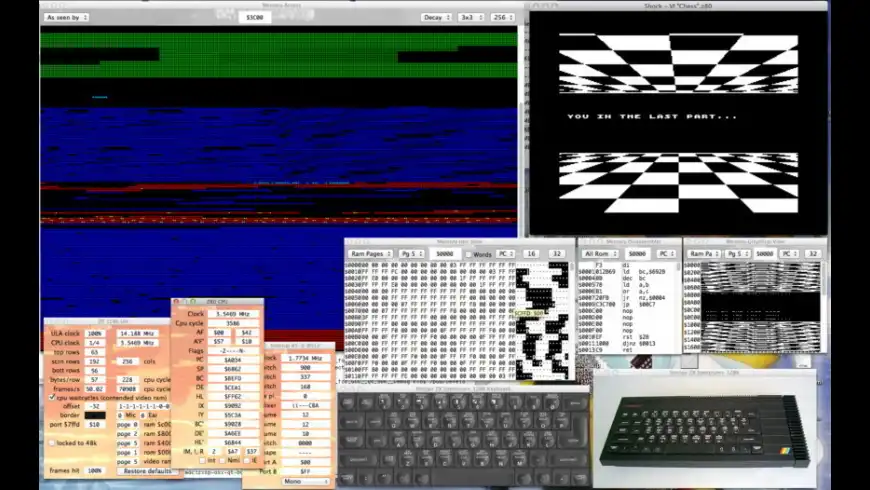
zxsp overview
zxsp is a simulator for the historic Sinclair ZX home computer families.
Supported machines:
- ZX Spectrum 16k, 48k, 128k, +2, +2A and +3.
- Spanish and French versions. Brazilian TK90X and TK95. Portuguese TK2048.
- TC2068, TS2068 and U2086
- ZX80, ZX81, TS1000, TS1500 and TK85
- Jupiter Ace
Features:
- Multiple instances
- Fullscreen mode
- Excellent stereo sound
- Precise screen and border effects
- Virtual tape recorder, keyboards and extensions
- Save highres and flashing Gif screenshots and record Gif movies
- Integrated debugger
- Instant-load and save tape files
Supported file formats:
.sna, .z80, .ace, .tap, .tzx, .80, .81, .o, .p, .wav, .aiff, .rom, .dck, .dsk, .img, .iso, .hdf, .asm and .scr files
Supported real-world machinery:
- Load from and save to real-world Specci or cassette recorder
- USB joysticks and game pads
Supported virtual peripherals:
- Tape recorder
- Misc. joystick interfaces
- Built-in joystick ports
- Interface 2 for joysticks and rom cartridge
- Kempston mouse interface
- DivIDE hard disc interface
- SPECTRA video interface
- Third party AY sound modules for the ZX81 and ZX Spectrum
- Lenslok
- Currah µSpeech
- Romantic Robots Multiface 1, 128 and +3
Integrated debugger:
- Load assembler source files
- Single stepper
- Z80 and AY sound chip register display & edit
- Memory view & edit and disassembly & inline assembler
- Breakpoints for exec, read or write access
- Video beam position indicator
What’s new in version 0.8.0pre27
Updated on May 18 2015
Version 0.8.0pre27:
View older zxsp updates- Emulation of the Currah µSpeech
- Emulation of the Multiface ONE, 128 and +3.
- Fixed: tape recorder did not split blocks properly
Information
License
Free
Size
17.5 MB
Developer’s website
https://k1.spdns.de/Develop/Projects/zxsp-osx/Distributions/Downloads
13934
App requirements
- Intel 64
- Mac OS X 10.6 or later
Try our new feature and write a detailed review about zxsp. All reviews will be posted soon.
(0 Reviews of )
There are no reviews yet
Comments
User Ratings

Apr 26 2015
Version: 0.8.0pre26
Wow i feel old suddenly. It was a awesome computer at the time ;)
Oct 8 2012
Version: 0.8.0pre4
Doesn't seem to start on 10.8.2. Getting an error message saying...
Check with the developer to make sure zxsp works with this version of OS X. You may need to reinstall the application. Be sure to install any available updates for the application and OS X.

Apr 29 2012
Version: 0.7.4pre1
This version does not run on 10.5 PPC ? Darn, another one bites the dust. Well then we have to use the older version, if you keep it in your downloads for all those PPC users still out there.
Jul 27 2007
Version: 0.7.1pr10
This is fab!
I love that there are people out there who do this stuff & for free too - it really is fantastic!
Thanks very much.
It allows me to play Knight Lore (which I STILL haven't completed), Manic Miner & all my other favourite Speccy games without the waiting for tapes, so my ZX can stay in the loft.
Superb - thanks.
Jun 7 2007
Version: 0.7
Is is stable and have all the features you want for a good emulator like those from the PC world. But one thing - something you've never seen before, something really unique makes this not only a good emulator but err.. an interactive museum... (?)
no. A time machine.
A simple idea with this realistic visualization of keyboard
just have to say - after years of searching I've found my program. Where? on MAC!
May 1 2007
Version: 0.6.7
Owning a Spectrum back in the day means this is an essential install on all the Macs I own/use.
I've never had any problems with it so can recommend without hesitation.
Apr 10 2007
Version: 0.6.6.2
*Crackle*PEEP*PEEP*Grind*Crackle*Krssshhhhhh*Crackle*
Ahhh, This brings back memories. The days of waiting 20 minutes to play Robocop on my friends Spectrum.
btw, I am having a minor issue with the instant .tap loading.
I have set zxsp to default to a 128k model. but when i try and load AY Riders demo "you are adult.tap" it sudden;ly switches to 48k and wont play it. The only way i can make it work is to go through the laborious steps of playing the tape. :(
*snap*crackle*pop*
Free

Similar apps
Fuse
Port of the Free Unix Spectrum Emulator.
Is this app is similar to Fuse? Vote to improve the quality of this list.
Vote results
0
Upvotes
3
Total score
0
Downvotes
New and Recently Updated