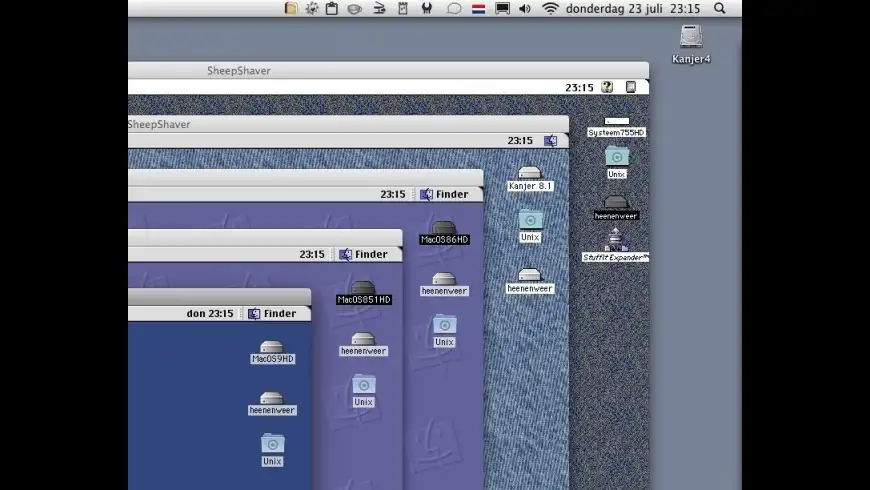
SheepShaver is an Open Source PowerPC Mac OS run-time environment. That is, it enables you to run PowerPC Classic Mac OS software on your computer, even if you are using a different operating system. However, you still need a copy of Mac OS and a PowerMacintosh ROM image to use this program. SheepShaver is distributed under the terms of the GNU General Public License (GPL).
Features:
SheepShaver runs Mac OS 7.5.2 thru Mac OS 9.0.4
PowerPC G4 emulation on non-PowerPC platforms, direct execution otherwise
Basic but portable JIT engine (x86, x86_64, mips)
What's New
Version 2.3: Release notes were unavailable when this listing was updated.
I first tried to install Mac OS 9.0 in SheepShaver, but even though the installation worked, it was impossible to boot from the installed OS. I got the blinking question mark, and a systematic crash when attempting to use the "Startup disk" control panel. So I tried 8.5 (upgraded to 8.6) instead, and it works.
Speed is quite good (about as fast as my old 800MHz G3). Overall it's pretty stable, as long as I don't try to do anything fancy like starting QuickTime Player (= instant crash). Clipboard sharing between OS X and the emulated OS is pretty cool, it even transfers images.
However, there are three major nuisances which make working with even the most basic applications awkward. First, the cursors are misaligned (text and crosshair cursors don't click where they are supposed to).
Second, each time I switch between SS and another application, there's like a 10% chance that when I return, SS will not accept any more input from the keyboard or mouse. I have to force quit it even though the OS inside it is still running.
Third, the folder sharing is very basic. Only simple datafork-only files can be shared, and type & creator codes are not transferred. Some file operations in the emulated environment fail when reading these files.
Another minor annoyance: command-clicking has no effect unless I use the middle mouse button of a three-button mouse.
Overall it's a whole lot better than nothing, but it would be even better if these 3 bugs were fixed.
I agree, I like to Play Quicktime Movie, On SS,
within My Linux Server, but can't without the Quicktime Crashing.
these 3 fixed would really help me out, turning a so-so useful Machine, to a real Workhorse.
In the meantime there have been some non-official updates which fix some of the bugs I mentioned (unfortunately, not the QuickTime crash). You can find them at http://www.emaculation.com/forum/viewforum.php?f=20 (see the sticky topics). Compiled binaries with these fixes have been made for OS X and Windows, but it should be possible to compile a Linux version as well.
Sadly, sharing a folder from the OS X side doesn't fully work - resource forks and such are not preserved properly. For instance, I can't copy a classic application back and forth without it being mangled. Data files appear to work, but type/creator info also appears to be lost, which confuses the OS 8/9 side.
Otherwise, works well. All of my previous stability problems on Intel are gone.
A GUI would be helpful (or some detailed documentation of the config file, which last I checked was a bit scattered and lacking - this may have been remedied since).
Wow. Some of you people really are useless without a pretty GUI.
I came across SheepShaver first on Linux. It worked okay for my needs then, which was occasionally running a few old Mac programs. On an old Pentium 3 the speed is tolerable. If you need to run old programs on the new Core Duos, give this a shot.
If you're avoid the command line like the plague and aren't willing to read a few man pages, you might look elsewhere. This is a typical Linux tool - best compiled from source and not designed for the lazy.
[Version 2.3]
There are currently no troubleshooting comments. If you are experiencing a problem with this app, please post a comment.
Please login or create a new MacUpdate Member account to use this feature
Watch Lists are available to MacUpdate Desktop Members Upgrade Now
Download and auto-install
using MacUpdate Desktop. Save
time moving folders and cleaning-up.
SheepShaver is an Open Source PowerPC Mac OS run-time environment. That is, it enables you to run PowerPC Classic Mac OS software on your computer, even if you are using a different operating system. However, you still need a copy of Mac OS and a PowerMacintosh ROM image to use this program. SheepShaver is distributed under the terms of the GNU General Public License (GPL).
Features:
SheepShaver runs Mac OS 7.5.2 thru Mac OS 9.0.4
PowerPC G4 emulation on non-PowerPC platforms, direct execution otherwise
Basic but portable JIT engine (x86, x86_64, mips)
Copy and paste of text between Mac OS and the host OS
File exchange with the host OS via a Unix icon on the Mac desktop
Color video display with support for run-time resolution switching
Run-time depth switching from 1 bpp to current host depth settings
Native QuickDraw 2D acceleration for BitBlt and FillRect operations
CD-quality stereo sound output
Networking: SheepShaver supports Internet and LAN networking via Ethernet and PPP with all Open Transport compatible MacOS applications
If you are using a PowerPC-based system, applications will run at native speeds (i.e., without any emulation involved). On other systems, SheepShaver provides the first PowerPC G4 emulator, though without MMU, to enable the execution of Mac OS Classic. Performance with the current CPU emulator using basic just-in-time (JIT) translation techniques is roughly 1/8-th of native speeds.
The following platforms are currently supported: Linux (i386, ppc, x86_64), MacOS X (i386, ppc), Darwin, NetBSD 2.0, FreeBSD 5.3 and Windows for x86. Please note that I am pretty careless of the Windows version since I am not a Windows developer. You are heartily invited to join the effort!
+1
+68
Dylan-Mcnamee reviewed on 21 Mar 2012
+3
+7
+1
+12
http://www.emaculation.com/forum/viewtopic.php?t=5911
The latest one seems to work great on my MacBook Pro (Early 2008).
-2
-2
http://www.emaculation.com/forum/viewtopic.php?t=5911
-1
+22
I wanted this in order to run an old OS9 game, Driver, but if QT will make SS crash Driver most certainly will.
Does anyone have any suggestions on how to get this great older game to run on my new Mac Mini, or am I SOL?
(been holding onto the disc for years now in hope! lol.)
Thank you in advance.
+11
DrLex reviewed on 04 Dec 2006
Speed is quite good (about as fast as my old 800MHz G3). Overall it's pretty stable, as long as I don't try to do anything fancy like starting QuickTime Player (= instant crash). Clipboard sharing between OS X and the emulated OS is pretty cool, it even transfers images.
However, there are three major nuisances which make working with even the most basic applications awkward. First, the cursors are misaligned (text and crosshair cursors don't click where they are supposed to).
Second, each time I switch between SS and another application, there's like a 10% chance that when I return, SS will not accept any more input from the keyboard or mouse. I have to force quit it even though the OS inside it is still running.
Third, the folder sharing is very basic. Only simple datafork-only files can be shared, and type & creator codes are not transferred. Some file operations in the emulated environment fail when reading these files.
Another minor annoyance: command-clicking has no effect unless I use the middle mouse button of a three-button mouse.
Overall it's a whole lot better than nothing, but it would be even better if these 3 bugs were fixed.
-17
within My Linux Server, but can't without the Quicktime Crashing.
these 3 fixed would really help me out, turning a so-so useful Machine, to a real Workhorse.
+11
-4
FvdG reviewed on 19 Sep 2006
Great.
However: more than 512 Mb gives a error (memoru settings)
+1
+18
truthhurts reviewed on 18 Sep 2006
Otherwise, works well. All of my previous stability problems on Intel are gone.
A GUI would be helpful (or some detailed documentation of the config file, which last I checked was a bit scattered and lacking - this may have been remedied since).
ddavidmullin reviewed on 20 Jun 2006
valens reviewed on 09 May 2006
I came across SheepShaver first on Linux. It worked okay for my needs then, which was occasionally running a few old Mac programs. On an old Pentium 3 the speed is tolerable. If you need to run old programs on the new Core Duos, give this a shot.
If you're avoid the command line like the plague and aren't willing to read a few man pages, you might look elsewhere. This is a typical Linux tool - best compiled from source and not designed for the lazy.
+20
Michael_Sebrecht rated on 21 Mar 2012
Imac Gc rated on 12 Feb 2012
Bolshoyblue rated on 03 Sep 2011
