MacUpdate
Join MacUpdate
New Member

New Developer
Explore
MacUpdate Desktop
Hot Apps

Business
Dashboard
Development
Drivers
Education
MacUpdate Promo
Popular Apps

Games
Home & Personal
Internet
Multimedia & Design
Utilities
iPhone
Apps

Login
Member Login

Developer Login
About
Search Mac Apps

Search iPhone Apps

Advanced Search
Region X
Region X 2.1
Your rating: Now say why...

(3) 2.6666666666666665

Change the region Apple DVD Player is set to.   Free
Add to my Watch List
Email me when discounted
  • Download Now
    1.9 MB
  • Visit Developer's Site
    xvi
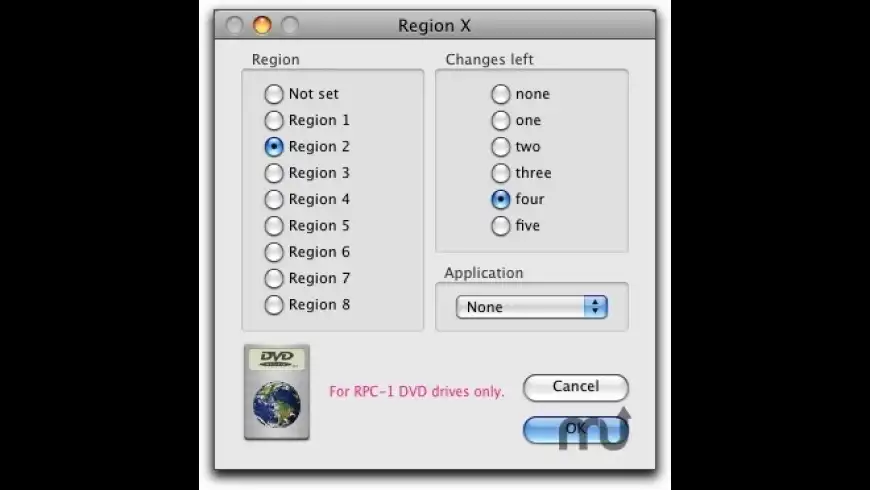
Region X will allow you to change the region Apple DVD Player is set to, when and only when you play a movie from a region-free DVD drive. You will also be able to modify the left changes count. That is, you will be able to change the region as often as you want. Compatible with Front Row and Apple's DVD Player.
What's New
Version 2.1:
    Now checks correctly whether you have a RPC-1 drive or not.
Requirements
  • PPC / Intel
  • Mac OS X 10.3 or later
  • A region-free drive is required.


MacUpdate - Region X


  • Erroneous
    +3
    Free
    Provides choice of opening DVD ...

  • DVD RegionCode...
    +1
    Free
    Allows user to set the DVD ...
Region X User Discussion (Write a Review)
ver. 2.x:
(3)
Your rating: Now say why...
Overall:
(13)

sort: smiles | time
burypromote
+1

+1

Neilio123 reviewed on 30 Jan 2011
Great Little App
[Version 2.0]


burypromote

+1

Ttrkwcz reviewed on 29 Jan 2011
After successfully flashing my Matshita 857E ZA0E drive, I can reset the region counter in Region X 1.8 but not in 2.0. What gives?!
[Version 2.0]

2 Replies

burypromote

+7
Jmknoble replied on 03 Feb 2011
Same here, MATSHITA DVD-R UJ-898 in a MacBook Pro 15-inch mid-2010.

I had to regress to Mac OS X 10.6.3 (which shipped with my MBP) to flash the DVD drive's firmware; neither the flasher nor DVD-Info-X v1.0.2 would talk to the DVD drive's firmware under 10.6.4 or later. Once the firmware was flashed, it remains flashed under 10.6.6. DVD-Info-X v3.0a3 shows the drive as RPC-1 (region-free). But Region X v2.0 says it's not. :-( Guess I still need to use Region X v1.8, then.
burypromote
+1

+1
Ttrkwcz replied on 03 Feb 2011
@Jmknoble: have you tried MatshiyaFlasher, available here: http://files.rpc1.org/index.php?act=category&id=1847 - it wirked for me on 10.6.6!
burypromote

Cdelmar commented on 25 Apr 2010
Does anyone know whether the "reset the counter" portion of the software will work on a non-flashed drive? I really don't want to flash my drive; what I liked about the version of Region X that I ran for years on my old PPC Mac was that I could simply keep using the same five "allowed" region changes indefinitely by resetting how many were still available. If I load this on my new Intel Mac, will it do the same thing?
[Version 1.8]


burypromote
-5

-34
An.onymous commented on 08 Jan 2010
As I said initially, there is a warning before one starts using this app : "Zone X works only on zone free readers (RPC-1) ... otherwise the reader will be blocked".

That's a fact that anybody can verify.

The rest of garadabout's vague, confused and pretended skilled argument does not resolve the issue.
[Version 1.8]

1 Reply

burypromote
+1

-10
Outer replied on 18 Jan 2011
OK, after following this thread I came upon this page:

< http://forum.rpc1.org/viewtopic.php?f=30&t=46116 >

and downloaded both MatshitaMemoryDump

< http://files.rpc1.org/index.php?act=view&id=5742 >

and MatshitaFlasher v2.01,

< http://files.rpc1.org/index.php?act=category&id=1847 >

as well as the associated RPC1 file for my installed Matshita
HJ-898_HC10.

MatshitaMemoryDump dumped nothing, so far as I can tell,
and MatshitaFlasher was unable to locate or detect my drive,
failing with a message about "... selected drive = (null)".

This was on a MacBookPro6,2 under OS X 10.6.6.

These programs were run under both an admin and a non-admin
account. I'm guessing 10.6.6 has broken (fixed?) something.

outer
burypromote
-11

-34

An.onymous reviewed on 13 Oct 2009
There is an absurd warning before one starts using this app : "Zone X works only on zone free readers (RPC-1) ... otherwise the reader will be blocked".
What is the use of an application that removes zone dependene only on zone free readers ????????????????????????????
[Version 1.8]

5 Replies

burypromote
+6

+6
Penguissimo replied on 13 Oct 2009
The point is that once a drive has been flashed with region-free firmware, you then need software to actually change the region of the drive…for example, if a disc will not play on a drive set to "Region Free", then this program can be used to set the drive to the region of that disc. It does what it does quite well and with a simple interface, but please don't confuse this function with the actual flashing of a drive with region-free firmware.
burypromote
-9

-34
An.onymous replied on 19 Oct 2009
Thank you for clarifying my statement GHLBTSK.
To sum :
- "Region Free" drives are not region free
- It is much easier to rip the movies into region-free movies (whatever the drive's so-called "freedom") than to bother having so-called "free" drives plus a software to make free drives work freely.
burypromote
+2

+31
Ochre replied on 01 Jan 2010
@AN.ONYMOUS: Here's your mistake:
"What is the use of an application that removes zone dependene only on zone free readers ?"
That's not what this software does. As it says in the description:
"Region X will allow you to change the region Apple DVD Player is set to [and] you will also be able to modify the left changes count."
It doesn't remove Zone Dependence---that's what RPC-1 firmware flashing does. It's a subtle difference, but an important one. It's a complicated subject and I don't claim to understand it fully (though I did read something somewhere that clarified the whole thing). Suffice to say it's all down to the film industry's continuing attempts to control DVD distribution.
EDIT: Here's a helpful link to explain the situation:
http://forum.rpc1.org/viewtopic.php?t=239
burypromote
-9

-34
An.onymous replied on 02 Jan 2010
To sum :

1. Do not buy a zone-free reader to overcome the zone limitation of a Mac. It won't work because the Mac has a chip that will keep requiring to respect the zone it is assigned to

2. Do not buy this Region X, because it ONLY WORKS ON ZONE FREE READERS, a machine you would never have bought for the reason explained in point 1.
burypromote
+1

+31
Ochre replied on 03 Jan 2010
*sigh* Chances are An.Onymous (probably a troll, to be fair) will respond poorly to this reply also, but I'd like to assure anyone who's unsure: using your Mac's drive as a multi-region DVD player is possible and, once properly implemented, simple. Frankly, ignore An.Onymous's summations---he doesn't seem to have the expertise or the knowledge necessary to make them.

1) There's no evidence to suggest buying an RPC-1 drive for your Mac will not allow you to watch DVDs from more than one region. If anything, Region X's existence strongly suggests the opposite---the second-layer of region protection is implemented in software, not a chip.
2) Region X is free.

Also, I accidentally gave An.Onymous's post a smile instead of a frown, so ignore his post's +1 rating. This is my last reply to this thread, simply to avoid being dragged down by a possible troll.
burypromote
+3

+35
robertcoogan commented on 12 Sep 2009
This saved my bacon many times. I lived in Okinawa for four years, plus my wife is from Thailand. So I have DVDs from three different regions, and occasionally I have to reset the drive. Many thanks to the devs for this one!
[Version 1.7]


burypromote
+4

+4
Timothy Smith commented on 22 Jul 2008
Just use VideoLan / VLC
[Version 1.5]


burypromote

-339
EchoRob tipped on 14 Jan 2008
There is a very simple solution to get around the dvd region code just use FairMount that comes free with the dvdremaster package. Set it to always open when a dvd is inserted in your preferences under cd's/dvd's
[Version 1.2]

3 Replies

burypromote
-3

-8
Robert Coogan replied on 02 Jul 2008
It's unlikely that a software solution by itself would work since the region encoding is part of the firmware, and not solely software-based. I was originally told that VLC Player would open any DVD, regardless of region, and that turned out to be wrong. That's why Region X works - it taps into the optical drive's firmware and makes the change there.
burypromote
+1

+42
Tice replied on 23 Jul 2008
That doesn't work - at least on my PowerBook. The DVD Player still doesn't accept the DVD because of the wrong region code. So FairMount isn't an option.

I use VLC (but used to set my drive regionfree with an older software (which doesn't seem to work after 10.5 anymore).
burypromote
+2

+98
TSMelo replied on 23 Jul 2008
If you want to use software A, always open software B first? Seriously? I don't even know or care if that would work... But it feels like a PC solution, not a Mac's...
burypromote
+1

-4
DanMartin commented on 06 Jan 2008
Fantastic!
Works like a charm with 10.5.1!

Kudos for the developers.
[Version 1.1.3]

8 Replies

burypromote

+1
tonehome commented on 08 Jan 2008
hi, i'm a nubie to this dvd region problem.
this program (Region X)
looks like the way to go.

but i have a very basic question.
my mac just has the standard drive
that came with it..

PIONEER DVD-RW DVR-107D

it has the limited region plays...

what do i need to do to enjoy the unlocking benefits of Region X?

many thanks for any help/instruction here!!
burypromote
+1

-4
DanMartin replied on 09 Jan 2008
Try this site and check if they have the script to flash your drive:
http://lasvegas.rpc1.org/
burypromote
+1

+1
tonehome commented on 09 Jan 2008
thanks dan,
haven't had a look yet,
but before i do,
can you explain what 'flashing the drive' actually is?

is it dangerous, as in, could it damage anything?

thanks again!
burypromote
+1

-4
DanMartin replied on 10 Jan 2008
There is the possibility of damage to your equipment. You do it at your own risk. That's why it's so important that you get the right script for your piece of hardware.

As to what flashing is, check this out:
http://www.tech-faq.com/flashing-firmware.shtml
burypromote

+1
tonehome commented on 10 Jan 2008
thanks again,
i've just spent time looking over lots of links that your links led me too.

i understand more about what acually happens with a flash,

but like me, there's lots of posters who are asking for a simple step by step
procedure for this process on their macs.

can you direct me to such simple instruction?
a
many thanks,
tony
burypromote

-4
DanMartin replied on 10 Jan 2008
Try this site out - http://forum.rpc1.org/ - and check the Macintosh Specific Section. Look for your specific
dvd recorder - brand, model and firmware revision.
burypromote

+1
tonehome commented on 10 Jan 2008
thanks,

i had checked that out.
i downloaded the program to suit my model, etc.

what stopped me was the part regarding the firmware.

i'm supposed to put the firmware into the folder and install.

there was no instruction as to
where the firmware is, and how to put the firmware into that folder.

any idea re this?

tony
burypromote

-4
DanMartin replied on 11 Jan 2008
What I downloaded was the script - "program" - that I ran once and it flashed the DVD. I did not have to install it. Please check if what you downloaded is a script. Also, remember that when you run such a program you MUST have your computer plugged into a working outlet and you MUST NOT under any circumstances interrupt the process. And, most important, you're doing it at your own risk so make sure you got the right script.
burypromote

+6
xypher commented on 03 Jan 2008
Here's a solution for using the app with a region free drive under Leopard. (Taken from a forum).

"Delete the ~/Library/Application Support/DVD Player directory and the ~/Library/Preferences/com.apple.DVDPlayer.plist file. After running Region X again, and modifying the zones, DVD Player will now be aware of the new settings."
[Version 1.1.3]


burypromote

+7
Gazzmanzx6 had trouble on 28 Jan 2011
Region X used to work fine for me but now with the new RPC-1 check it just states I don't have a region free drive and Quit is the only option.
I have 3 DVD drives, 2 internal and 1 external. One of the internal drives is region free, the other 2 drives aren't.

Back to the previous version for me.
[Version 2.0]

1 Reply

burypromote

+7
Gazzmanzx6 replied on 13 Feb 2011
Version 2.1 fixes the problem
burypromote

Scene_kid had trouble on 02 Jun 2010
hey, well the Region X, when opened indicates a warning saying that, your drive would be locked... But I would like to ask what to do so, so that my drive doesn't lock...
[Version 1.8]


burypromote

Samjurai had trouble on 01 Apr 2009
Hey, I'm running an early 2008 Mac Pro. I installed a second DVD drive which has been flashed to RPC1 .. I'm wondering if this app knows which of my 2 drives to change the region of, as there is no selection for this would it automatically do the main drive? NOT the second drive (which is the RPC1 drive) .. would a workaround be to swap the drives over? any advice or confirmed workarounds would be much appreciated. thanks :)
[Version 1.6]


burypromote

globetrotterdk had trouble on 14 Jan 2008
How can you tell if you have a region-free DVD drive installed??
[Version 1.2]

2 Replies

burypromote
+3

+41
Macroxx replied on 14 Jan 2008
You can use the program "DVD Info X". It tells you if your DVD drive is region free or not.

http://www.macupdate.com/info.php/id/16366/

.
burypromote

+334
MacUpdate Lon replied on 14 Jan 2008
Nice tip, thanks. I just downloaded DVD Info X. I live outside the USA and so I sometimes have region issues.
burypromote

noemi had trouble on 28 Nov 2006
hi! i can not download the program, the link doesn't work. how did you do it? please help! :O

thanks a lot :)
[Version 1.1.2]


+87

R1000m rated on 27 Jan 2011

[Version 2.0]


Kazheard rated on 25 Jan 2011

[Version 1.9]


Downloads:210,209
Version Downloads:25,006
Type:Multimedia & Design : Video
License:Free
Date:12 Feb 2011
Platform:PPC / Intel
Price:Free0.00
Overall (Version 2.x):
Features:
Ease of Use:
Value:
Stability:
Displaying 1-10 of 39
< 1 2 3 4 >
Displaying 1-5 of 5
Displaying 1-2 of 2
-
-
-
Please login or create a new
MacUpdate Member account
to use this feature
Watch Lists are available to
MacUpdate Desktop Members
Upgrade Now
Download and auto-install
using MacUpdate Desktop. Save
time moving folders and cleaning-up.
Region X will allow you to change the region Apple DVD Player is set to, when and only when you play a movie from a region-free DVD drive. You will also be able to modify the left changes count. That is, you will be able to change the region as often as you want. Compatible with Front Row and Apple's DVD Player.
Add/Update Listing About MacUpdate Desktop Career Opportunities RSS Twitter Facebook Advertise Sitemap
Copyright © 2012 MacUpdate LLC


- -
