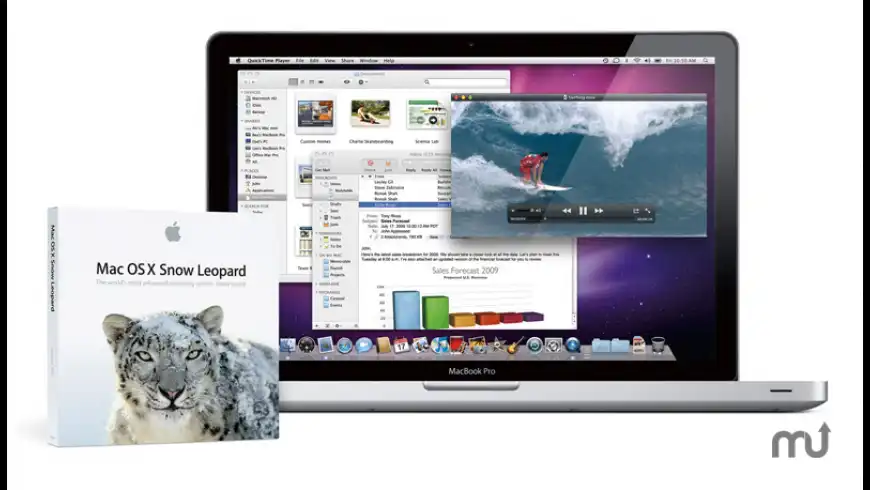
Apple Mac OS X 10.6 Snow Leopard builds on a decade of Mac OS X innovation and success with hundreds of refinements, new core technologies and out of the box support for Microsoft Exchange.
To create Snow Leopard, Apple engineers refined 90 percent of the more than 1,000 projects that make up Mac OS X. Users will notice refinements including a more responsive Finder; Mail that loads messages up to twice as fast; Time Machine with an up to 80 percent faster initial backup; a Dock with Expose integration; QuickTime X with a redesigned player that allows users to easily view,
What's New
Version 10.6.8 v1.1:
Resolves issues with:
Transferring personal data, settings, and compatible applications from a Mac running Mac OS X 10.6 Snow Leopard to a new Mac running Mac OS X 10.7 Lion
Certain network printers that pause print jobs immediately and fail to complete
System audio that stops working when using HDMI or optical audio out
Requirements
PPC / Intel, Mac OS X 10.6.6 or later
I installed the Supplemental update without installing the Combo Update first because I was getting some kind of error. Now, after restarting my sound doesn't work. Any help?

Installing the 10.6.8 V1.1 Combo updater will overwrite Safari 5.1 if you have already installed it, and replace it with 5.0.5 or .6. Just reinstall Safari 5.1, or skip the Combo thing altogether and do the Supplemental update. FYI.
I have repeatedly downloaded the 10.6.8 v1.1 combo update and I can never open the resulting .dmg file. Anyone else having this problem? Anyone have an alternate download link? I tried apple uk, but could not find a suitable link.
I installed this update through Software Update. The size of the file was 1/10th of what is being downloaded here. It was quick without any problems. Some people have stated that the About This Mac window notates the supplemental update. My window still says OS 10.6.8
I think what you got was the "Mac OS X 10.6.8 Supplemental Update," which says it resolves the exact same issues as this update. It's in Software Update, but there's also a direct download that's only 10MB. (http://www.macupdate.com/app/mac/39580/mac-os-x-10.6.8-supplemental-update)
I *think* what this update is is actually 10.6.8 with the above "Supplemental Update" already rolled into it, and as a combo updater, can update an existing 10.6.8 installation the same as just installing the "Supplemental Update" can.
I hope my frustration with version numbering is more appropriate now... :) Not only are there two versions of 10.6.8, there are apparently two differently named updates to end up with the new version. (Is it "10.6.8 version 1.1?" Is it "10.6.8 with Supplemental Update?" Seems like it's both!)
After installing the Combo updater, rebooting wouldn't make it to the logon screen, the MBP 2011 13in just shut down.
Replacing the mach_kernel file with the 10.6.7 version from my emergency back-up restored everything to normal.
I experienced the same issue after applying the MBP Software Update 1.4 which installed a newer version of the mach kernel, turned out the new Combo updater has the same newer version of that file. You need to make the mach-kernel (to be found at your main volumes root level) visible first before being able to replace it.
Upgraded a couple days ago. Only glitch I've seen was with an old Xerox printer driver. Still the rock solid SL I'm used to. Currently working up courage to upgrade my main computer to Lion, which has also worked fairly well so far on my old MacBook.
If you're having lots of weird bugs, I highly suggest doing a fresh system install, running software update until everything is curent, and then migrating your user files back from your time machine.
great to see SL is still supported just in process of migrating back to SL from Lion which is not usable for me and probably one of the worst releases apple had in a long time
What, are they afraid to call it OSX 10.6.9?? It would be the best named OS of all time. Colbert would have a blast asking if people had '6.9 their computer.
I understand why 1.1 was needed as the paused printer queue issue was a real problem for the environments we support. More a fix of the fix than a real update...
The issue isn't it being needed, it's the numbering being stupid. Version 10.6.8 version 1.1! Shows up as "Mac OS X 10.6.8 Supplemental Update" in Software Update for me, where I just started installing it from.
It's stupidly confusing. Call it 10.6.9 like the original poster suggested. Or if you're scared to bump it to 10.6.9 if it's "too minor," then use 10.6.8.1 or 10.6.8a or something at least halfway-sane like that.
It's not really a trivial point, though. It makes things like tech support harder when you now essentially have two versions of 10.6.8. "Do you have 10.6.8 or 10.6.9?" is a much easier question for the average user than "Do you have the newer 1.1 version of 10.6.8 or just 10.6.8 version 1.0? You can find that in System Profiler under this arcane thingy."
Make it a named update of some other sort rather than a version (with revision, no less!) of a version, or call it something that makes sense... Using overly complicated version numbers makes them much less useful.
Well home users are going to run Software Update. And techs are going to understand that 10.6.8 v1.1 is a re-release of 10.6.8. I mean, this isn't the first time Apple re-released a dot release update. I understand your point, but the answers are all at the download page at support.apple.com.
The update went through fine for me, but ever since upgrading the locationd process has been going crazy - way too many internet access attempts. Running Little Snitch I can see that it tries (unsuccessfully, I might add) to determine my location every 10 seconds (5 of which is rest and 5 of which is network activity). Last night I accidentally fell asleep with the AirPort still connected, and despite having no applications running and no viruses, managed to rack up 112MB of network activity in 7 hours! I have a usage cap on my service, so I don't want the computer wasting resources this way. Unfortunately I need location services for some of my apps (though they're pretty useless right now because Skyhook keeps reporting my location incorrectly). Anybody else having this problem? Any idea how to fix it?
1) UnderCover v4.5. This problem has been eliminated now; the developer sent me an update within 18 hours to correct the problem. Thank you, Peter!
2) iTunes v10.3.1. This problem persists. I have no idea why iTunes needs to constantly know my location, but turning on iTunes while my AirPort is active results in an endless stream of locationd access attempts. I've included this in Troubleshooting on the iTunes page (http://www.macupdate.com/app/mac/5661/apple-itunes)
Blue screen after 10.6.8 update (by software update) on my macbook pro. I can't boot and i get no access to the login window ! I see only the apple logo, on go to the blue screen... next the MBP automatically shut down !
This update is really dangerous ! Don't apply it !
See my post below.
The mach_kernel resides at root level as an invisible file.
Boot from your emergency back-up, then
locate it with Path Finder or another suitable application, make it visible. Find the older machkernel by browsing through the 10.6.7 Combo Updater using the demo version of Pacifist (look it up here on MU), extract it to your Desktop (remember to make it visible first, I think it is possible from within Pacifist). Alternatively, use Path Finder and drag a copy from your working back-up to your Desktop, then drag it onto the icon of your havoc'ed disk - remember it is found at root level.
Reboot from your default unit, it should work now, should the mach kernel be the root of your problem (excuse the pun).
Hope this helps.
Normally, one should be very careful manipulating with these essential files - there's a reason why they're invisible by default - but since your system seems to be hosed IMHO it is worth giving it a try, since it may revive your MBP. If it shouldn't work as expected, a fresh install will be necessary anyway.
An updated version of the mach_kernel file (creation date: June 8, 2011) made my MBP shutdown prematurely after applying the MBP Software Update ver1,4 . Restoring the older mach_kernel (March 6 2011) from back-up made everything normal again.
The 10.6.8 Combo Updater also installs the newer mach_kernel at Root level, and again the MBP would shut down during boot, before the login screen. Safe Boot would let me proceed a couple of minutes beyond login, before the mac would shut down without any error message. No clue in the system log (last entry before shutdown was "BUG found in libdispatch" - hm).
Again, replacing the mach_kernel file with the older version of which I had kept a copy, cured the problem, and as I am typing this, my MBP has been running without a hitch for almost one hour.
Another poster at MU (a_w) had similar problems with his MBP 13 Early 2011 after applying the MBP SW 1.4 updater, again with the new mach_kernel file being the culprit.
Hope this can help anybody having skipped the MBP 2011 software update and experiencing premature shutdowns of their new macbook pro after updating to Snowy 10.6.8.
After installing the Combo updater, my MBP 13 Early 2011 would shut down spontaneously during startup, even before log-in.
Safe boot made it survive a couple of minutes longer, then it would shut down without a kernel panic. No clue in the system log (last message before shutdown was, however, that a bug was found in libdispatch - hm).
Then I remembered a similar problem after installing the MacBook Pro Software Updater 1.4, which amongst a couple of framework updates also updated the mach_kernel file at Root level. Replacing that with the previous mach_kernel file made the premature shutdown issue go away.
The 10.6.8 updater again replaced the older mach_kernel with the newer item, I found (using Path Finder). Fortunately I was able to boot from an emergency drive and then replace the mach_kernel with the older version. VoilĂ - everything runs stable now.
This problem seems to be specific to some MBP 13 Early 2011, as another poster here on MU (a_w) encountered a similar issue with his own machine, and again the newer mac_kernel appeared to be the culprit.
If anybody needs the old mach_kernel, I would be able to send it to him or her.
Updated through Software Update, and it hung my 2010 13" MacBook Pro during the restart cycle! After 15 minutes it was clearly not making any headway, so I finally had no choice but to power down to restart. Not sure if this messed anything up yet, but it's distressing to say the least. So far only noticeable difference from 10.6.6 is it's a little slower all around (start-up, apps, making a WI-FI connection). Perhaps this will improve, but I'm not holding my breath.
Hi all, I purchased a shiny new 2.8 GHz Intel Core I5 27" iMac which came bundled with OS 10.6.3 yesterday. I transferred my old iMac to the new one as per a typical set-up and then applied the auto-update to 10.6.7.
Upon attempting restart the machine immediately came up with code on the top left hand side (I wish I had taken a photo) saying that a system could not be found etc. I freaked out and re-installed the system (10.6.3) from the DVD.
The machine re-started fine. Has anyone experienced this. What do I do to update - will it happen again? Any ideas.
I installed this update on 5 different machines and every time the updated appears to install correctly and the machine restarts but the update is actually not applied and some software will stop working.
If you run software update it will show the update again and about my Mac will still show 10.6.4
I installed via software update and combo update and both with the same result.
The thing Apple broke with the 10.6.3 Update is still broken: can't export movies with chapters using QuicktimePlayer's function "Save for Web" (no files are produced, no error messages available). So, can anyone tell me how I'm supposed to make a iPhone-Version of my podcast-movies without QuickTimePlayer and with chapters?
Please login or create a new MacUpdate Member account to use this feature
Watch Lists are available to MacUpdate Desktop Members Upgrade Now
Download and auto-install
using MacUpdate Desktop. Save
time moving folders and cleaning-up.
Apple Mac OS X 10.6 Snow Leopard builds on a decade of Mac OS X innovation and success with hundreds of refinements, new core technologies and out of the box support for Microsoft Exchange.
To create Snow Leopard, Apple engineers refined 90 percent of the more than 1,000 projects that make up Mac OS X. Users will notice refinements including a more responsive Finder; Mail that loads messages up to twice as fast; Time Machine with an up to 80 percent faster initial backup; a Dock with Expose integration; QuickTime X with a redesigned player that allows users to easily view, record, trim and share video; and a 64-bit version of Safari 4 that is up to 50 percent faster and resistant to crashes caused by plug-ins.
Snow Leopard is half the size of the previous version and frees up to 7GB of drive space once installed. For the first time, system applications including Finder, Mail, iCal, iChat and Safari are 64-bit and Snow Leopards support for 64-bit processors makes use of large amounts of RAM, increases performance and improves security while remaining compatible with 32-bit applications.
Grand Central Dispatch (GCD) provides a revolutionary new way for software developers to write applications that take advantage of multicore processors. OpenCL, a C-based open standard, allows developers to tap the incredible power of the graphics processing unit for tasks that go beyond graphics.
papwilly reviewed on 09 Sep 2011
+2
+43
+48
+2
+2
Pepper131 reviewed on 26 Jul 2011
+63
+17
Drsfg reviewed on 26 Jul 2011
+2
+62
I *think* what this update is is actually 10.6.8 with the above "Supplemental Update" already rolled into it, and as a combo updater, can update an existing 10.6.8 installation the same as just installing the "Supplemental Update" can.
I hope my frustration with version numbering is more appropriate now... :) Not only are there two versions of 10.6.8, there are apparently two differently named updates to end up with the new version. (Is it "10.6.8 version 1.1?" Is it "10.6.8 with Supplemental Update?" Seems like it's both!)
+17
-1
-70
Replacing the mach_kernel file with the 10.6.7 version from my emergency back-up restored everything to normal.
I experienced the same issue after applying the MBP Software Update 1.4 which installed a newer version of the mach kernel, turned out the new Combo updater has the same newer version of that file. You need to make the mach-kernel (to be found at your main volumes root level) visible first before being able to replace it.
-1
bennyboyhead reviewed on 25 Jul 2011
If you're having lots of weird bugs, I highly suggest doing a fresh system install, running software update until everything is curent, and then migrating your user files back from your time machine.
+2
+109
+1
+43
+2
+53
-1
+56
+3
+62
It's stupidly confusing. Call it 10.6.9 like the original poster suggested. Or if you're scared to bump it to 10.6.9 if it's "too minor," then use 10.6.8.1 or 10.6.8a or something at least halfway-sane like that.
-1
+56
+3
+62
Make it a named update of some other sort rather than a version (with revision, no less!) of a version, or call it something that makes sense... Using overly complicated version numbers makes them much less useful.
-2
+56
+14
+14
1) UnderCover v4.5. This problem has been eliminated now; the developer sent me an update within 18 hours to correct the problem. Thank you, Peter!
2) iTunes v10.3.1. This problem persists. I have no idea why iTunes needs to constantly know my location, but turning on iTunes while my AirPort is active results in an endless stream of locationd access attempts. I've included this in Troubleshooting on the iTunes page (http://www.macupdate.com/app/mac/5661/apple-itunes)
+3
This update is really dangerous ! Don't apply it !
-70
See my post below.
The mach_kernel resides at root level as an invisible file.
Boot from your emergency back-up, then
locate it with Path Finder or another suitable application, make it visible. Find the older machkernel by browsing through the 10.6.7 Combo Updater using the demo version of Pacifist (look it up here on MU), extract it to your Desktop (remember to make it visible first, I think it is possible from within Pacifist). Alternatively, use Path Finder and drag a copy from your working back-up to your Desktop, then drag it onto the icon of your havoc'ed disk - remember it is found at root level.
Reboot from your default unit, it should work now, should the mach kernel be the root of your problem (excuse the pun).
Hope this helps.
-70
+3
Solved !
-70
The 10.6.8 Combo Updater also installs the newer mach_kernel at Root level, and again the MBP would shut down during boot, before the login screen. Safe Boot would let me proceed a couple of minutes beyond login, before the mac would shut down without any error message. No clue in the system log (last entry before shutdown was "BUG found in libdispatch" - hm).
Again, replacing the mach_kernel file with the older version of which I had kept a copy, cured the problem, and as I am typing this, my MBP has been running without a hitch for almost one hour.
Another poster at MU (a_w) had similar problems with his MBP 13 Early 2011 after applying the MBP SW 1.4 updater, again with the new mach_kernel file being the culprit.
Hope this can help anybody having skipped the MBP 2011 software update and experiencing premature shutdowns of their new macbook pro after updating to Snowy 10.6.8.
-70
Safe boot made it survive a couple of minutes longer, then it would shut down without a kernel panic. No clue in the system log (last message before shutdown was, however, that a bug was found in libdispatch - hm).
Then I remembered a similar problem after installing the MacBook Pro Software Updater 1.4, which amongst a couple of framework updates also updated the mach_kernel file at Root level. Replacing that with the previous mach_kernel file made the premature shutdown issue go away.
The 10.6.8 updater again replaced the older mach_kernel with the newer item, I found (using Path Finder). Fortunately I was able to boot from an emergency drive and then replace the mach_kernel with the older version. VoilĂ - everything runs stable now.
This problem seems to be specific to some MBP 13 Early 2011, as another poster here on MU (a_w) encountered a similar issue with his own machine, and again the newer mac_kernel appeared to be the culprit.
If anybody needs the old mach_kernel, I would be able to send it to him or her.
+3
bk213238@skynet.be
Thanks !
-70
A mail with the zipped mach_kernel file has just been sent.
Tell me how it works out.
BW
+14
Upon attempting restart the machine immediately came up with code on the top left hand side (I wish I had taken a photo) saying that a system could not be found etc. I freaked out and re-installed the system (10.6.3) from the DVD.
The machine re-started fine. Has anyone experienced this. What do I do to update - will it happen again? Any ideas.
-1
+1
-5
+109
I installed this update on 5 different machines and every time the updated appears to install correctly and the machine restarts but the update is actually not applied and some software will stop working.
If you run software update it will show the update again and about my Mac will still show 10.6.4
I installed via software update and combo update and both with the same result.
+5
-42
+2
Aeon rated on 22 Jul 2011
+1
Mhmyers rated on 23 Jun 2011
+5
Jackmacb rated on 25 Mar 2011
+63
Desterwallaboo rated on 22 Mar 2011
+25
Serste rated on 06 Jan 2011
+10
Evilinstone rated on 06 Jan 2011
+5
Dan1983 rated on 06 Dec 2010