MacUpdate
Join MacUpdate
New Member

New Developer
Explore
MacUpdate Desktop
Hot Apps

Business
Dashboard
Development
Drivers
Education
MacUpdate Promo
Popular Apps

Games
Home & Personal
Internet
Multimedia & Design
Utilities
iPhone
Apps

Login
Member Login

Developer Login
About
Search Mac Apps

Search iPhone Apps

Advanced Search
RAR
RAR 4.0.1b1
Your rating: Now say why...

(2) 0.75

Command line RAR archive utility (Beta.)   Shareware ($29)
Add to my Watch List
Email me when discounted
  • Download Now
    644 KB (Beta)
  • Download 4.0.0
    643 KB (Stable)
  • Visit Developer's Site
    rarlab.com
RAR is a compression program offering an original algorithm. This new way to compress files provides greater efficiency, and makes smaller archives -- especially on multimedia files, and archives with many files. RAR also offers self-extracting capabilities as well as disk-spanning (or multi-volumes). RAR is the official RAR archive utility for Mac OS X (offered as a command line utility), especially useful while reading all those alt.binaries newsgroups.

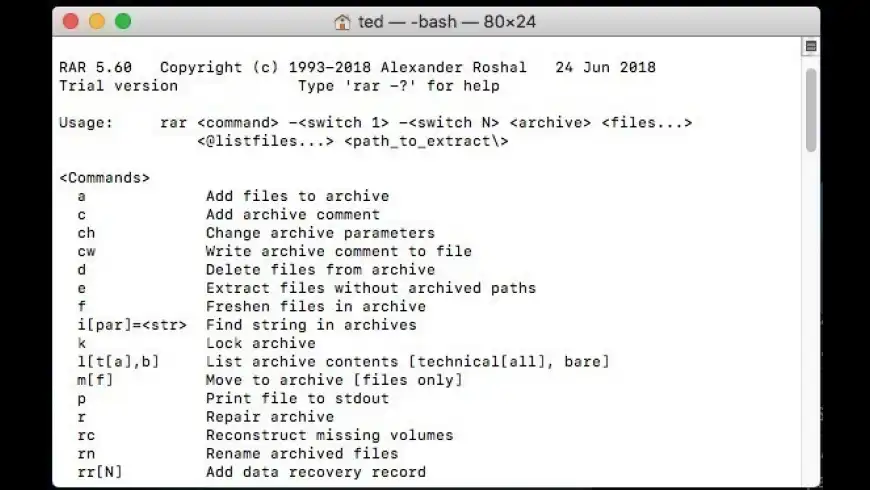
To use the RAR command line application, place the files in any folder on your hard drive, and call the utility by typing
What's New
Version 4.0.1b1:

Bugs fixed:

  • "Repair" command failed to properly reconstruct structure of RAR archives, which contained at least one file with packed size exceeding 4 GB. This bug did not affect the recovery record based repair. It happened only if recovery record was not found and RAR performed reconstruction of archive structure;
  • RAR could crash when creating a new archive with -agNNNN switch if archive number in generated name was very large, like a thousand or more.
Version 4.0.1b1:

Bugs fixed:

  • "Repair" command failed to properly reconstruct structure of RAR archives, which contained at least one file with packed size exceeding 4 GB. This bug did not affect the recovery record based repair. It happened only if recovery record was not found and RAR performed reconstruction of archive structure;
  • RAR could crash when creating a new archive with -agNNNN more...
Requirements
PPC / Intel, Mac OS X 10.3.9 or later


  • Rarify
    +12
    Free
    GUI for RAR compressor.

  • BetterZip
    +12
    Shareware $19.95
    Archive inspection tool.

  • unRarX
    +11
    Free
    GUI front-end for unrar.

  • RAR Expander
    +11
    Free
    Extracts files contained in RAR ...

  • SimplyRAR
    +9
    Free
    GUI for RAR compression.

  • sArchiver
    +5
    Shareware $19.99
    File archiving and extraction.
RAR User Discussion (Write a Review)
ver. 4.x:
(2)
Your rating: Now say why...
Overall:
(6)

sort: smiles | time
burypromote

-26

Gn-0000 reviewed on 22 Jul 2011
It is really a joke. It wouldn't multi-thread on multi CPU cores system!!! Oh my God! It only draws 1 CPU core to work in my 12 cores Westmere Mac Pro!!! Jesus Crisis. We are no longer to work on a 80386 computer! Why no multi-threading support?!!

It takes 5 hours to complete the job of compressing 50GB iso files into multi-segmented far files!

it actually does not stick to our era!
[Version 4.0.1b1]


burypromote
+1

+27

Antoinesynopsis reviewed on 10 May 2011
No graphical interface and it costs 29 $ ?!! It's a joke ?!
[Version 4.0.1b1]


burypromote
-5

+17
Gary_box commented on 04 Feb 2010
I use Unrar. Much better and free
[Version 3.9.2 beta 1]

2 Replies

burypromote
+3

+99
Lounge Deluxe replied on 16 Feb 2010
Unrar is just about decompressing (and excellent at it), Rar can also compress.
burypromote
+1

+298
cksum replied on 16 Mar 2010
Sigh. Did IQs drop suddenly?

Unrar is RAR, in that, it's the same exact program, from the same exact developer, using the same exact algorithm, except it does not have the functionality of actually making rar files, just decompressing them. And that's why it's free. It gives the entire public the ability to decompress proprietary rar files at no added charge (exact same deal with Stuffit).

That's why both spit out the same CP notice ("unrar -h", "rar -h"): Copyright (c) 1993-2009 Alexander Roshal
burypromote
+8

+12
M2k commented on 31 Dec 2009
I think this is another case of MAC users being neglected by software companies who prioritise Windows versions.

If they want to charge MAC users the same money as Windows users they should give MAC users the same product, not some outdated basic version over and over again.

Lets face it, WinRAR / RAR is not exactly a top-end piece of software with major complexities in developing and supplying a GUI front-end for MAC users, it seems the developers are plain lazy and cannot be bothered to give their users / customers what they want.
[Version 3.9.1]


burypromote
+2

+6
RexLuthor commented on 31 Mar 2009
I was looking for a right click "create rar archive" option just like on windows or on the finder for zip archives. I finally found something that does this amazingly on a blog. Check this out:
http://stuffforlife.blogspot.com/2009/03/data-compression-in-mac-os-x-how-to.html

Hope this is useful.
[Version 3.8]


burypromote
-9

-31
ShotgunWeddings commented on 02 Aug 2008
What I can't believe is people are actually dumb enough to buy into this lame excuse of a RAR option.

It's 2008 , CLI based tools is not only wrong it's and insult to every Mac user.

Like most Mac users we left the Windows side to get away from the stupid command line garbage because the Mac OS was using a GUI front end for everything instead, saved time and increased productivity.

Terminal junkies need a reality check , you want CLI , then buy a UNIX or PC box. I don't want CLI period.

30 bucks for an inconvienent method , you couldn't me double that to even waste a single keystroke to use it!

Ha ha ha
[Version 3.8b4]

4 Replies

burypromote

+28
Bruce_Y replied on 02 Aug 2008
While I agree that the major paradigm of the Mac experience is a GUI interface, but, sarcasm aside:

the RAR compression is supposed to be pretty much state of the art/ tighter than other archive compression schemes. So there is some value in itself.

But I agree that it seems Nuts for Mac users to have to pay the same $29 that a Windows user pays who gets both Command line and a nice GUI window interface (think similar to winzip).

Seems to me that Mac users should either pay less for getting Command line only, or should be getting the same bundle of CLI plus GUI.
As it is now, you still have to buy another package which then calls the RAR CLI, if you want to get it all done from the Mac GUI (which would be my preference).

Would be nice if the RAR folks, or one of our clever Mac wizard developers, could put together a Friendly user interface with RAR compression and at a total packaged reasonable price.
burypromote

+32
Gannet replied on 02 Aug 2008
Except that RAR *isn't* state of the art/ tighter than other archive compression schemes. Just like DivX isn't state of the art for video compression, people only use it because other people are doing it and it's easy.
7-zip offers very competitive compression in comparison with RAR and is entirely free. If you want a nice, full-featured compression program for OS X you can get BetterZip (not free), which can compress to a variety of formats including 7-zip and RAR (RAR licence must be purchased separately).
burypromote
+1

+101
Chriswan replied on 20 Aug 2008
Agreed

You better of buying BetterZip which altough by default can't create a RAR archive (have to buy a RAR license), can do a lot more and priced less
burypromote

+298
cksum replied on 16 Mar 2010
Um yeah, here's a reality check for YOU: Mac OS X is a fully certified UNIX system... how about that. And cli on a PC? You obviously have no idea what you're talking about. Too bad you didn't just keep your mouth shut; now there's really no doubt you are a fool...
burypromote
+2

+200
Mark Everitt commented on 30 May 2008
If you only need the unrar utility you can get it using macports. This has some advantages such as not needing to install stuff into /usr/bin, and if you use porticus with macports then the only use of the command line will be to use unrar itself.

Macports, Porticus and unrar obtained this way are all free.
[Version 3.8b1]

2 Replies

burypromote

+298
cksum replied on 16 Mar 2010
But don't you have to install macports (and X11)? Seems like a silly tradeoff for copying a single file into /usr/bin to me...
burypromote

+8
ednl replied on 16 Mar 2010
Put it in /usr/local/bin
burypromote

+6

xypher reviewed on 30 May 2008
Has excellent functionality. To get the best out of it use with the wrapper, 'RarMe' available here:

http://www.macupdate.com/info.php/id/12598

Simply place the Rar and Unrar files into the resources folder.
[Version 3.8b1]


burypromote
+3

+8

Etnier reviewed on 18 Jun 2007
It's almost impossible to believe that this program, vital for people who do wish to transmit files using the .rar format, is so incredibly difficult, not to say risky to install. And to charge $30.00!!!

Installation instructions are not included in the package: you have to be on this page of comments to learn how to 'install'.

"(give root:wheel ownership via 'sudo chown root:wheel ')":This is incomprehensible to me.

"copy 'rar' and 'unrar' to '/usr/bin',
copy 'default.sfx' to '/usr/lib/' and
copy 'rarfiles.lst' to '/etc/'."

A bit more easy to understand, but not for most Macintosh users. There are comments here from users who can't locate their usr/bin and similar files, not surprising given that those folders are invisible.

IMHO any Mac developer who releases general-purpose software in such an arcane bundle of bits should be ashamed of themselves. Isn't this what an INSTALLER is for?????

I guess these guys "own" the .rar format and so we're stuck with this, but it's just not fair.
[Version 3.7]

9 Replies

burypromote

matt_belbin replied on 22 Nov 2007
where is user/bin ?
when i click on my user, i cant find 'bin' anywhere.
sorry im a mac noob.
burypromote

chimpy commented on 24 May 2008
You're mistaking /usr/ for /Users/ or your Home folder. /usr/ is a hidden folder in the Computer folder. You can only access it by enabling hidden folders, or by pressing Shift+Command+G in Finder (or select Go to Folder from Finder's Go menu) and then type in "/usr/bin/" (minus the quotes). Your predicament shows exactly why the OP is right.
burypromote

+4
GForce replied on 01 Jun 2008
I agree with this comment. There are no installation instructions and no installer. How could you release such an app without either one or both?
burypromote

+30
mrelcee replied on 16 Jun 2008
Agreed - it wouldn't take much for them to make a package installer to do this for you.

As a matter of fact, 3-4 minutes if you are familiar with how to do it and 15 minutes tops if it's your first time..

I've done it myself to hand out to non-techie friends..

On the other hand, I'm rather grateful they do a Mac build at all and that the winrar key I bought ~8 years ago still works when i install it in /etc for this version.

That is truly a liberal licensing scheme..
burypromote

chimpy replied on 17 Jun 2008
I ended up using SimplyRAR because it's free, and has this RAR binary in it, so it RARs stuff perfectly well. It's how this binary should have been implemented.
burypromote

+8
Etnier replied on 17 Jun 2008
Yeah: I recently found SimplyRAR as well and am happy I did.
burypromote

+4
~s replied on 11 Jul 2008
This is a command-line utility. If you download it, you usually know how to install and how to use.

Otherwise, go somewhere else and pick a front-end and mac-like such as the ones mentioned around (I think)...
burypromote

+4
~s replied on 11 Jul 2008
And, BTW, no need to install into /usr/bin, login as administrator or similar. You can place the binary in whatever place you wish.

I still remember the days when "mac-like" was equivalent to be unable to watch divx or hear mp3...
burypromote
+1

+160
Ilgaz replied on 08 May 2010
never copy anything to /usr/bin , it belongs to OS vendor. copy to /usr/local/bin instead.

Besides it is pathetic (a .pkg can do same thing), they are giving very wrong instructions.
burypromote

+4
Leo Kuznetsov (developer) commented on 01 Jun 2007
Zipeg is not Windows only. It is actually developed on and for Macintosh and was ported to Windows lately.
Try http://www.zipeg.com/mac.index.html
[Version 3.7]


There are currently no troubleshooting comments. If you are experiencing a problem with this app, please post a comment.


+38

Werty rated on 17 Jan 2012

[Version 4.0.1b1]


Downloads:86,176
Version Downloads:8,900
Type:Utilities : Compression
License:Shareware
Date:10 May 2011
Platform:PPC / Intel
Price: $29.00
Overall (Version 4.x):
Features:
Ease of Use:
Value:
Stability:
Displaying 1-10 of 19
< 1 2 >
Displaying 1-1 of 1
-
-
-
Please login or create a new
MacUpdate Member account
to use this feature
Watch Lists are available to
MacUpdate Desktop Members
Upgrade Now
Download and auto-install
using MacUpdate Desktop. Save
time moving folders and cleaning-up.
RAR is a compression program offering an original algorithm. This new way to compress files provides greater efficiency, and makes smaller archives -- especially on multimedia files, and archives with many files. RAR also offers self-extracting capabilities as well as disk-spanning (or multi-volumes). RAR is the official RAR archive utility for Mac OS X (offered as a command line utility), especially useful while reading all those alt.binaries newsgroups.

To use the RAR command line application, place the files in any folder on your hard drive, and call the utility by typing in the full path to the application (e.g., to run from the current directory, type "./rar" or "./unrar" followed by the appropriate parameters). Typing the application name (rar or unrar) without any parameters will produce a helpful guide to each program's usage.
Add/Update Listing About MacUpdate Desktop Career Opportunities RSS Twitter Facebook Advertise Sitemap
Copyright © 2012 MacUpdate LLC


- -
