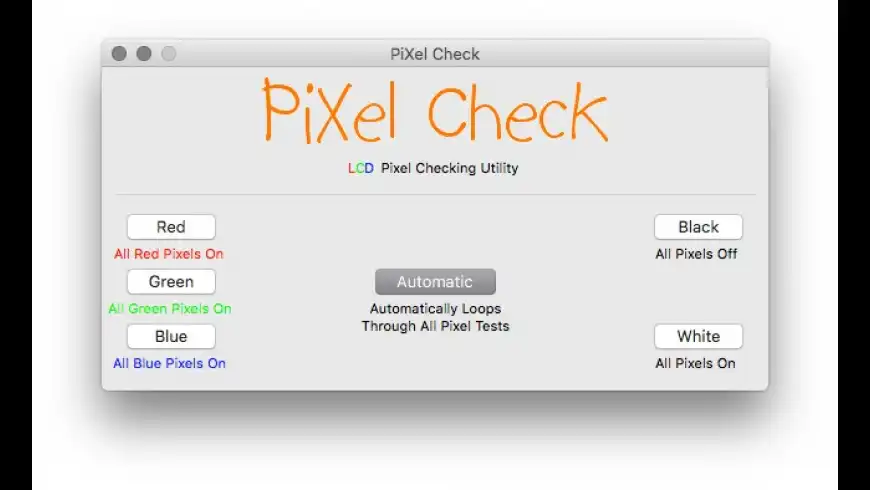
PiXel Check is an application that assists you in visually inspecting your LCD flat-panel display for bad or "dead" piXels.
The concept is simple - select a test color, and PiXel Check will put up a screen to allow you to check the specific piXels.
"Red" activates all red piXels, "Blue" activates all blue piXels, and "Green" activates all of the green piXels. The "Black" and "White" tests activate or deactivate all red, green, and blue piXels respectively.
The reason that red, green, and blue are the colors that are checked for is because each piXel on an LCD
What's New
Version 1.2 adds the following:
This version of PiXel Check is dedicated to the seven brave men and women of the Space Shuttle Columbia who lost their lives on February 1, 2003.
Multiple monitor support! There are no options to select, it just magically detects your extra display(s).
Help (English) is now available from within the application.
Added Italian localization, thanks to Max Rotunno.
Cleaned up more code and corrected a description faux pas relating to Black and White test modes.
Version 1.2 adds the following:
This version of PiXel Check is dedicated to the seven brave men and women of the Space Shuttle Columbia who lost their lives on February 1, 2003.
Multiple monitor support! There are no options to select, it just magically detects your extra display(s).
Help (English) is now available from within the application.
Excellent little program, cycles through all the primary colours plus black and white. All you need to test your LCD for bright dots or dead pixels (many LCD manufacturers have 30 day zero bright dot policies)
Also free which is what you want for something you may only test once every few years.
Would be nice if this was ported to intel though. Takes a while to launch on startup.
To bring them back to life, try massaging them. Not to hard though.
Anonymousreviewed on 08 Oct 2003
I downloaded this following an Ars Technica review, curious to see if there were any dead pixels I didn't know about. I've yet to run it but ...
... I'm a space buff, and I wholeheartedly approve of the dedication for this software.
[Version 1.2]
Anonymousreviewed on 04 May 2003
Simple and easy to use, great little utility. (os 10.2.5,17 inch Imac) And by the way, I have a dead pixel and my mac is only 6 months old, DOH!!! Lucky for me I bought CompUSA's warrenty for my moniter.
[Version 1.2]
There are currently no troubleshooting comments. If you are experiencing a problem with this app, please post a comment.
Please login or create a new MacUpdate Member account to use this feature
Watch Lists are available to MacUpdate Desktop Members Upgrade Now
Download and auto-install
using MacUpdate Desktop. Save
time moving folders and cleaning-up.
PiXel Check is an application that assists you in visually inspecting your LCD flat-panel display for bad or "dead" piXels.
The concept is simple - select a test color, and PiXel Check will put up a screen to allow you to check the specific piXels.
"Red" activates all red piXels, "Blue" activates all blue piXels, and "Green" activates all of the green piXels. The "Black" and "White" tests activate or deactivate all red, green, and blue piXels respectively.
The reason that red, green, and blue are the colors that are checked for is because each piXel on an LCD flat-panel display is actually made up of 3 separate transistors - red, green, and blue. When all of the transistors are turned on, you see black, and when all of them are turned off, you see white - the reason why there are also black and white check modes.
+1
+1
choyboy reviewed on 02 Jun 2009
Also free which is what you want for something you may only test once every few years.
Would be nice if this was ported to intel though. Takes a while to launch on startup.
+447
+1
Does what it should, and does it very, very well!
Anonymous reviewed on 20 May 2005
Anonymous reviewed on 24 Nov 2004
Anonymous reviewed on 07 Sep 2004
What's point of the application?
+3
To bring them back to life, try massaging them. Not to hard though.
Anonymous reviewed on 08 Oct 2003
... I'm a space buff, and I wholeheartedly approve of the dedication for this software.
Anonymous reviewed on 04 May 2003
